Connecting GitHub as a CI/CD provider
This section deals with setting up a GitHub App which is required for sfp server to integrate with your GitHub org.
sfp server acts on your repositories through a GitHub App: it clones code, writes commit statuses and checks, comments on and merges pull requests, and registers repository webhooks. These capabilities exceed what GitHub Actions' default GITHUB_TOKEN provides, which is why a dedicated GitHub App is used.
The App is the automation identity. It is separate from the GitHub OAuth App used to log users in (see Setting up sfp server → [6] Configure login): a typical setup has a login provider for users and this GitHub App for machine work. On Azure DevOps, the equivalent automation identity is a service principal. Connect either one after the server is up, in Settings → Integrations, or in the onboarding wizard — see Setting up sfp server → [5] Configure your git provider.
Automation vs. user attribution. The App is the actor for machine-driven work — cloning, checks, statuses, webhook creation. Actions that should be traceable to a person — opening a release issue, or raising a PR on a user's behalf through IssueOps — run under that signed-in user's OAuth token, so they appear under the user's name, not the App's. The user OAuth token comes from the login provider, not from this App.
The GitHub reference describes how repository operations authenticate as an installed App.
[1] Choose your app: managed or registered
The path depends on where your repositories live.
| Where your repos live | What you use |
|---|---|
| GitHub.com | The managed flxbl-cloud app, installed during onboarding — see 1.a |
| GitHub Enterprise Server | A GitHub App you register in your GHES org — see 1.b |
GitHub Enterprise Cloud with data residency (SUBDOMAIN.ghe.com) | A GitHub App you register in your enterprise — the same steps as 1.b |
[1.a] GitHub.com — install the managed flxbl-cloud app
On GitHub.com there is no manual App to build: during onboarding (or in Settings → Integrations → GitHub → Install GitHub App) you authorize the prebuilt flxbl-cloud app and pick which repositories it can access. No App ID or private key is copied. The server then verifies the installation when you continue onboarding.
[1.b] GitHub Enterprise Server — register a GitHub App
GitHub Enterprise Server has no prebuilt app, so you register one. The same applies to GitHub Enterprise Cloud with data residency (SUBDOMAIN.ghe.com): register the app in your enterprise, then set the host as described in 2.a.
- Open your GHES org's Settings → Developer settings → GitHub Apps and select New GitHub App.
- Give it a name and display information. The app's own Webhook URL and Webhook secret fields can be left blank: sfp server registers repository webhooks itself after the app is installed, to
https://<your-domain>/sfp/api/repository/webhook.
[1.c] Repository permissions
Grant the app these permissions. Each maps to an operation the server performs (clone and file writes, pull request and issue interaction, checks and statuses, webhook registration, team-member lookups):
| Repository permission | Level | Why |
|---|---|---|
| Contents | Read & write | Clone repositories, read and write files in the repo |
| Issues | Read & write | Comment, label, create and update issues |
| Checks | Read & write | Create and update CI/CD check runs |
| Commit statuses | Read & write | Set commit status for CI/CD |
| Pull requests | Read & write | Comment on, review, merge and label pull requests |
| Webhooks | Read & write | Create, update and delete repository webhooks |
| Members | Read-only | Resolve team members for environment approvers |
| Metadata | Read-only | Baseline access GitHub requires (installations, user and team lookups) |
If the app is missing Webhooks permission, repository webhook creation fails. The server reports this as: "Please update the GitHub App permissions to include Repository permissions > Webhooks > Read & Write."
[1.d] Subscribe to events
Subscribe the app to these events — the exact set sfp server listens for:
push, pull_request, pull_request_review, pull_request_review_comment, issues, issue_comment
These are also the events sfp server writes on each repository webhook it registers.
[1.e] Generate the private key and install the app
- In the app's General section, under Private keys, select Generate a private key and download the
.pemfile. It is shown once; store it securely. - Open the Install App tab, select Install, choose your organization, and grant the app the repositories (or all repositories) sfp server should reach.
- Enable Device Auth in the GitHub App, this is required for Codev to authenticate on behalf of users in creating issues and pull requests Link
[2] Add the app credentials to the server
Enter the App ID (from the app settings page) and the private key (.pem contents) in Settings → Integrations → GitHub, or in the onboarding wizard's integration step. The server stores them encrypted at rest. They are not part of the sfp server init prompts — the CLI's secret collection does not ask for them. As an alternative to the UI, the running server also accepts GITHUB_APP_ID and GITHUB_APP_PRIVATE_KEY environment variables.

[2.a] GitHub Enterprise — set the GitHub host
The server works against https://github.com unless a GitHub host is configured. For GitHub Enterprise, set the host in one of two places:
| Where | When to use it |
|---|---|
| GitHub Server URL on the Global GitHub App integration, in Settings → Integrations → GitHub or the onboarding wizard's integration step | The host resolves to a public address |
GITHUB_SERVER_URL in the tenant .env | The host resolves to a private address, or you keep the host in the environment |
The server uses the first value it finds: the integration's GitHub Server URL, then GITHUB_SERVER_URL, then https://github.com. One server works with one GitHub host; every project uses it for clones, API calls, webhooks, links and the GitHub Packages registry.
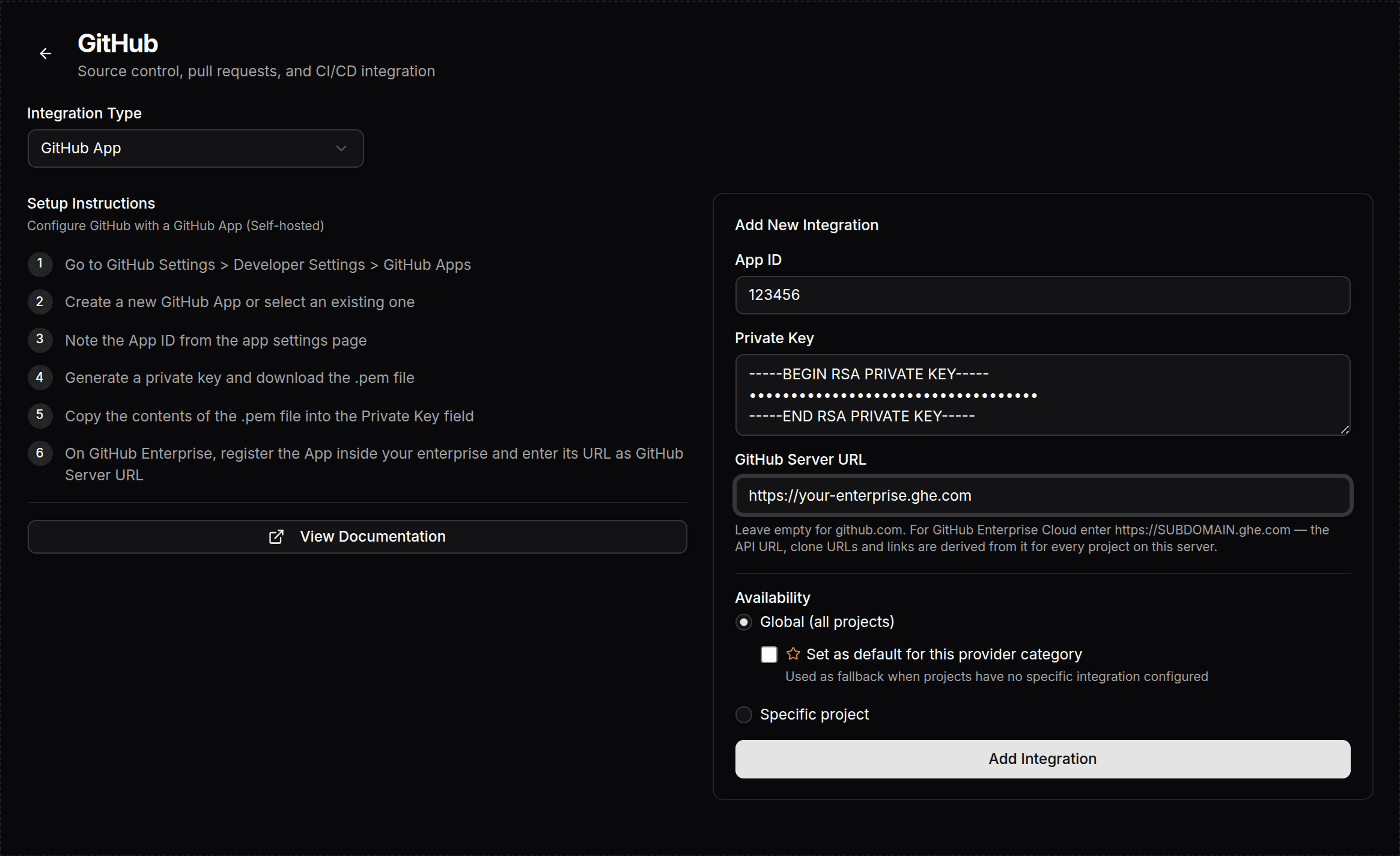
The GitHub Server URL must be an https:// origin without a path, query, port or credentials. On save, the server rejects a host that is, or resolves to, a loopback, private, link-local or metadata address. A stored value that is not a valid public https:// origin is ignored with a warning in the server log, and the next source applies.
The API address is derived from the host:
| Host | API address |
|---|---|
https://SUBDOMAIN.ghe.com | https://api.SUBDOMAIN.ghe.com |
Any other host, for example https://github.example.com | https://github.example.com/api/v3 |
GITHUB_API_URL in the tenant .env overrides the derived API address only while the host comes from GITHUB_SERVER_URL. While the integration defines the host, the API address is always derived from it.
A changed integration host reaches all server instances and workers within two minutes; workers read it from the server before each repository clone and approval callback. A change to GITHUB_SERVER_URL or GITHUB_API_URL needs a restart of the stack. To check the host in use, call GET /sfp/api/integrations/github/host. It returns serverUrl, apiUrl, source (integration, environment or default) and the configured app with its install URL on that host.
[2.b] GitHub Packages (npm) — optional registry token
If your pipelines publish or consume GitHub Packages (npm), configure a GITHUB_TOKEN with read:packages and write:packages under Settings → Integrations → npm Registry. GitHub Apps cannot operate on GitHub Packages; the server uses this token only to authenticate against npm.pkg.github.com. If you do not use GitHub Packages, this token is not needed.
[3] Verify the integration
Once the app is installed on a repository, the server registers the repository webhook itself — you do not configure webhooks on GitHub by hand. Confirm:
- In Settings → Webhooks, the repo's webhook is listed as active against
https://<your-domain>/sfp/api/repository/webhook. - The payload URL is reachable from GitHub.com over HTTPS — a server reachable only by SSH, VPN, or a bastion is not. See Webhook ingress for private servers when the server is private.
- In GitHub's Recent deliveries for that webhook, a delivery returns
2xxand the server log reports the signature was verified. See Troubleshooting → Webhooks for failures.
Prerequisites
Prepare a host for sfp-server before you run sfp server init — sizing, operating system, the container engine, network, DNS, TLS, firewall, and the registry secrets required at init time.
Self Hosted Supabase Configuration
Configure the bundled self-hosted Supabase that an sfp server provisions — the API gateway, GitHub login, keys, and day-to-day maintenance.