Authenticating to Environments
Configure authentication for environments in sfops workflows including production, sandboxes, and automated deployments
Environments in sfops are authenticated using the credentials stored in Github. This section describes the various mechanisms used for authenticating environments
Authenticating to Production Environment
If your DevHub and Production are the same org (typical for most organizations), authentication uses the existing DEVHUB_SFDX_AUTH_URL secret - no additional configuration needed.
If your Production org is different from your DevHub (less common), you need to:
- Create a GitHub Environment named 'PROD'
- Add an environment secret titled
SFDX_AUTH_URLwith the Production org's auth URL value
Authenticating to Other Environments
Authenticating to any other environments backed by a sandbox depends on how the sandbox is being created. The authentication mechanism will use the sandbox name to connect, which can be configured in two ways:
Sandbox Name Configuration
The authentication layer needs to know the sandbox name. This is determined as follows:
When to set SBXNAME variable:
- Required: Create
SBXNAMEvariable in your GitHub environment if the environment name differs from the actual Salesforce sandbox name - Not needed: Skip this if your GitHub environment name matches the sandbox name exactly
Examples:
- GitHub environment "STAGING" with Salesforce sandbox "staging" → No
SBXNAMEneeded - GitHub environment "UAT" with Salesforce sandbox "uat" → No
SBXNAMEneeded - GitHub environment "STAGING" with Salesforce sandbox "stg-sandbox-01" → Set
SBXNAME=stg-sandbox-01 - GitHub environment "QA" with Salesforce sandbox "qa-refresh-nov" → Set
SBXNAME=qa-refresh-nov
For complete details on setting up GitHub environments, see Creating an Environment.
Choose the appropriate authentication method based on how your sandbox was created:
Option 1: Sandboxes created by the DevHub user configured in GitHub
Sandboxes created by the DevHub user (the CI/CD user authenticated via DEVHUB_SFDX_AUTH_URL) can be authenticated automatically using the sandbox name configured above. No additional secrets are required.
Please note, when a sandbox is refreshed from the UI, irrespective of whether the action was done by the same user configured in Github, sfops will not be able to authenticate to this environment, and you will need to provide SB_SFDX_AUTH_URL as mentioned in Option 2.
Option 2: Sandboxes created by any other users in production
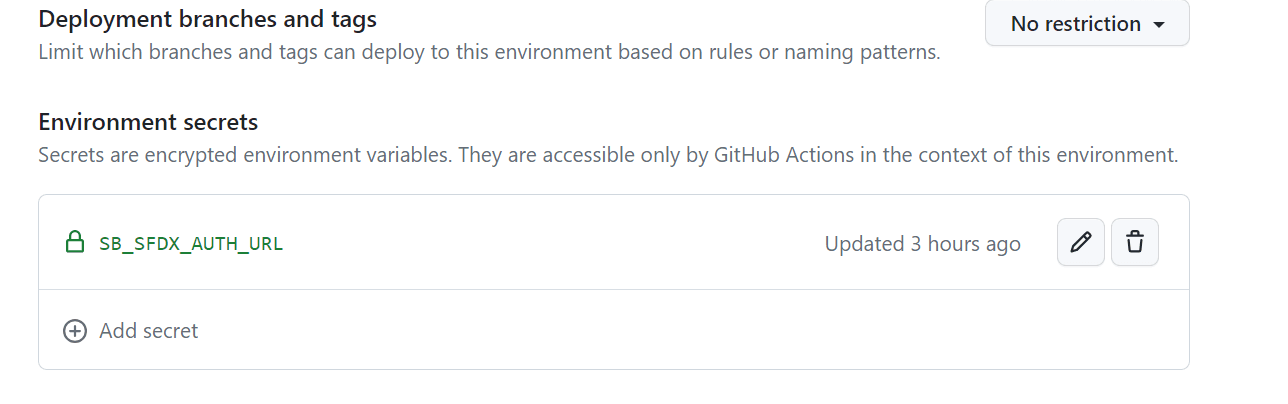
To authenticate a sandbox that was not created by the DevHub user configured in GitHub (the CI/CD user authenticated via DEVHUB_SFDX_AUTH_URL), one needs to provide an environment secret SB_SFDX_AUTH_URL which can be obtained by using the instructions here.
Authentication for Daily Test Runs
Daily test runs require special authentication configuration for organizations using sfp pro without sfp server. Organizations that have fully onboarded to sfp pro with sfp server can skip the GitHub secrets configuration and use the simpler server-based approach.
GitHub Secrets Based Authentication (sfp pro without server)
For GitHub secrets based daily test runs, authentication requirements depend on how your sandboxes were created:
For sandboxes created by the DevHub user (Option 1 above)
If your sandboxes were created by the DevHub user configured in GitHub:
- You do NOT need to add any
*_SFDX_AUTH_URLrepository secrets - Authentication happens automatically through the DevHub connection
- Only set
SBXNAMEvariable if your GitHub environment name differs from the actual sandbox name (see Sandbox Name Configuration section above)
For sandboxes NOT created by the DevHub user (Option 2 above)
If your sandboxes were created by other users or refreshed via UI, you need to:
- Add repository secrets for each environment using the exact format:
<ENVIRONMENT_NAME>_SFDX_AUTH_URL - Pass these secrets in your daily test workflow
Important Limitation: Due to how GitHub Actions handles secrets in reusable workflows, only these specific environment names and their corresponding secrets are supported:
| GitHub Environment Name | Required Repository Secret |
|---|---|
| STAGING | STAGING_SFDX_AUTH_URL |
| SIT | SIT_SFDX_AUTH_URL |
| PREPROD | PREPROD_SFDX_AUTH_URL |
| UAT | UAT_SFDX_AUTH_URL |
| QA | QA_SFDX_AUTH_URL |
| IQA | IQA_SFDX_AUTH_URL |
Custom environment names are not supported in automated workflows
If you have a sandbox with a custom name (e.g., "myawesomestagingorg"), you must rename it to one of the supported names above (e.g., "STAGING") for daily test runs to work.
This limitation exists because the workflow cannot dynamically pass arbitrary secrets, and only the predefined environment names are configured.
Selecting Which Environments to Test
For GitHub secrets based authentication, environments are selected based on GitHub environment variables:
- Create GitHub environments with one of the supported names (STAGING, SIT, PREPROD, UAT, QA, IQA)
- Add a variable
TESTRUN=trueto each environment you want to include in daily test runs - The workflow will automatically discover and test all environments with
TESTRUN=true
Remember to update your project workflow
If you use any of the supported environments (STAGING, SIT, PREPROD, UAT, QA, IQA), you must update your sfops-cron-daily-quality-test.yml workflow to include the corresponding auth URL secret in the secrets section.
Example daily test workflow configuration:
apex-test-runs:
  uses: ./.github/workflows/apex-test-on-test-envs.yml@main
  secrets:
    DEVHUB_SFDX_AUTH_URL: ${{ secrets.DEVHUB_SFDX_AUTH_URL }}
    STAGING_SFDX_AUTH_URL: ${{ secrets.STAGING_SFDX_AUTH_URL }}  # Add if you have STAGING environment
    UAT_SFDX_AUTH_URL: ${{ secrets.UAT_SFDX_AUTH_URL }}          # Add if you have UAT environment
    # Add other environment secrets as needed
    DATADOG_API_KEY: ${{ secrets.DATADOG_API_KEY }}
    DATADOG_HOST: ${{ secrets.DATADOG_HOST }}
    SFOPSBOT_APP_PRIVATE_KEY: ${{ secrets.SFOPSBOT_APP_PRIVATE_KEY }}
    NPM_TOKEN: ${{ secrets.GITHUB_TOKEN }}
sfp server Based Authentication (sfp pro with server)
For sfp server based daily test runs:
- Authentication is managed centrally through sfp server
- No need for individual environment secrets in GitHub
- Supports any environment name without restrictions
- Auth URLs are stored and retrieved dynamically from sfp server
No naming restrictions with sfp server
sfp server removes the environment naming limitations. You can use any sandbox name and the authentication will work seamlessly for daily test runs.
Selecting Which Environments to Test
The workflow automatically tests all environments that have the metadata testrun: true set in the sfp server.
To configure which environments are included in daily test runs, you have three options:
- Using codev: Manage environments through the graphical interface in codev desktop application
- Using sfp CLI: Create environments with
--metadata '{"testrun": "true"}'See sfp Environment documentation for complete CLI reference. - Using sfp server REST API: Update environment metadata directly via API
# Update existing environment metadata via REST API
curl -X PATCH https://your-sfp-server.com/environments/{environmentId} \
  -H "Authorization: Bearer <token>" \
  -H "Content-Type: application/json" \
  -d '{"metadata": {"testrun": "true"}}'
See sfp server API documentation for complete API reference.
To view which environments will be tested:
sfp server environment list --repository <owner/repo> --metadata "testrun=true"Example daily test workflow configuration:
apex-test-runs:
  uses: ./.github/workflows/apex-test-on-test-envs-v2.yml@main
  with:
    sfp-server-url: ${{ vars.SFP_SERVER_URL }}
  secrets:
    DEVHUB_SFDX_AUTH_URL: ${{ secrets.DEVHUB_SFDX_AUTH_URL }}
    SFP_SERVER_TOKEN: ${{ secrets.SFP_SERVER_TOKEN }}
# This workflow will automatically run tests on all environments
# with metadata testrun=true (e.g., my-awesome-staging-org, my-awesome-uat-org)