Documentation · Overview
sfp CLI
CLI for modular Salesforce development and release management
sfp is a purpose-built CLI for modular Salesforce development and release management. sfp streamlines and automates the build, test, and deployment processes of Salesforce metadata, code, and data. It is built on the Open CLI Framework and leverages the same core libraries and APIs as the Salesforce CLI.
sfp is designed to work with the sfp server, which provides environment management, authentication services, org pool orchestration, and team collaboration capabilities. Together, sfp CLI and sfp server form the foundation of codev — flxbl's platform for Salesforce DevOps.
sfp is a premium addon for Build Your Own (BYO) workflows. If you are using codev (the flxbl platform UI), sfp CLI is used under the hood and you may not need to interact with it directly. This documentation covers the sfp CLI for teams building custom CI/CD pipelines and workflows.
Key Aspects of sfp:
- Server-Powered Architecture: sfp CLI works with the sfp server for centralized environment management, credential storage, org pool orchestration, and task execution via workflows.
- Built with codified process: sfp is derived from extensive experience in modular Salesforce implementations. By embracing the #FLXBL framework, it streamlines the process of creating a well-architected, composable Salesforce Org, eliminating time-consuming efforts usually spent on re-inventing fundamental processes.
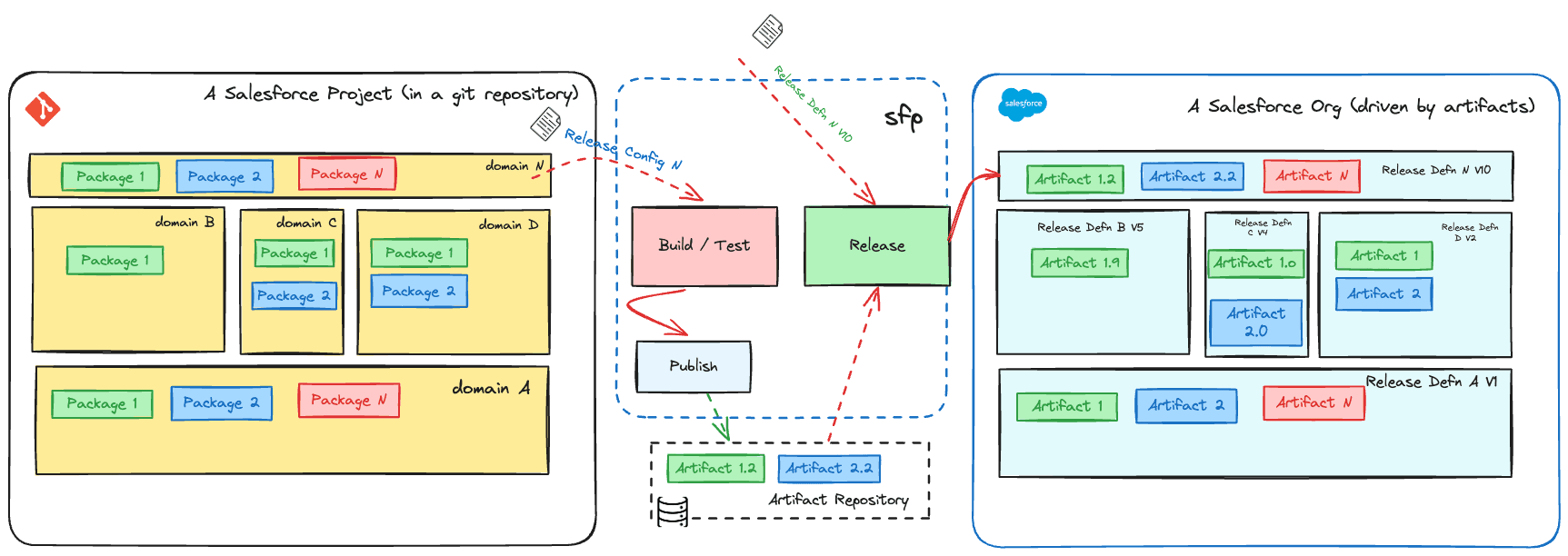
- Artifact-Centric Approach: sfp packages Salesforce code and metadata into artifacts with deployment details, ensuring consistent deployments and simplified version management across environments.
- Best-in-Class Mono Repo Support: Offers robust support for mono repositories, facilitating streamlined development, integration, and collaboration.
- Support for Multiple Package Types: sfp accommodates various Salesforce package types with streamlined commands, enabling modular development, independent versioning, and flexible deployment strategies.
- Orchestrate Across Entire Lifecycle: sfp provides an extensive set of functionality across the entire lifecycle of your Salesforce development.
- End-to-End Observability: sfp is built with comprehensive metrics emitted on every command, providing unparalleled visibility into your ALM process.
Commands
sfp
├── ai - Commands to manage AI Providers
│   └── test
├── apextests - Manage apex tests in a package or org
│   ├── resume
│   └── trigger
├── artifacts - Manage artifacts for a project
│   ├── fetch
│   ├── list
│   ├── promote
│   └── query
├── auth - Authenticate with the SFP server
│   ├── clear
│   ├── display
│   ├── list
│   └── login
├── config - Manage CLI configuration settings
│   ├── get
│   ├── list
│   ├── set
│   └── unset
├── dependency - Manage the dependencies of a project
│   ├── expand
│   ├── explain
│   ├── install
│   └── shrink
├── dev - Commands to manage developers in your org
│   ├── create
│   └── grant
├── flow - Manage Salesforce flows in your org
│   ├── activate
│   ├── cleanup
│   └── deactivate
├── flows - Run and manage long-running flows (sandbox operations, privilege elevation, etc.)
│   ├── approve
│   ├── cancel
│   ├── list
│   ├── reject
│   ├── run
│   ├── types
│   └── watch
├── impact - Utilities to help you understand the impact of various components
│   ├── apex
│   ├── package
│   └── releaseconfig
├── metrics - Report, query and display metrics from sfp server
│   ├── display
│   ├── query
│   └── report
├── org - Commands to manage orgs (authenticate, open, list)
│   ├── list
│   ├── login
│   └── open
├── package - Commands to manage packages in your org
│   ├── create - Create diff/data/source/unlocked packages
│   │   ├── data
│   │   ├── diff
│   │   ├── source
│   │   └── unlocked
│   └── install
├── pool - Build and manage scratch org or sandbox pools
│   ├── delete
│   ├── extend
│   ├── fetch
│   ├── list
│   ├── probe
│   ├── scratch - Build and manage scratch org pools
│   │   └── init
│   └── unassign
├── profile - Commands to manage profiles in your project or org
│   ├── merge
│   ├── reconcile
│   └── retrieve
├── project - Commands to manage your project
│   ├── analyze
│   ├── pull
│   ├── push
│   └── report
├── releasecandidate - Manage release candidates
│   ├── abort
│   ├── fetch
│   ├── finalize
│   ├── generate
│   ├── list
│   ├── status
│   └── update
├── releaseconfig - Probe and manage release configurations
│   └── probe
├── repo - Manage your project repository
│   ├── clone
│   ├── list
│   ├── patch
│   └── visualize
├── review-envs - Acquire and manage review environments
│   ├── acquire
│   ├── assign
│   ├── extend
│   ├── list
│   ├── release
│   ├── rules - List and test pool assignment rules
│   │   ├── list
│   │   └── match
│   └── unassign
├── sandbox - Commands to manage sandboxes
│   ├── create
│   ├── delete-with-cleanup
│   ├── delete
│   ├── list
│   ├── login
│   ├── update
│   └── validate
├── scratch - Commands to manage scratch orgs
│   ├── delete
│   └── login
├── user - Commands to manage users in your org
│   ├── deactivate
│   ├── freeze
│   └── unfreeze
├── validate - Validate a change in your project repository
│   ├── org
│   └── pool
├── build
├── install
├── publish
├── quickbuild
├── release
├── update
Server Adminstration Commands
*🔧 Admin Commands*

└── 📁 *server* - Commands for administrators to manage sfp server
    ├── 📁 *application-token* - Manage application tokens
    │   ├── `create` 🌐
    │   ├── `list` 🌐
    │   └── `revoke` 🌐
    ├── `audit` 🌐
    ├── 📁 *builds* - Manage builds
    │   └── `list` 🌐
    ├── 📁 *callback* - Send callback notifications (GitHub, Slack)
    │   └── `post` 🌐
    ├── 📁 *doc-store* - Manage document store
    │   ├── `add` 🌐
    │   ├── 📁 *collection*
    │   │   ├── `add` 🌐
    │   │   ├── `delete` 🌐
    │   │   ├── `get` 🌐
    │   │   ├── `list` 🌐
    │   │   └── `update` 🌐
    │   ├── `delete` 🌐
    │   ├── `get` 🌐
    │   └── `update` 🌐
    ├── 📁 *environment* - Manage environments
    │   ├── `activate-by-sandbox` 🌐
    │   ├── `activate` 🌐
    │   ├── `compare` 🌐
    │   ├── `create` 🌐
    │   ├── `deactivate-by-sandbox` 🌐
    │   ├── `deactivate` 🌐
    │   ├── `delete-by-sandbox` 🌐
    │   ├── `delete` 🌐
    │   ├── `find` 🌐
    │   ├── `get` 🌐
    │   ├── `list` 🌐
    │   ├── `lock` 🌐
    │   ├── `unlock` 🌐
    │   └── `update` 🌐
    ├── `health` 🌐
    ├── `init` 🌐
    ├── 📁 *integration* - Manage integrations
    │   ├── `create` 🌐
    │   └── `get` 🌐
    ├── 📁 *key-value* - Manage key-value store
    │   ├── `add` 🌐
    │   ├── `delete` 🌐
    │   ├── `get` 🌐
    │   └── `update` 🌐
    ├── `logs`
    ├── 📁 *org* - Manage Salesforce org registrations
    │   ├── `delete` 🌐
    │   ├── `get-default-devhub` 🌐
    │   ├── `register-sandbox` 🌐
    │   ├── `register` 🌐
    │   └── `update` 🌐
    ├── 📁 *pool* - Manage scratch org and sandbox pools
    │   ├── `cleanup` 🌐
    │   ├── 📁 *config* - Manage pool configurations
    │   │   ├── `create` 🌐
    │   │   ├── `delete` 🌐
    │   │   ├── `get` 🌐
    │   │   ├── `list` 🌐
    │   │   └── `update` 🌐
    │   ├── `monitor` 🌐
    │   ├── `provision` 🌐
    │   ├── `replenish` 🌐
    │   └── `status` 🌐
    ├── 📁 *project* - Manage projects
    │   ├── `create` 🌐
    │   ├── `get` 🌐
    │   ├── `list` 🌐
    │   └── `update` 🌐
    ├── 📁 *repository* - Manage repository authentication
    │   ├── `auth-token` 🌐
    │   └── `npmrc` 🌐
    ├── 📁 *review-envs* - Manage review environment rules
    │   └── 📁 *rules* - Create, update, delete pool assignment rules
    │       ├── `create` 🌐
    │       ├── `delete` 🌐
    │       └── `update` 🌐
    ├── `scale`
    ├── 📁 *slack* - Manage Slack integration
    │   ├── `delete` 🌐
    │   ├── `list` 🌐
    │   ├── `manifest`
    │   ├── `setup` 🌐
    │   ├── `status` 🌐
    │   ├── `test` 🌐
    │   └── `update` 🌐
    ├── `start` 🌐
    ├── `status`
    ├── `stop`
    ├── `update` 🌐
    ├── 📁 *user* - Manage users
    │   ├── `add` 🌐
    │   └── `delete` 🌐
    └── 📁 *webhook* - Manage webhooks
        ├── `delete` 🌐
        ├── `get` 🌐
        ├── `list` 🌐
        ├── `register` 🌐
        ├── `trigger-event` 🌐
        └── `update` 🌐