Generating a changelog
A changelog records what went into a release: the commits and work items behind it, which artifacts changed, and which versions were installed. sfp produces it in two forms — a Markdown file for reading, and a JSON file carrying the same data for other tools to render.
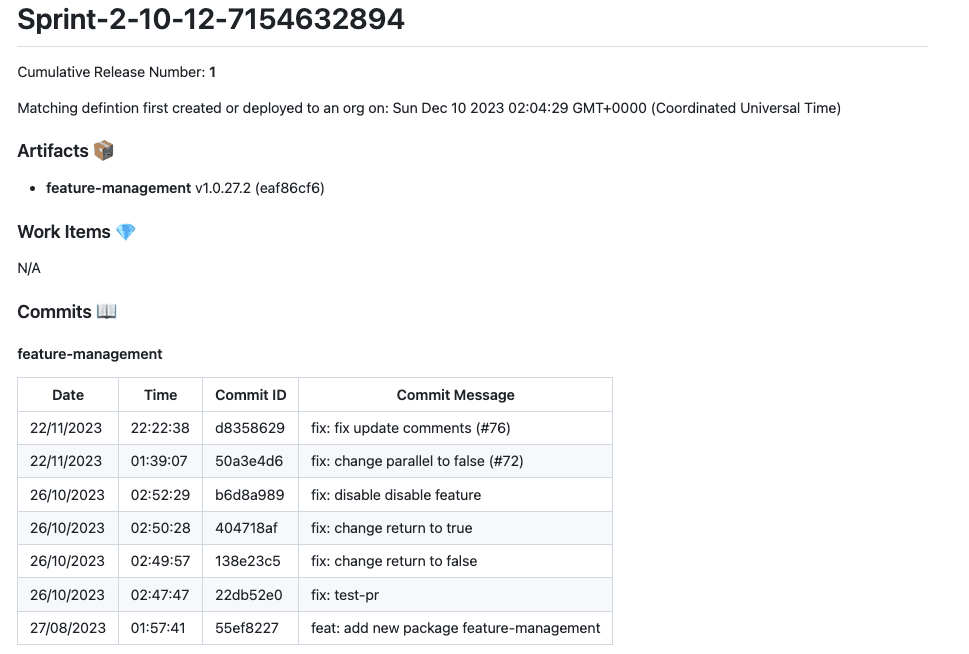
From v51 the changelog is computed on sfp server. The server holds the release candidate and the record of what has been deployed where, and it compares them to produce the changelog — no local changelog branch is checked out or maintained.
During a release
Pass --generatechangelog to sfp release and the changelog is generated as part of the deployment, against the release candidate being released:
sfp release \
  --releasecandidate core:Release-2.0.0 \
  --targetorg production \
  --repository myorg/myrepo \
  --generatechangelog \
  --directory changelog
--directory sets where the Release-Changelog.md and releasechangelog.json files are written; without it they are printed. The work item filters and links come from the release config baked into the candidate — see Identifying work items.
On demand
Four commands generate a changelog without running a release. Each compares a release candidate against a different baseline, so the changelog answers a different question. All require a server connection (--repository and --sfp-server-url), take one or more candidates as -n domain:releaseName, and write files to --output when given or print otherwise.
| Command | Compares the candidate against | Answers |
|---|---|---|
sfp changelog from-candidate | The previously deployed candidate for the domain | What will this release deploy? |
sfp changelog from-commit | Package versions tagged at a git reference (-r) | How does this candidate differ from that commit? |
sfp changelog from-env | Artifacts installed in a registered environment (-u) | What will change in this environment? |
sfp changelog from-org | Artifacts installed in a local Salesforce org (--targetorg) | What will change in this org? |
from-candidate is the preview before deploying — it lists the changes a release candidate will carry:
sfp changelog from-candidate \
  -n core:Release-2.0.0 \
  --repository myorg/myrepo \
  --output changelog
Compare against an environment's actual installed state instead:
sfp changelog from-env \
  --environment QA \
  -n core:Release-2.0.0 \
  --repository myorg/myrepo \
  --output changelog
Pass -n more than once to combine domains into one changelog. from-commit, from-env and from-org also accept --work-item-url to override the link base from the release config.
Identifying work items
The changelog surfaces work items by matching commit messages against the regular expressions in the workItemFilters of your release config. Given the filter BE-[0-9]{2,5} and this commit:
fix/BE-1836: added config changes for field type changes (#1629)sfp identifies BE-1836 and links it to your tracker by appending the code to the workItemUrl attribute. Specify several patterns by separating them with colons — a commit matching any of them is included:
BE-[0-9]{2,5}:FEAT-[0-9]{3,4}:BUG-[0-9]+The filters and the URL live in the release config, so every changelog for a domain — during a release or on demand — uses the same rules. See release definition for the full set of changelog attributes.