Aliasfy Packages
| Attribute | Type | Description | Package Types Applicable |
|---|---|---|---|
| aliasfy | boolean | Enable deployment of contents of a folder that matches the alias of the environment |
|
Aliasified packages are available only for Source Package
Aliasify enables deployment of a subfolder in a source package that matches the target org. For example, you have a source package as listed below. \
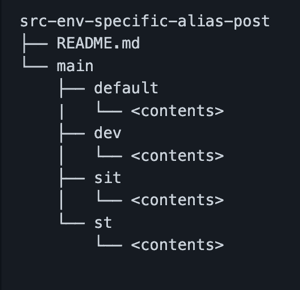
During Installation, only the metadata contents of the folder that matches the alias gets deployed. If the alias is not found, sfp will fallback to the 'default' folder. If the default folder is not found, an error will be displayed saying default folder or alias is missing.\
// Demonstrating package directory with aliasfy
{
  "packageDirectories": [
      {
      "path": "src/src-env-specific-alias-post",
      "package": "src-env-specific-alias-post",
      "versionNumber": "2.0.10.NEXT",
      "aliasfy" : true
    }
Default folder are only deployed to sandboxes
When to Use Aliasfy Packages vs String Replacements
Both aliasfy packages and string replacements provide environment-specific deployments, but serve different purposes:
Use Aliasfy Packages When:
- You have structural metadata differences between environments (different fields, objects, workflows, or permissions)
- You need completely different files per environment (e.g., different page layouts, record types)
- The entire metadata component varies by environment
- You're managing environment-specific declarative configurations
Use String Replacements When:
- Only configuration values differ between environments (endpoints, emails, feature flags)
- You want to avoid duplicating entire files just to change a few values
- You need to maintain single source of truth for business logic
- You're dealing with code-based metadata (Apex, LWC, Aura) with environment-specific values
Combine Both When:
- Large packages need both structural differences AND configuration value changes
- Different teams manage different aspects of environment-specific configurations
- You're gradually migrating from full file duplication to value-based replacements
Example Comparison
Aliasfy Approach - Different permission sets per environment:
src-env-specific/
  default/
    permissionsets/
      StandardUser.permissionset-meta.xml  # Basic permissions
  production/
    permissionsets/
      StandardUser.permissionset-meta.xml  # Production-specific permissions
  staging/
    permissionsets/
      StandardUser.permissionset-meta.xml  # Staging-specific permissions
String Replacements Approach - Same code, different values:
// Single file with placeholders
public class IntegrationService {
    private static final String ENDPOINT = '%%API_ENDPOINT%%';
    private static final String API_KEY = '%%API_KEY%%';
}
String replacements complement aliasfy packages - use them together for complete environment management