Domains
Domains group packages into independently releasable units, defined by release configuration files — the unit codev's builds, candidates, and releases are organised around.
A domain groups related packages into a unit that is validated, built, and released together. Domains typically mirror business capabilities — sales, service, platform — so the teams that own them can ship independently. A project defines one domain or many: a small project ships as a single domain, larger ones split by capability. Everything downstream in codev is organised per domain: a merge builds only the domains it affected, release candidates collect per domain, a release installs one domain's candidate into an environment, and validation scopes itself to the domain's configuration.
A domain is a file
A domain is defined by a release configuration — a YAML file in your repository, one file per domain. The file names the domain, lists the packages it includes, and carries the domain's behaviour: the pool its validations draw environments from, how package dependencies are treated, and release properties such as skipping already-installed versions, promoting unlocked packages before production, and how changelog work items are detected.
releaseName: sales
pool: sales-pool
includeOnlyArtifacts:
  - sales-crm
  - sales-unpackaged-pkg
excludeAllPackageDependencies: true
releasedefinitionProperties:
  skipIfAlreadyInstalled: true
Because a domain is a file, it follows your branch: creating or editing one shows up as a workspace change to commit and review through a pull request, like any other code. The full set of options: Release config.
Managing domains
Dev > Modularize > Domains shows every domain as a tree with its packages and pool, an Unassigned Packages bucket for packages no domain includes, and a YAML editor over the selected domain's configuration. A four-step wizard creates new domains, and per-package actions transfer, remove, and reorder. The mechanics: Domains.
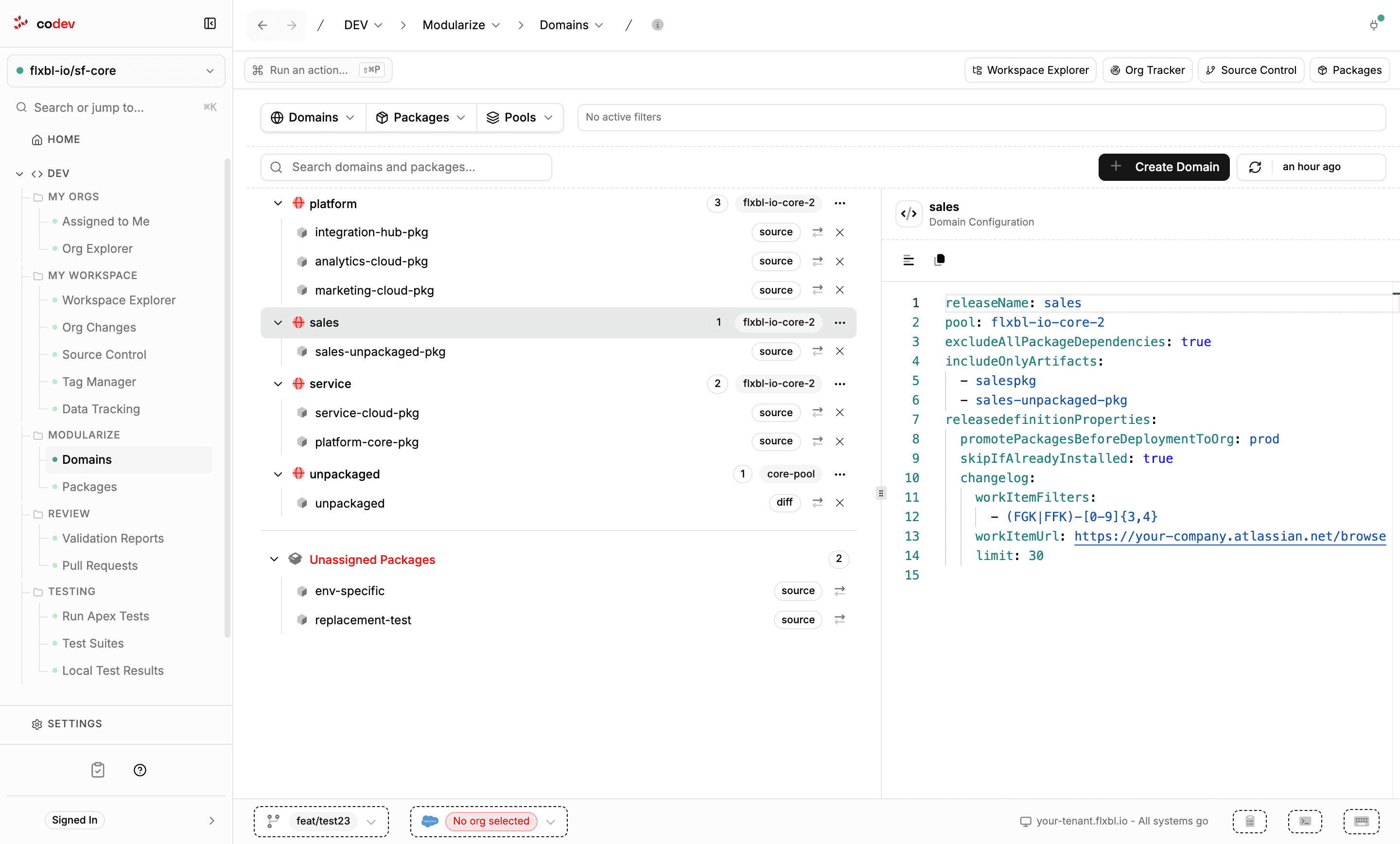
A package belongs to a domain by being listed in its configuration. Packages in no configuration collect in the unassigned bucket — they are still built and versioned, but no domain's release candidates or releases carry them.
What a domain organises
- Builds. When a merge lands, codev determines which domains the change affected and builds only those — packages in unaffected domains are skipped. See Builds.
- Release candidates. New package versions collect on a release candidate per domain, so each domain has its own answer to "what is ready to deploy". See Release candidates.
- Releases. A release installs one domain's candidate into an environment, in dependency order. See Releases.
- Validation. A pull request validates the changed packages scoped to the domain's release configuration, on an environment from the domain's pool. See Validation.
A change that spans domains is handled at release time: when the same work item appears on more than one domain's candidate, the candidates are linked, and the Request Release dialog offers to release those domains together. See Linked releases.
Projects
A project maps a repository into codev — everything codev tracks is scoped to a project, while orgs, teams, and Operations live at the instance level.
Packages
The packages codev builds and installs — source, unlocked, org-dependent unlocked, diff, and data — how each behaves, and how a type is declared.