Validation
What happens when codev validates a change — real deployments to a review environment, Apex tests and coverage, and why the result predicts the release.
Validation answers one question before a change merges: will it deploy and pass its tests? codev validates by actually deploying the changed packages to a real org — a review environment — and running the Apex tests there. The review environment is either fetched from a pool or a dedicated environment set aside for review. This differs from check-only deployment: what passed validation has genuinely deployed somewhere once already.
You meet validation in three places: the checks on a pull request, the per-commit Validate action in Source Control, and the results under Change Validation and Validation Reports.
What a validation run does
- Acquires the review environment — fetched from the configured pool, or the dedicated environment chosen for the run.
- Identifies the changed packages — scoped to the domain's release configuration, so only packages of that domain validate.
- Deploys the changed packages to the environment, respecting dependencies.
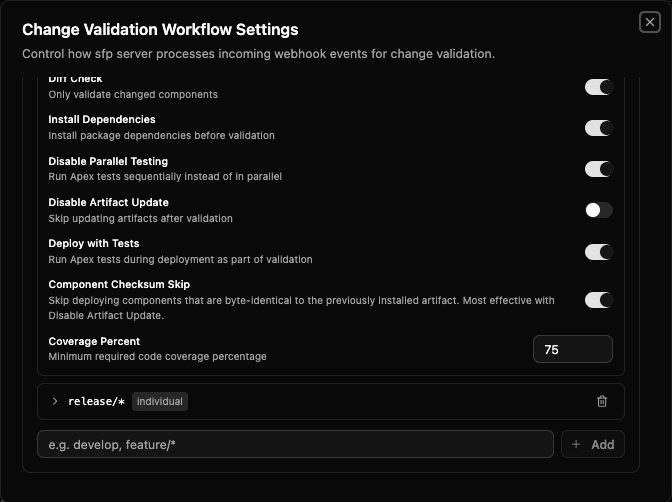
- Runs the Apex tests and checks each package's coverage (default threshold 75%).
- Reports the outcome — deployment errors, test failures, coverage warnings — as the check or report you see.
It validates the merge result
Validation does not test your branch as it stands — it merges the target branch into a temporary copy first and validates the merge result, what the code will look like once the pull request merges. A merge conflict between the branches fails validation at this step: the same conflict the merge would hit, surfaced earlier.
It validates what you will actually ship
By default, validation applies the same component checksum skip a release applies: for a changed package, only the components that differ from the previously installed version are deployed. The validation payload therefore matches the release payload.
Validation deploys real source to a real org, so it does not depend on a package type's build-time validation — a source package is validated to the same depth as an unlocked one. The trade-offs between types: Choosing a package type.
Modes
| Mode | What it does |
|---|---|
| Thorough (default) | Deploys the changed packages with their dependencies in full and runs all tests. |
| Individual | Identifies the changed packages and validates each individually, ignoring what is already installed in the environment. |
Full detail — pool behaviour and the exact sequence of activities: Validating a change · Different types of validation.
Environments
An environment binds a registered org to a project, giving it a role in that project's delivery — tracked, locked, and monitored.
Package installation
How artifacts install into an org — version skipping, component checksum skip, test execution per package type, and the behaviours baked in at build.