Change validation
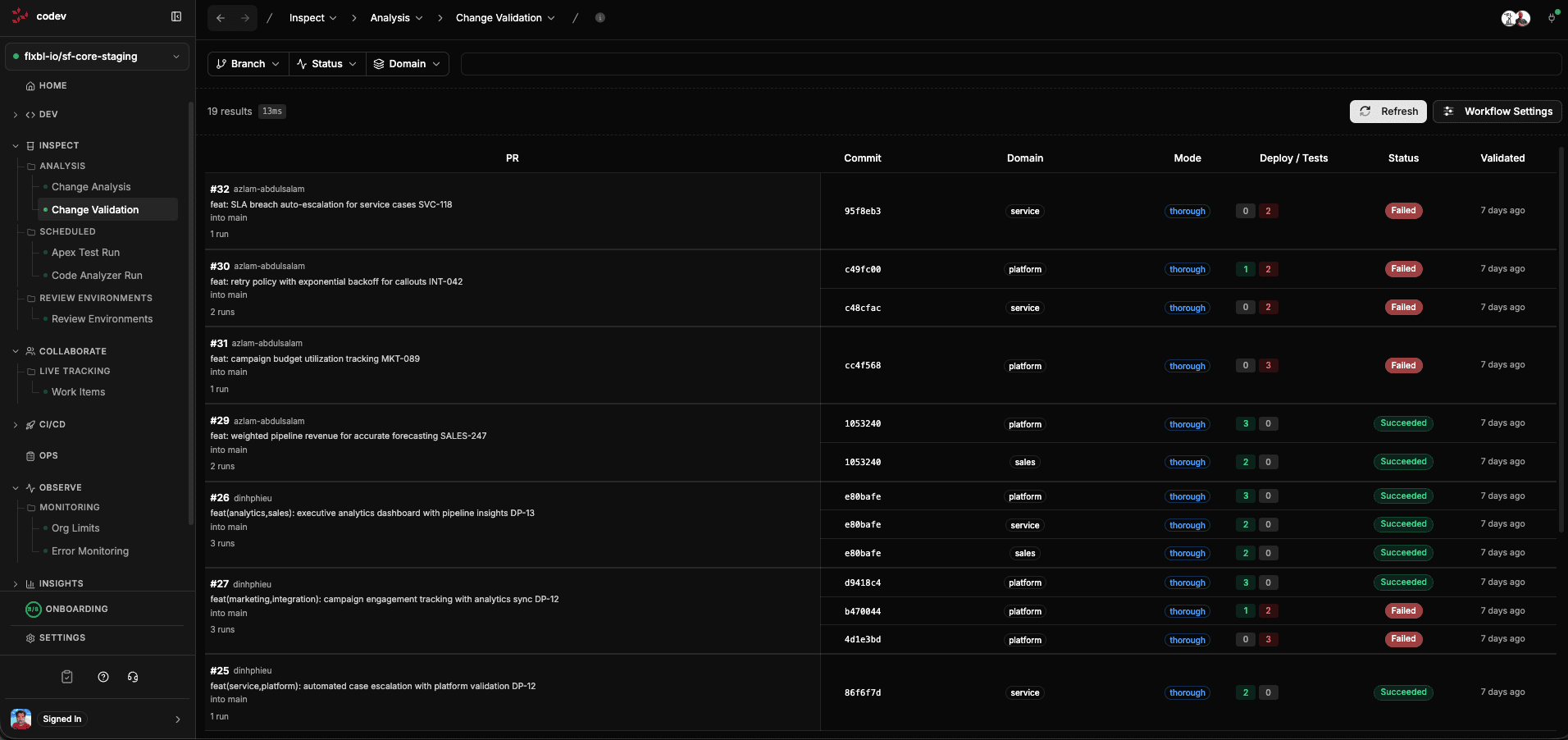
Change Validation goes beyond static analysis — it actually deploys your changed packages to a real Salesforce org and runs Apex tests against them. This tells you whether the deployment will succeed before you merge.
Unlike tools that use "check-only" deployments, codev performs a real deployment to a review environment. This catches issues that check-only deployments miss, like data-dependent failures and post-deployment script errors.
What happens when a PR is validated
When a PR is opened or updated, codev's validation workflow:
-
Detects impacted domains — analyzes the PR diff to determine which release configs (domains) have changed packages. Only affected domains are validated.
-
Allocates a review environment — for each impacted domain, codev matches the PR to a pool using review environment rules and acquires exclusive access to an org from that pool.
-
Deploys the changed packages — clones the repository at the merge ref, builds the impacted packages, and deploys them to the review org. Dependencies are installed if needed.
-
Runs Apex tests — triggers tests for the deployed packages and validates code coverage against the configured threshold (default: 75%).
-
Reports results — publishes deployment and test results to the server, updates the PR check run in GitHub, and applies labels (
validation-succeeded,validation-failed, etc.).
The review environment is released after validation completes, making it available for the next PR.
Validation modes
codev supports two validation modes, configured per branch pattern:
Thorough mode
The default for PRs targeting main. Deploys all packages in the domain (not just the changed ones) and runs comprehensive tests. This catches integration issues between packages.
Individual mode
Used for PRs targeting release branches. Validates only the changed packages individually, which is faster and appropriate when you need to verify a specific fix without rebuilding the full domain.
Viewing validation results
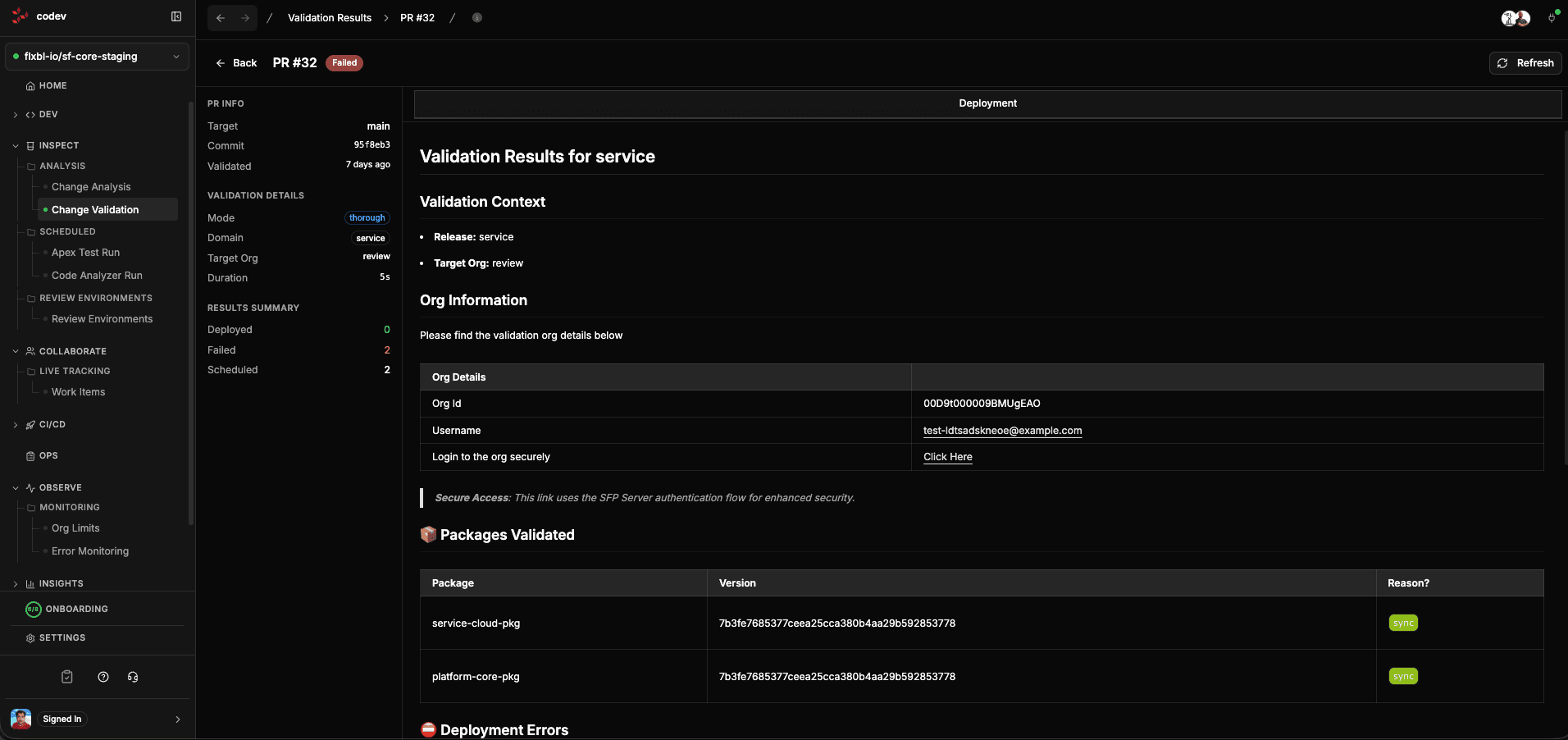
Click any PR row to see the full validation detail. The left sidebar shows:
- PR Info — branch, target, commit, when validated
- Validation Details — mode (thorough/individual), domain, target org, pool used, duration
- Results Summary — deployed/failed/scheduled counts, test pass rate
The main content area shows the validation report with:
- Validation Context — the release and target org used
- Org Information — org ID, username, and a secure login link
- Packages Validated — which packages were deployed and whether they succeeded
- Deployment Errors — if anything failed, the specific errors with component details
Tracking validation runs
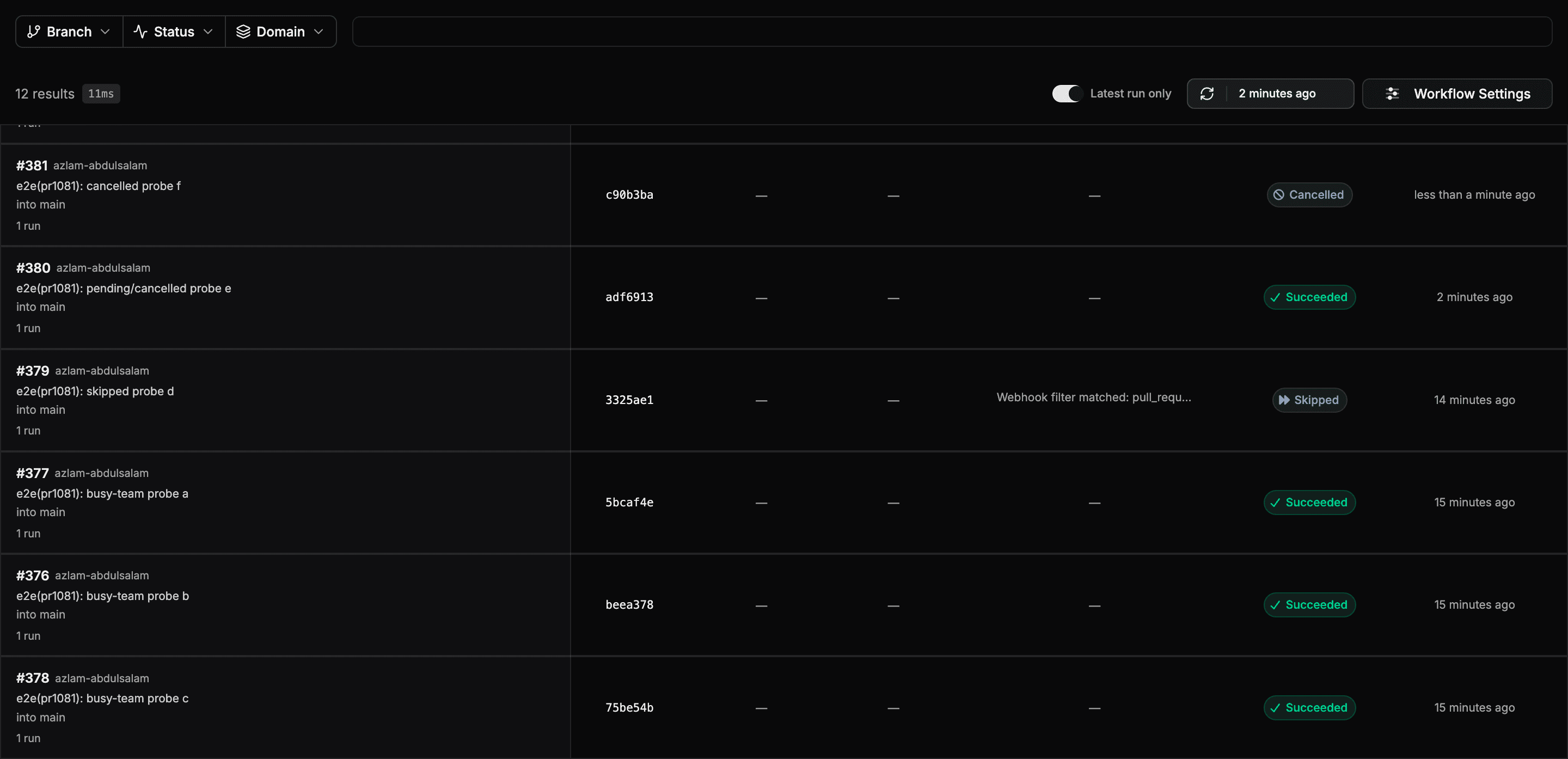
The Change Validation page tracks every PR validation from the moment it is triggered, not only runs that finished and published results. A run that is still in progress, was skipped, or failed before producing a report still appears on the page, so you can always answer "did validation run for my PR, and where is it now?"
Each run shows one of five statuses:
| Status | Meaning |
|---|---|
| Pending | Validation has been dispatched and is queued or running |
| Succeeded | The validation workflow completed |
| Failed | The validation workflow failed before publishing results |
| Cancelled | The run was cancelled — for example, the PR was closed while validation was still running |
| Skipped | A webhook filter excluded validation for this PR; the filter reason is shown on the row |
Clicking a run that has not published results yet opens the workflow run, where you can follow its logs and progress. Once results are published, the row opens the full validation detail instead.
Rerunning a failed domain
When one domain fails, you can rerun that domain alone instead of the whole validation. Open the validation's run, select the failed domain's job, and click Retry job. The rerun validates the same commit as the original run.
When the rerun finishes, codev updates the pull request's existing codev: PR Validation check on GitHub, or its status on Azure DevOps. The result covers every domain: the check passes only when each domain's latest attempt passed. The validation-succeeded or validation-failed label changes with it.
After a rerun, the validation report in the check, the pull request comment, and codev shows an Attempts table below the verdict. It has one row per attempt, newest first, with the attempt's result, start time and duration, the reason it failed or the domain it reran, and a link to its run. A validation with a single attempt has no Attempts table.
A rerun does not pick up new commits. When the pull request is updated, the push starts a new validation.
Latest run only
By default the page shows only the most recent run for each PR. Turn off Latest run only in the action row to see the full run history, including earlier commits on the same PR.
Configuring validation
Click Workflow Settings on the Change Validation page to enable or disable the PR validation workflow.
Validation behavior can be customized per branch pattern through project settings:
- Validation mode —
thoroughorindividual - Skip testing — skip Apex test execution (use with caution)
- Coverage percent — minimum code coverage threshold (default: 75%)
- Diff check — only build and validate changed packages
- Install dependencies — install package dependencies before validation
- Component Checksum Skip — deploy only the components that changed since the previously installed artifact (on by default)
For example, you might run thorough validation with testing on PRs to main, but individual validation without testing on feature branches for faster feedback.
When validation starts
Start validation in Workflow Settings sets what starts a validation automatically. It applies to the whole project:
- On PR updates (the default) — validation starts when a pull request is opened or updated.
- After required checks pass — validation waits until the checks listed under Required checks have finished on the pull request's latest commit.
- Manually — nothing starts validation automatically. Start it with
/codev validateon the pull request, Run validation, or the validation API.
In every mode, a member or owner can comment /codev validate on the pull request, or use Run validation on the Change Validation page, to start a validation now. With On PR updates, this runs validation again on top of the automatic run. With After required checks pass, it starts validation without waiting for the checks, and no second validation starts when they pass. The commenter's Git identity must be linked to a member or owner account, and the branch filters of PR validation still apply. A project saved with the earlier From a PR comment setting works as Manually. With suggested tests on, validation also waits until every test list of the pull request is decided. A change to these settings applies from the next pull request update; pull requests already open are not re-evaluated.
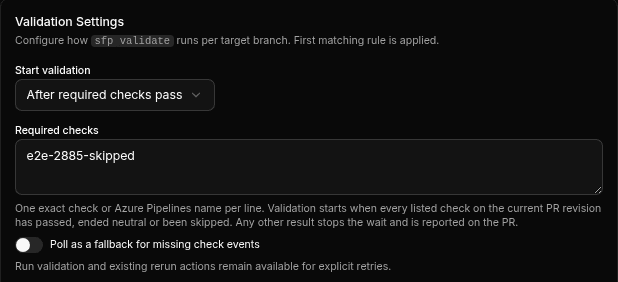
Waiting for required checks
With After required checks pass, enter one check name per line under Required checks. Names are exact and case-sensitive. On GitHub, enter the check's name as the pull request shows it (a job name, not a workflow name). On Azure DevOps, enter the Azure Pipelines definition name or the pull request status name. Do not list codev: PR Validation: validation would wait on its own result. codev also refuses codev: Test selection there, because validation already waits for test decisions on its own.
Validation starts when every listed check has finished as passed, neutral or skipped. These are the results GitHub branch protection accepts for a required check, so a check that is skipped on a pull request does not hold validation back. On Azure DevOps, a pull request status of Not applicable counts as skipped; a pipeline build counts only when it succeeded.
When a listed check finishes with any other result, such as failed, cancelled or timed out, codev stops waiting and does not start validation for that commit. It comments on the pull request with the check's name and result. Re-running the check does not restart the wait: push a new commit, or start validation with /codev validate or Run validation.
A check that is still running, or is not on the pull request, keeps validation waiting. codev stops waiting after 24 hours, or after Stop waiting after when polling is on.
Check completion events
codev learns that a check has finished from the repository's webhook. Saving After required checks pass adds the check completion event to the repository's existing codev webhook. If codev cannot update the webhook, for example because the GitHub App lacks webhook access, Workflow Settings shows Saved, but the repository webhook doesn't report finished checks and onboarding shows Configure Webhooks as not done. Fix the access, then run Configure Webhooks in onboarding.
Until the webhook reports finished checks, validation starts only if Poll as a fallback for missing check events is on. Polling reads the checks every Poll interval seconds (60 by default). It also recovers events the webhook missed.
Component checksum skip
Validation deploys only the components whose source changed since the previously installed artifact, so the payload it validates matches what a release will deploy. It is on by default. Turn it off for a target branch with the Component Checksum Skip toggle in Workflow Settings; every validation on that branch then deploys the full component set.
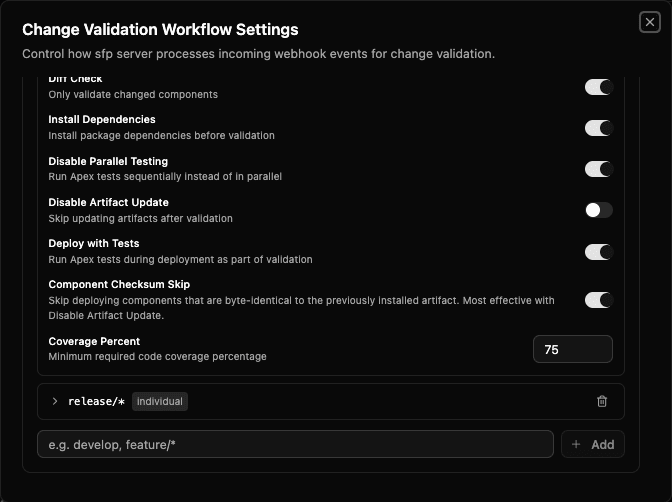
It is most effective with Disable Artifact Update. With artifact updates off, the review org's records stay pinned to the published baseline, so every pull-request iteration compares against that baseline and deploys only what changed. With artifact updates on, only the first iteration on a reused org benefits.
For what the optimisation skips, the component types it always deploys, and how it falls back, see sfp: Component checksum skip.
Suggested tests for diff packages
For how the options compare and what each runs at each stage, see Test selection for diff packages.
A diff package that no test suite binds deploys with RunRelevantTests, so Salesforce picks the tests. Test selection for diff packages in Workflow Settings makes validation run a list of test classes instead: one codev suggests and people accept, or one the pull request's author declares. It applies to the whole project, not per target branch:
- RunRelevantTests (default) — validation behaves as before.
- codev suggested (bounded list) — each pull request that changes Apex in a diff package gets a list of suggested test classes. Depth sets how far codev follows the classes that use a changed class before it reaches their tests, from 1 to 5 (default 2).
- Declared by the author — the pull request's author names the test classes, and validation runs exactly those. See Tests declared by the author.
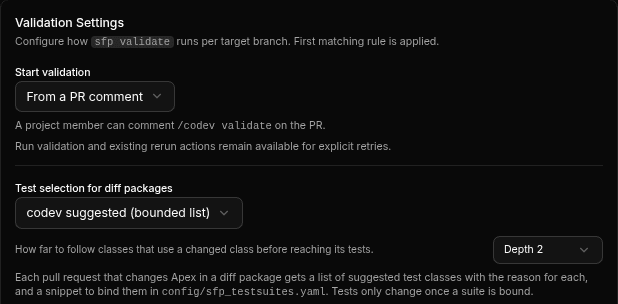
With codev suggested on, a pull request goes through these steps:
- codev finds the lists. On every pull request update, codev reads the pull request's source and suggests test classes for each diff package whose Apex the pull request changes. This needs no review environment. Validation does not start yet.
- People decide. Each list is accepted, edited or rejected, on the validation page or with
/testscomments. - Validation runs the decided lists. Once every list is decided, validation starts. A package with an accepted list deploys with
RunSpecifiedTestsand exactly those classes. - Builds and releases run them after merge. Builds bind the accepted lists to the package, so releases deploy it with the same tests.
For how codev picks the tests, see sfp: How the list is built.
Validation waits for test decisions
When codev has found the lists, it comments on the pull request with each package's list and Validation starts once every list is decided. The pull request's validation page shows the same lists under Validation waits for test decisions, with Accept, Reject and Edit list on each list.

A list is Pending until someone accepts or rejects it. A package whose pull request changes no Apex, or that sets isOptimizedDeployment: false, is Not needed and has nothing to decide. A pull request that changes no Apex in any diff package validates straight away.
Deciding the last pending list starts validation as Start validation says:
| Start validation | After the last decision |
|---|---|
| On PR updates | Validation starts at once |
| After required checks pass | Validation starts once the required checks have passed too |
| Manually | Nothing starts on its own. /codev validate or Run validation now works |
While a list is pending, /codev validate, Run validation and the validation API refuse to start, and name the packages that wait: Validation waits for a test decision on sales-diff. Decide with /tests or on the codev page.
A push to the pull request finds the lists again. A list whose suggestion did not change keeps its decision, so validation starts at once. A list whose suggestion changed goes back to Pending and waits again.
If codev cannot find the lists, for example because the pull request's source cannot be read, validation starts without them and each package keeps its own test level. A single package whose list cannot be computed stays Pending for builds, but does not hold validation back.
Deciding on a list
The validation page shows each package's current list: the suggested classes, the classes added by hand (Source Added) and the suggested classes taken out (Removed). History records each decision, who made it, from where and on which commit.
- Edit list opens a dialog. Untick a class to remove it, and enter class names under Add test classes. Save list applies both.
- Accept records the current list. A list with no classes cannot be accepted: add classes or reject it.
- Reject records that the package keeps no list.
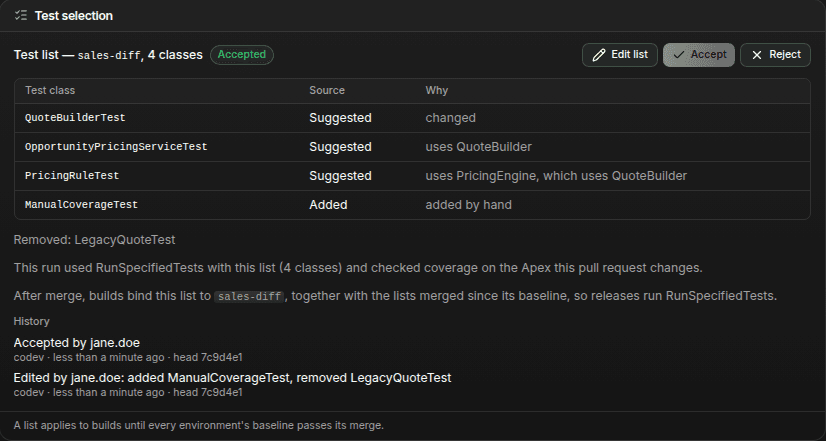
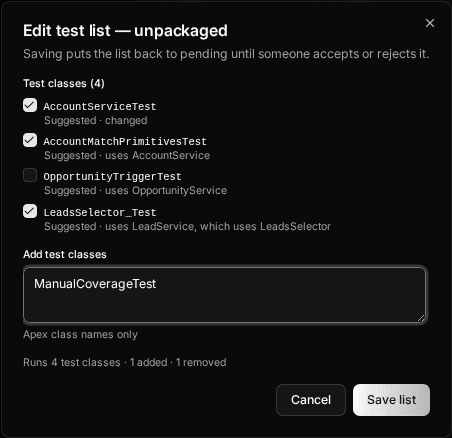
Saving an edit puts an accepted or rejected list back to Pending, so it needs a new accept or reject. A new commit that changes a package's suggestion does the same to an accepted list. Classes added or removed by hand carry over to the new suggestion.
A decision made after validation that changes what validation would run, such as rejecting an accepted list or accepting an edited one, cancels any validation in progress and validates the pull request again once every list is decided. Accepting a list that did not change starts nothing.
From a pull request comment
The same decisions work as comments on GitHub and Azure DevOps pull requests:
/tests accept
/tests reject
/tests add sales-diff:QuoteBuilderTest,PricingTest remove sales-diff:LegacyTestacceptandrejectwithout a package apply to every package that has a list. Name one to decide only that package:/tests accept sales-diff.addandremovecan go in one comment, in either order. Prefix each class with its package (package:Class) when the pull request has more than one package with a list./testson its own replies with the pull request's lists and the commands./codev tests …works the same as/tests ….
codev replies with the result, or with the reason it refused the command, and updates its pull request comment.
Members and owners can decide, on the page and in comments, including the pull request's author. A comment is accepted when the commenting Git identity is linked to a member or owner account, the same requirement as /codev approve.
What validation runs
| The package's list | Validation deploys the package with |
|---|---|
| Accepted | RunSpecifiedTests with the accepted classes, plus the classes of any suite already bound to it |
| Rejected or Not needed | its own test level: RunRelevantTests, or its bound suites |
With an accepted list, each Apex class and trigger that the pull request changes must reach the coverage threshold (75% by default) from the listed tests alone, so a missing test fails the pull request instead of the release. A class added by hand that does not exist in the project fails validation and names the class. With Skip testing or the package's skipTesting, the tests are skipped and the list does not run.
After the run, each list says what the run used, for example This run used RunSpecifiedTests with this list (4 classes) and checked coverage on the Apex this pull request changes.
After merge: builds and releases
A build binds to each diff package the accepted lists of the pull requests merged since the package's baseline, joined with the suites bound to it in config/sfp_testsuites.yaml. Releases then deploy the package with RunSpecifiedTests and that list, in every environment. The lists of two pull requests merged between two releases are combined.
A list applies to builds until every environment's baseline for the package has passed its merge. After a release moves the baselines past it, later builds no longer run its tests.
A build binds no list, and the package keeps its own test level, while any pull request in that range has a pending or rejected list for the package, or a commit was pushed without a pull request. The build log names them. The validation result warns about this before merge under Releases fall back to RunRelevantTests, with the pull requests that block it:
- Pull requests merged before the setting was turned on have no decision. Builds fall back until the baselines pass them.
- Lists can still be decided after the pull request is merged, on its validation page or with
/tests. Deciding them lets the next build bind the lists. - An artifact override on a release takes precedence over the bound list.
For the artifact format and the full list of fallback reasons, see sfp: Lists decided in codev.
The codev: Test selection check
codev posts a codev: Test selection check on the pull request's commit: a check run on GitHub and a pull request status on Azure DevOps. It stays in progress while any package's list is pending. It passes when every list is accepted, rejected or not needed, or when no diff package in the pull request changes Apex. Its details list each package's status and list.
To block merging until every list is decided, require the check with branch protection. It cannot be added under Required checks in Workflow Settings, because validation already waits for the decisions.
Tests declared by the author
With Declared by the author, codev suggests nothing and nobody accepts a list. The author names the tests for each diff package the pull request changes, in either or both of two ways:
-
A
tests:footer on any commit of the pull request, in the style of theversion:footer. A package prefix carries on to the class names after it, and commas separate class names:feat(orders): recalc discount on update tests: diff-lifecycle-pkg:AccountServiceTest,OrderTriggerTest -
A committed file under
.codev/tests/, with any name and the extension.yamlor.yml, that maps each package to its classes. Name it after something you know before the pull request exists, such as the work item:.codev/tests/JIRA-123.yaml. The file stays in the repository after merge as a record:diff-lifecycle-pkg: - AccountServiceTest - OrderTriggerTest
Both work from the pull request's first commit. Validation finds the pull request's files from its own changes, not from their names:
- A file the pull request adds declares all its classes.
- A file that was already there, which the pull request changes, declares only the classes the pull request adds to it. A renamed file is compared with its old name.
- Files the pull request doesn't touch, including other pull requests' files left in the folder, and files it deletes declare nothing.
- A file the pull request adds or changes that isn't valid fails validation, which names the file.
Each pull request can keep its own file, so pull requests in parallel never edit the same one.

On each push, validation reads the footers of the pull request's commits and the tests files it adds or changes, and joins them into one list per package. codev records that list as accepted for the pull request's head, so validation does not wait for a decision. /tests add and /tests remove change it as for a suggested list, and the list stays accepted. /tests add <package>:<Class> also starts a list for a package that has none yet. /tests accept has nothing to do, and /tests reject is refused: take classes out with /tests remove.
Validation then runs the list as it runs an accepted one (see What validation runs): RunSpecifiedTests with the declared classes and the classes of any suite bound to the package, and the coverage threshold on each Apex class and trigger the pull request changes. Validation fails, and names what is wrong, when:
- a diff package whose Apex the pull request changes has no tests declared. The message gives the footer, the file and the
/tests addcommand to declare them; - a declared class doesn't exist in the project, or a declared package isn't in the project;
- the declared tests don't cover a changed class or trigger to the coverage threshold.
A package with skipTesting, a package whose Apex the pull request doesn't change, and a package with isOptimizedDeployment: false need no declaration.
Merged pull requests that aren't released yet
A diff package deploys every change since its baseline. After another pull request is merged, and until it reaches the baseline, a pull request's validation also deploys that pull request's Apex in the same package. So validation also runs the lists of the merged pull requests in the package since its baseline. They show as Source Declared with merged PR #<number>. They aren't added to this pull request's own list, so builds after merge still bind each pull request's own list. Once the merged pull request is in the baseline, its list drops out.
A merged pull request or commit with no recorded list, such as a commit pushed straight to the base branch, adds nothing. It does not fail validation or raise a warning; validation runs the lists it could find. A package whose Apex only merged pull requests changed needs no declaration; it runs the lists that were found.
The validation page and the pull request comment show each class with Source Declared and where it was declared: a commit footer with its commit, a tests file, or a merged pull request. The page has Edit list but no Accept or Reject.
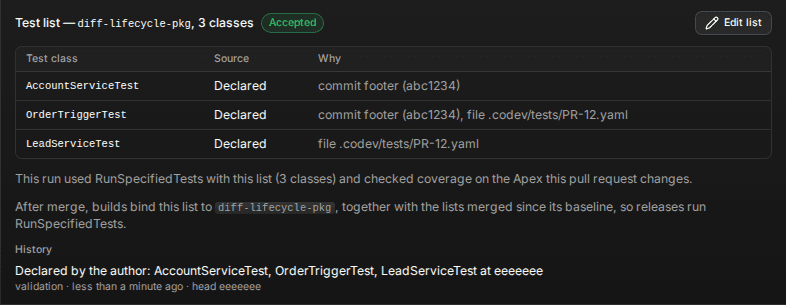

After merge, builds bind the list codev recorded for the pull request, as in After merge: builds and releases. They do not read the commit footers again, so the list holds after a squash merge. codev posts no codev: Test selection check in this mode.
Per-package controls
Individual packages can override validation behavior through sfdx-project.json attributes:
skipTesting— skip Apex tests for this packageskipCoverageValidation— skip coverage checks for this packagetestSynchronous— run tests serially instead of in parallel (useful for tests with DML conflicts)alwaysSync— always include this package when any other package in the same domain is validatedcheckOnlyAgainst— validate this package using check-only deployment against specific named orgs instead of pool environmentsdisableChecksumSkip— always deploy this package's full component set, even when only some of its components changed
For detailed reference on these attributes, see sfp: Controlling validation attributes.
Prerequisites
For change validation to work, you need:
- A review environment configured — this can be a dedicated Salesforce org (simplest to get started), a sandbox pool, or a scratch org pool. See Review Environments.
- Review environment rules mapping your branches and domains to the target — see Review Environments
- The PR validation workflow enabled — toggle in Workflow Settings
Requiring validation before merge
codev posts the validation result to the pull request as the codev: PR Validation check, but it does not block the merge on its own. To stop a pull request from merging until validation passes, make that check required in your source provider's branch protection. See Branch protection and required checks.
Further reading
- Validation — the concept: what a validation run does and why its result predicts the release
- sfp: Validation overview
- sfp: Validation modes
- sfp: Validation scripts