Cascades
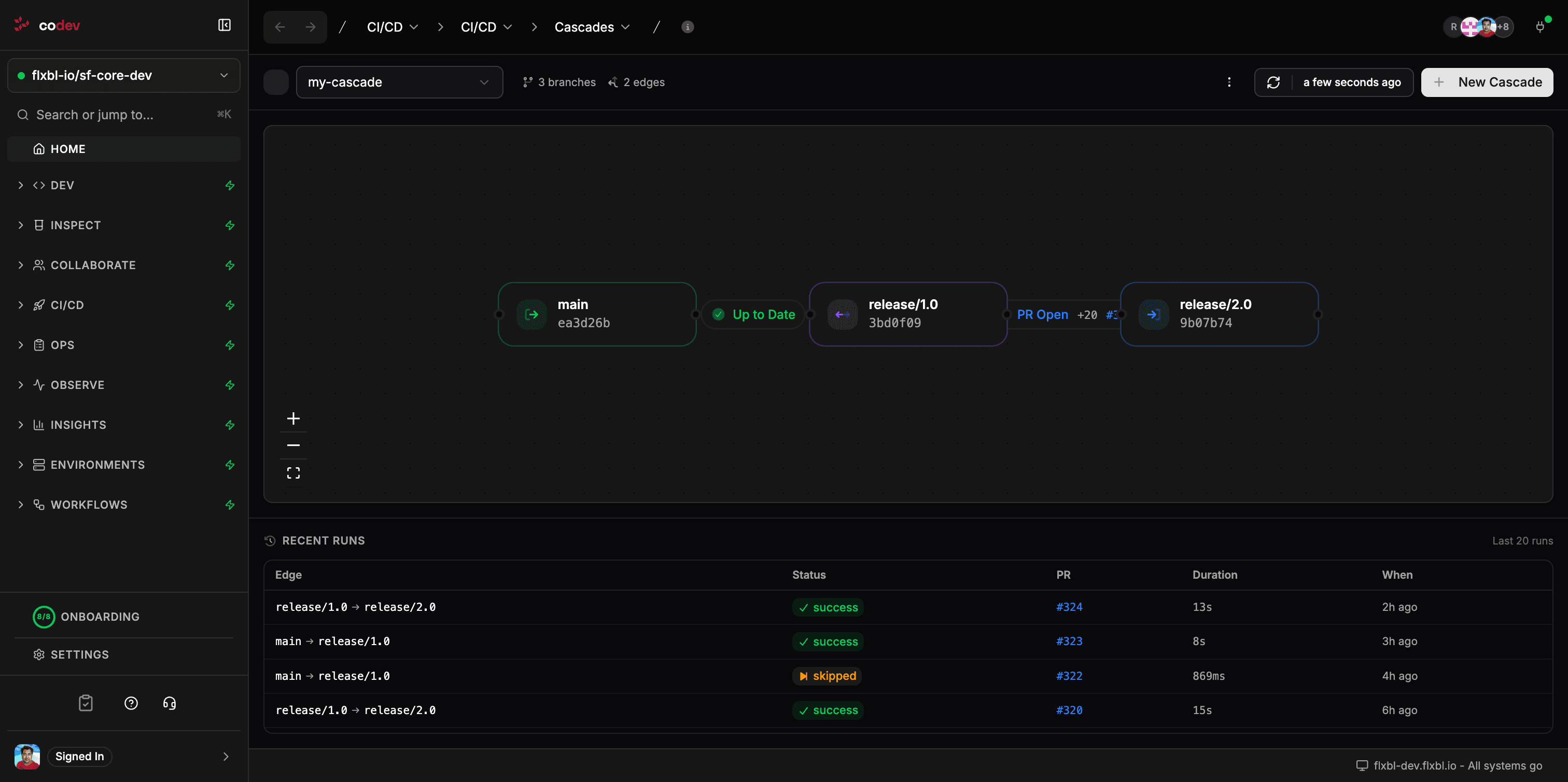
Cascades are for long-running branches. The default branching pattern in codev is trunk-based development with domains and short-lived feature branches that merge directly back to main. Cascades are not part of that model.
A cascade describes how changes should flow between two or more long-running branches, and automates the integration work that keeps those branches from drifting apart.
When to use a cascade
Use a cascade only when a long-running parallel branch is unavoidable. Typical situations:
- A managed package upgrade effort that lives on its own branch for weeks while regression testing finishes
- A vendor or partner delivering a capability that spans multiple domains and is not ready to merge in increments
- A major refactor (security model, domain split, foundational library replacement) that needs to keep absorbing trunk changes over a multi-week effort
If your branches live for days rather than weeks, you do not need a cascade.
The longer a branch lives, the more integration cost accumulates. Cascades reduce the cost of operating long-running branches; they do not remove it. Trunk-based development remains the default.
What a cascade does
A cascade watches a source branch, opens a pull request from cascade/<source>-to-<target> against the target branch when the source moves ahead, attempts a three-way merge, and updates the PR on each cascade run. When the PR is merged, codev runs a cascade build that ensures every package in every affected domain is also deployed to the environments registered against the target branch.
AI-assisted merge
When a cascade attempts a three-way merge and hits conflicts, you can either resolve them by hand or use AI-assisted merge. AI assist is enabled per edge by setting aiAssistedMerge: true.
When enabled, on a conflict the cascade:
- Builds a functional summary of what each branch changed since they diverged, drawing on commit history from both sides.
- Analyzes each conflicted file and produces a proposed resolution with a confidence score between 0 and 1.
- Applies resolutions with a confidence of at least 0.7. Files below the threshold are left as standard git conflict markers.
- Writes the analysis into the cascade PR description: an overall summary, a table of resolved files with the decision taken, a table of unresolved files with the obstacle, and a merge plan.
Reviewers see the PR with the high-confidence conflicts already resolved and the AI's reasoning recorded inline. The PR still goes through the normal review process — the AI does not bypass approval.
- source: main
  target: release/spring-26-upgrade
  trigger:
    type: on_merge
  aiAssistedMerge: true
The confidence threshold is fixed. If you need to revisit a resolution after the AI has applied it, edit the cascade branch directly — see Resolving conflicts by hand.
Conflict-set limits
AI-assisted merge is skipped when the conflict set is too large to analyze. The cascade falls back to a manual conflict pull request and records the reason in the pull request body and the run summary.
Two optional per-edge keys set the cut-off:
| Key | Default | Measures |
|---|---|---|
skipAiMergeAboveConflictedFiles | 100 | Number of conflicted files |
skipAiMergeAboveConflictedLines | 10000 | Total conflicted lines across those files |
Whichever limit is crossed first decides. Both take a positive integer; omit a key to use its default.
- source: main
  target: release/spring-26-upgrade
  trigger:
    type: on_merge
  aiAssistedMerge: true
  skipAiMergeAboveConflictedFiles: 100
  skipAiMergeAboveConflictedLines: 10000
Rerunning a cascade run can set either value for that run alone. Open the run, choose Rerun entire flow, expand Advanced JSON overrides, and supply the keys:
{ "skipAiMergeAboveConflictedFiles": 5 }Overrides are merged into the run's stored payload, so keys you omit keep the value the previous run used. To stop overriding a threshold that an earlier run set, pass it as null — that removes the key and the edge's configured value applies again:
{ "skipAiMergeAboveConflictedFiles": null }Configuration
A cascade is a YAML document attached to your project. It has a name, an optional description, and one or more edges. Each edge has a source branch, a target branch, and a trigger.
name: spring-26-upgrade
description: Keep the Spring '26 upgrade branch in sync with trunk
edges:
  - source: main
    target: release/spring-26-upgrade
    trigger:
      type: on_merge
    aiAssistedMerge: true
Trigger types
| Trigger | When it runs |
|---|---|
on_merge | After a merge to the source branch |
scheduled | On an interval (e.g., 4h, 1d) |
manual | Only when invoked via sfp cascade run --name <name> or the Run action in codev |
Multi-edge cascades
A cascade can contain a chain of edges. Edges must form a DAG; cycles are rejected at save time.
name: release-promotion
edges:
  - source: main
    target: release/1.0
    trigger: { type: on_merge }
  - source: release/1.0
    target: release/2.0
    trigger: { type: scheduled, interval: 4h }
Creating a cascade
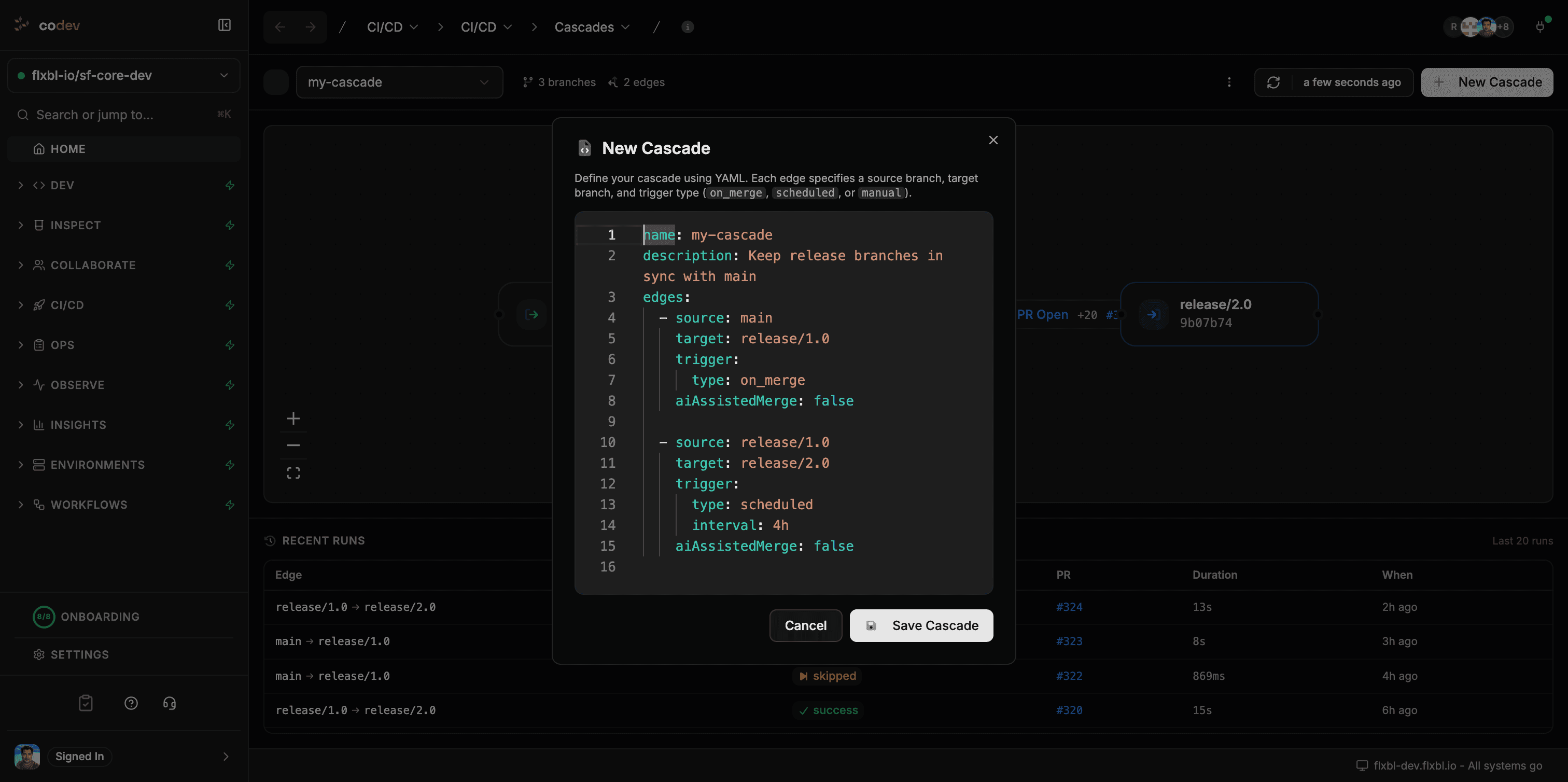
Click New Cascade on the Cascades page to open the YAML editor. The editor validates as you type — missing fields, invalid trigger intervals, and DAG violations are reported before save.
From the terminal:
sfp cascade create -f cascade.yaml
sfp cascade run --name <cascade-name>
sfp cascade list
The CLI and the UI write to the same project configuration.
What happens when a cascade PR is merged
When a cascade PR is merged, codev runs a cascade build that:
- Processes every package in every affected domain, including those whose artifacts already exist
- Produces release definitions for each domain
- Deploys to every environment registered against the target branch
Merge with a merge commit. Do not squash, do not rebase. The merge commit's second parent is how git tracks what has already been cascaded. Squashing or rebasing drops that link, and the next cascade run will re-compute the same merge base and re-propose the same changes — and the same conflicts. The cascade PR description includes this warning for reviewers.
Resolving conflicts by hand
To resolve conflicts manually, check out the cascade/<source>-to-<target> branch, fix the conflicts, commit, and push. codev detects human commits on the cascade branch and pauses automatic updates to that PR until it is merged or closed.
Cascades and Build on Merge
Cascade behavior is independent of the Build on Merge workflow. Three settings can be configured separately:
| Setting | Controls |
|---|---|
| Build on Merge | Whether non-cascade pushes trigger a build |
| Cascade build | Whether merged cascade PRs trigger a cascade build |
| Cascade edges | Whether cascade PRs are opened and updated when branches drift |
Cascade edges open PRs even when both build flows are disabled. This makes cascades usable in projects that run builds from an external pipeline.
Run history
The Recent Runs table shows the last 20 runs per edge with the source and target, run status, cascade PR number, duration, and time. Run statuses:
| Status | Meaning |
|---|---|
success | A cascade PR was opened or updated cleanly |
no_change | The source had no commits that were not already on the target |
skipped | A previous cascade PR is open and has human commits; auto-update is paused |
conflicts | Conflicts could not be resolved automatically |
ai_assisted | AI assist resolved one or more conflicts |
error | The run failed; see the workflow run for details |
Controlling what the cascade build deploys
The cascade build uses the same release configs and sfdx-project.json controls as a normal build:
- Skip a package — add
"ignoreOnStage": ["build"]to the package entry. See Ignoring packages from being built. - Group packages into a domain — define a release config per domain. See Release config reference.
A package excluded from a domain's release config will not be deployed by the cascade build.