IssueOps
IssueOps runs codev operations through your issue board — GitHub Issues or Azure Boards. Each request is filed on that board, and the item it creates is the record: codev runs the matching flow, comments on the thread as it progresses, and closes it when the work is done.
There are two ways in:
- The Operations catalogue — a page in codev listing ready-made requests (create a sandbox, request elevated access, install a package, run tests). Each files an item on your board and starts the flow that carries it out.
- Comment commands — type a command on a pull request or issue (for example
/sfp sync qaor/sfp approve) without opening codev, and it acts on it in place.
Both paths require the requester to be a codev member; actions that change a shared environment or approve a release require the owner role. Everything works the same on GitHub and Azure DevOps.
The Operations catalogue
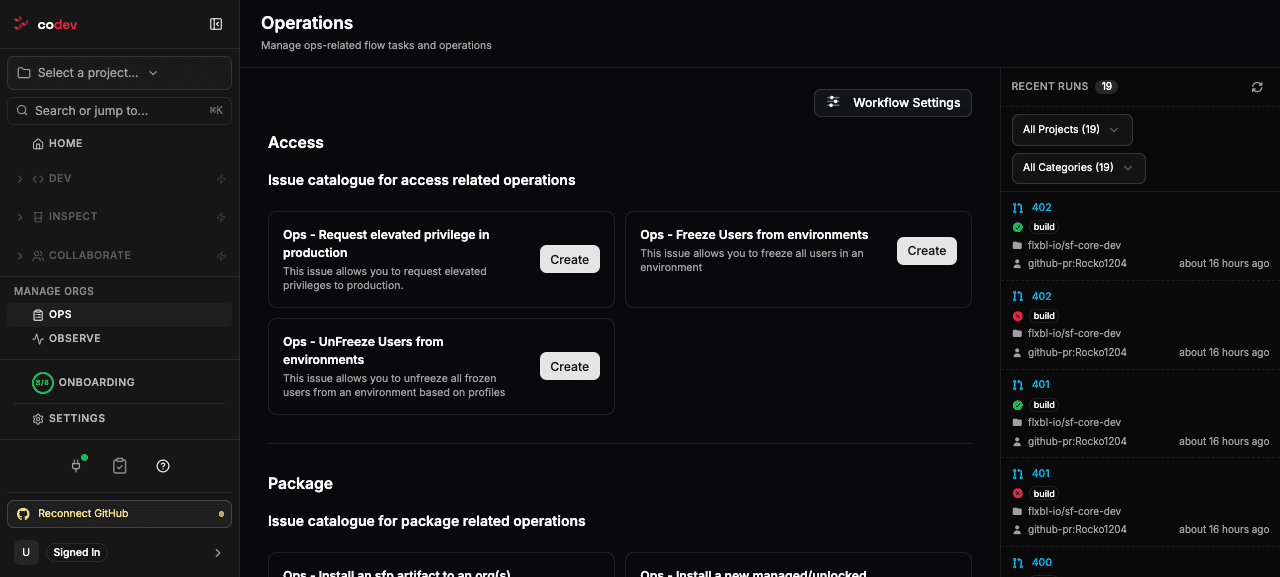
The Ops section lists the operations codev can run, grouped by area:
- Access — request elevated privileges in production, or freeze and unfreeze users in an environment.
- Package — install an sfp artifact, or a managed or unlocked package, into a target org.
- Environment — create, refresh, or delete a Salesforce sandbox, or sync an org to a branch.
- Test — run Apex tests against an org.
Clicking Create opens a short form for the operation's parameters. When you submit it, codev files an item on your issue board describing the request and starts the flow that carries it out. That item is the record of the request: codev comments on it as the flow progresses and closes it when the work is done.
Access operations name an access level rather than individual permissions. The levels come from the project's developer config, where an owner defines what each level grants:
Tracking requests
Request Tracking lists every request and where it is. A request moves through open → in progress → completed (or failed), and you can filter by project, status, type, who created it, and time range. Each row links back to the issue it came from and, once running, to the flow carrying it out — so you can answer "did my sandbox refresh finish?" without leaving codev.
Comment commands
You can also drive codev by commenting on a pull request or issue. Commands start with /sfp, /codev, or /sfops (the leading / is optional, and the three prefixes are interchangeable), and codev replies in the thread.
Most commands act on the review environment assigned to a pull request:
| Command | What it does |
|---|---|
/sfp assign | Assign a review environment from a pool to this pull request |
/sfp status | Show the assigned environment, its expiry, and a login URL |
/sfp extend --hours 24 | Extend the environment's lease (or --immortal to stop it expiring) |
/sfp renew | Release the current environment and assign a fresh one |
/sfp unassign | Return the environment to the pool |
/sfp sync <env> | Deploy the pull request's changes to a named environment (approval-gated) |
/sfp sync-review-env | Deploy the changes to the assigned review environment (no approval) |
/sfp record / /sfp stop | Start or stop a browser recording session on the review environment |
/sfp approve / /sfp reject | Approve or reject a pending request (see Approvals) |
Add --domain <name> to scope a command to one domain. /sfp help lists the commands available on the current thread. Only codev members can run commands, and actions that change a shared environment or approve a release require the owner role.
Approvals
Some operations — releasing to a production environment, or a privileged-access request — pause at an approval gate and wait for a person. Approvers can resolve them from Pending Approvals in the codev app, or directly in the thread:
/sfp approve
/sfp reject --reason "Change freeze until Monday"
Approving or rejecting requires the owner role. See Workflows: Pending Approvals for segregation of duties and the audit trail.
GitHub and Azure DevOps
IssueOps works the same on both providers. On GitHub a request is an issue on the repository's board, and commands run on issue and pull-request comments. On Azure DevOps a request is a work item on the project's board — Azure Boards scopes work items to the project, not to a repository — and commands run on work-item and pull-request comments. The set of operations and commands is identical.