Documentation · Overview
Workfloor
Where people and agents deliver Salesforce changes together
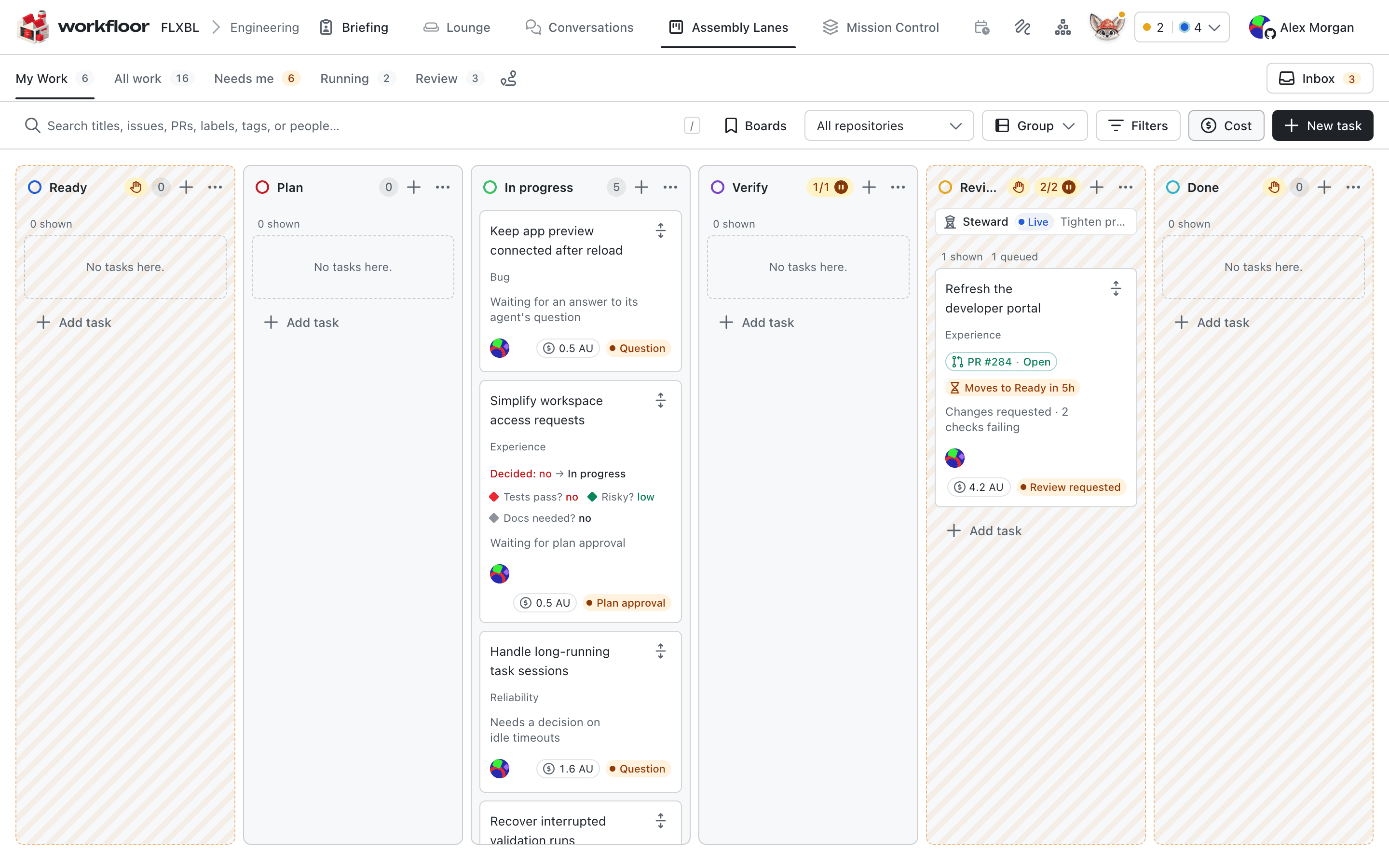
Workfloor is where people and agents deliver changes together. A team describes a piece of work, an agent carries it through the stages of a lane — planning it, building it, verifying it — and people review the result, answer its questions and approve.
Workfloor is in early access. This section starts with the journey from a new project to a first delivered change and is extended as the product is released. Workfloor works with any repository; these pages are written for Salesforce teams.
How work moves
- Work arrives as a card: a task someone writes, or an issue or pull request taken in from GitHub through Mission Control.
- The card enters an assembly lane, the project's delivery process. A lane is an ordered set of stages, for example Plan, In progress, Verify and Review.
- At each stage the lane's agent, usually Flux, works on the card in a checkout of the project's repositories: it writes a plan, changes the metadata and code, runs the checks and opens a pull request.
- When Flux needs a person, the card says so. It waits for a plan to be approved, a question to be answered or a review to be given.
- The card moves on as each stage finishes. A stage's way out can be a person's move, Flux saying it is done, or the card's pull request being merged.
For a Salesforce team, a card might be a validation rule on Opportunity, an Apex trigger with its test class, or a permission set change. The change is made in the project's repository and opened as a pull request.
Areas of the app
| Area | What it is for |
|---|---|
| Briefing | What needs you now, what is running and what was interrupted, for you and across the project |
| Lounge | Notes people pin for the team about a card or a piece of work |
| Conversations | A private conversation with Flux about the project, which can be handed off as team work |
| Assembly Lanes | The lane boards: every card, the stage it is in and what its agent is doing |
| Mission Control | The project's GitHub issues and pull requests, taken in and dispatched to a lane, and grouped into missions |
| Routines | Standing work that runs on a schedule, once a project admin has approved it |
| Wiki | The project's wiki, which agents read from and keep up to date |
| Settings | People, projects, repositories, lanes, agents and runners |
Agents
Workfloor provides the agents. Every project has Flux, and a Salesforce project also has Salesforce AutoPilot. There are no prompts to maintain and no models to choose: a lane names the agent for each stage, and a project admin sets a small number of options. See Agents.
Workfloor and codev
codev is the development foundation for a Salesforce project: its environments, sandbox pools, validation and releases. Workfloor is where the work on that project is described, carried out by agents and reviewed. The two share one Flxbl account, so a person signs in once.
Getting started
- Sign in — open your team's Workfloor and link your GitHub account.
- Create a project — name it, add its people and repositories, and connect GitHub.
- Onboard the project — Flux reads the repositories and proposes what the project needs.
- Invite your team — add people and give them a role in the project.
- Deliver your first card — describe a change and follow it to a merged pull request.
The terms used throughout this section are defined in Core concepts.