Agents
The agents a Workfloor project is offered, Flux and Salesforce AutoPilot, and what a project admin can set for them.
Agents are offered by Workfloor. Every project has Flux, and a Salesforce project also has Salesforce AutoPilot. There is nothing to install, add or configure to get them: a lane stage names one, and it works the cards that enter that stage.
Salesforce AutoPilot runs only in Salesforce projects. A project is a Salesforce project when one of its repositories has an sfdx-project.json at its root, or when a project admin sets Workbench to Salesforce on the project's General tab.
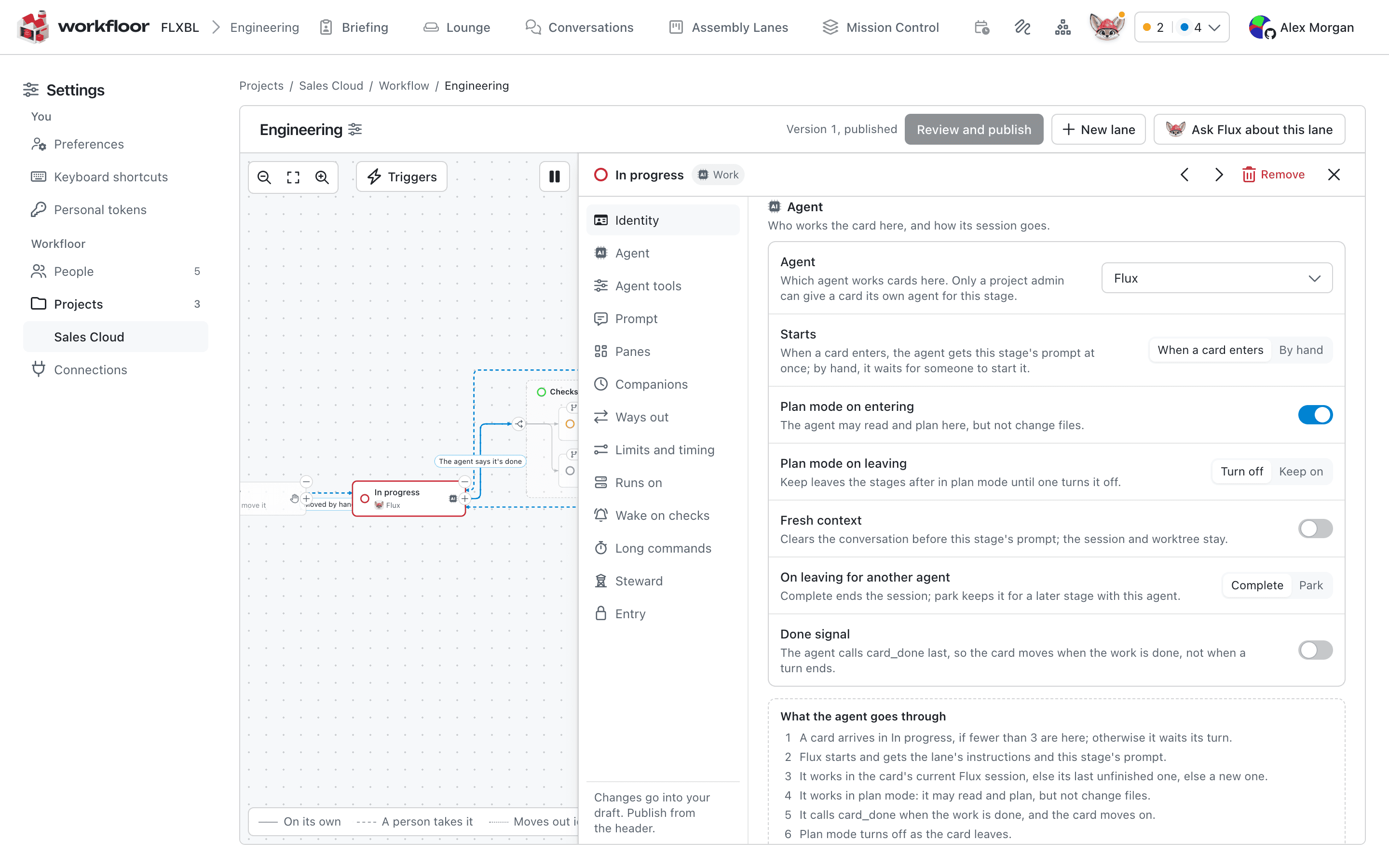
Choose the agent at a stage
The agent is chosen where the work happens, in the lane editor (see Assembly lanes). A stage can use the lane's agent, name one itself, or have none. For Flux, the stage also names the profile it works as: Plan, Build, Verify, Review, and a few others for release, intake, triage and operations work. The profile decides what Flux is doing at that stage, such as planning a change for review or checking that it does what was asked.
A project admin can also give one card its own agent for a stage.
What a project admin sets
The project's Agents tab, under Settings > Projects, holds only what differs for this project.
Permission requests. While working, an agent can ask to do something, such as run a command or fetch a page. A project admin chooses Allowed, or Ask the card's people, who then answer each request on the card. The choice applies to every agent in the project from each agent's next start. An agent's questions to people always go to the card's people.
Default settings. An agent can declare settings of its own beyond what a stage sets. Salesforce AutoPilot does. A project admin sets their defaults on the Agents tab. A lane stage can override a default, and a card can override a stage's value where the stage has not locked it. Some settings that act as safety controls can only be set by a project admin, at the project's defaults, and never per stage or per card.
Steering. A card's assignee, or a project admin, can choose how much the agent thinks on its own, from Steer closely to Let it think. This is the card's thought level. On the Agents tab, People may steer it on team cards turns this on or off for an agent. With it off, cards run at the agent's own level. People can always steer in their own conversations.
What people see
Members see the agent by name on cards and in the lane graph, for example Flux, with the profile where one is set. They do not choose what an agent runs on.
Next: Runners.
Assembly lanes
How a Workfloor assembly lane moves Salesforce changes through stages, how a project admin edits a lane's stages and agents, and how a new version is published.
Runners
Register a runner for a Workfloor project so its agents run on your own machine, set which runners a project's cards use, and drain or remove a runner.