Cherry-to
Deliver a source pull request's change onto a divergent target branch as a draft pull request, using native Git first and AI to resolve a semantic transplant when the target has moved on.
Cherry-to takes the change in one pull request and delivers it onto a different, separately evolving branch — a staging or hotfix branch whose history has diverged from the source. You run it by commenting /codev cherry-to <target-branch> on the source pull request. codev opens a draft pull request against the target branch containing that change, and never touches the target branch directly.
codev applies the change with Git when it applies cleanly, and uses your connected AI provider to transplant it when the target has diverged too far for a plain apply. Either way the result is a draft you review and merge yourself.
Cherry-to is an exception path, not a promotion path. The standard way to move a change between environments is to promote its built artifact through a release. Delivering source changes into a separately evolving branch creates a second delivery line that can drift from your artifact history. Reach for cherry-to only when you need a pull request's change on a branch and artifact promotion does not fit — see When to use cherry-to.
Before you start
Three things must be in place before a comment will dispatch. If any is missing, codev replies on the pull request and does nothing else.
| Requirement | What it means |
|---|---|
| The target branch is allowed | An owner lists the branches cherry-to may deliver to in the project configuration (see below). A target that is not on the list is rejected. |
| An AI provider is connected | Cherry-to always runs an AI analysis, so the project needs an available AI provider. Without one, the command is rejected. |
| You can act on the repository | codev checks repository write access on GitHub, and organization membership on Azure DevOps, before it runs the command for you. |
Allowing target branches
Cherry-to only delivers to branches an owner has allowed for the project. List them under cherryTo in the project configuration:
{
  "cherryTo": {
    "targetBranches": ["staging", "release/*"]
  }
}
Each entry is a branch name or a wildcard pattern (release/* matches release/2026-01, release/2026-02, and so on). A comment whose target does not match any pattern is rejected before any work starts. Removing the cherryTo configuration turns the feature off for the project.
Running it
On the source pull request, comment:
/codev cherry-to stagingcodev acknowledges the comment, runs the analysis, and posts back a link to the draft delivery pull request when it finishes. The command also appears in the welcome message codev posts on new pull requests, so you do not have to remember the exact syntax.
The target you name must differ from the source pull request's own branch and its base branch — cherry-to delivers a change elsewhere, so those are rejected.
What codev delivers
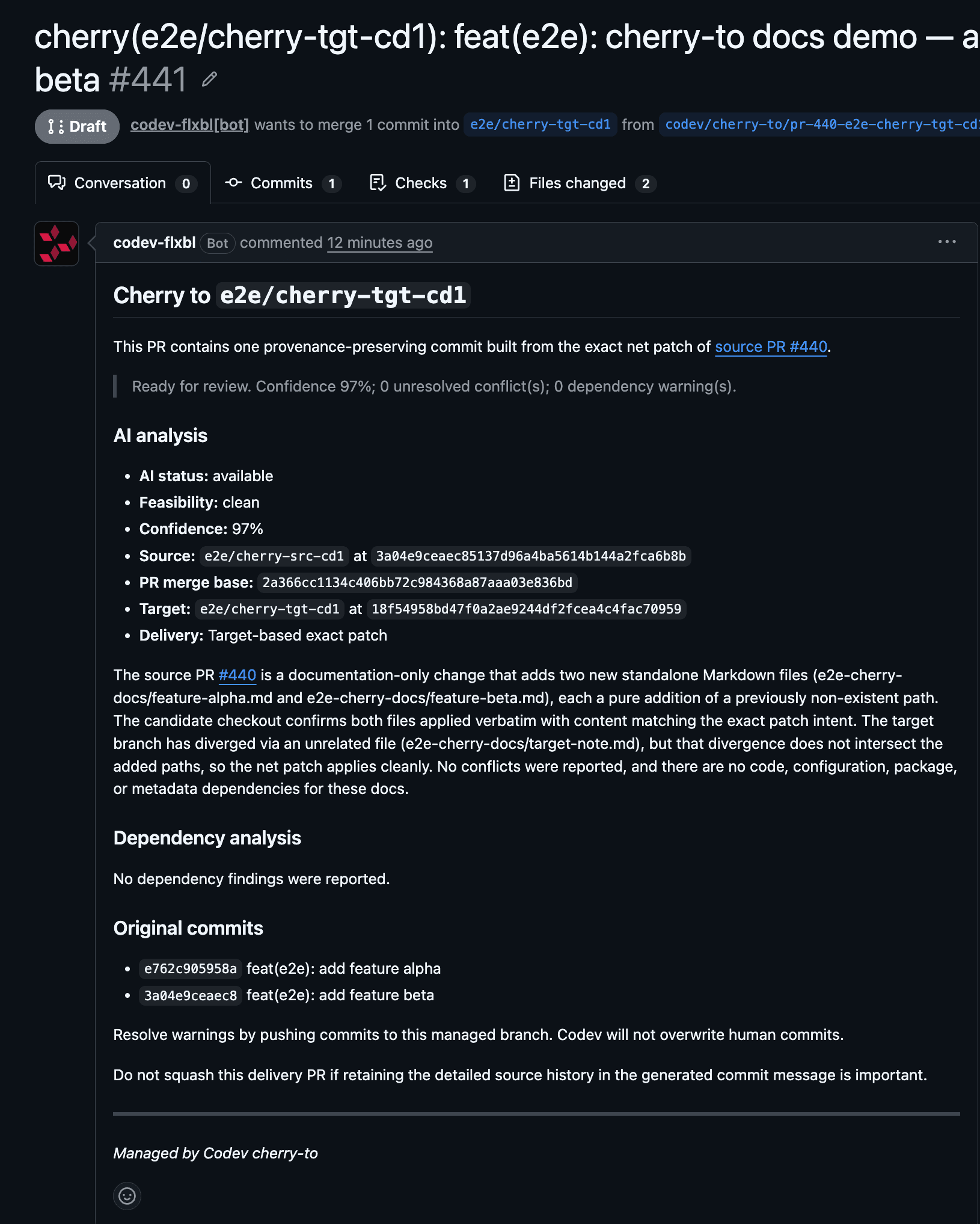
The delivery pull request is always a draft against the target branch. Its body records everything codev did:
- One squashed commit. The source pull request's commits are combined into a single delivery commit so the target receives one coherent change rather than a partial replay. The commit message retains each original commit — its author, date, subject, and body — and carries structured provenance that ties the delivery back to the source pull request and the exact change it delivered.
- The AI analysis. The confidence, any warnings, resolved conflicts, unresolved conflicts, and missing-dependency findings are written into the pull request body.
- A review check. A Codev Cherry Review check on the pull request summarises the outcome — success when the delivery is clean and needs no attention, failure when something warrants a human look (a conflict, a warning, or a missing dependency). The check is advisory; it never marks the draft ready and never merges it.
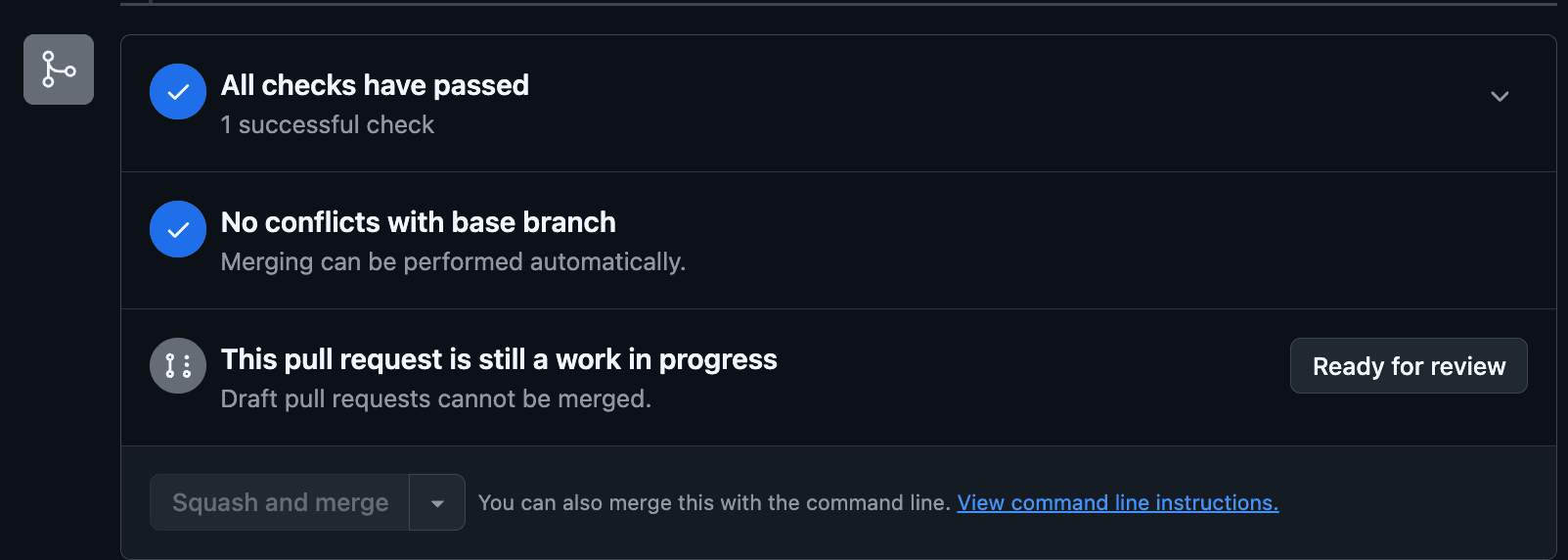
Merging the draft is an ordinary merge into the target branch. Whatever build-on-merge your target branch already runs takes over from there.
Clean transplant or semantic transplant
codev tries the deterministic path first and only reaches for AI when Git cannot express the change on the diverged target:
| Mode | When it applies | What you see |
|---|---|---|
| Clean transplant | The source change applies onto the target with Git. | The delivery reports "Cherry-picked the exact net change." High confidence, Codev Cherry Review passes. |
| Semantic transplant | The target has diverged — for example it edited the same lines differently — so a plain apply cannot express the intent. | codev's AI provider works out the intended result, applies it with no conflict markers, and reports "Semantically transplanted the intended change." The Codev Cherry Review check fails so the change gets a human review. |
The AI only applies a resolution it is confident in and that introduces no conflict markers. Anything it cannot resolve is left visible in the draft rather than guessed at.
Conflicts and missing dependencies
Two findings send a delivery to human review while still producing a draft:
- Unresolved conflict. When neither Git nor the AI can resolve a clash, codev creates the draft with the conflict shown the way the provider shows any conflicting pull request — with a path annotation and no committed conflict markers. You resolve it in the draft.
- Missing dependency. When the change references something that does not exist on the target — an Apex class, a field, a component the source relied on — codev still creates the draft, but the analysis lists the missing paths and the review check fails.
In both cases the draft is the point of the exercise: codev hands you a reviewable starting point instead of blocking, and instead of pushing an uncertain result to the branch.
Confidence is advisory. A high-confidence, clean delivery is still a draft you merge yourself; a low-confidence or conflicted one is never pushed to the target. The draft is always the handoff.
Re-running the same command
Running the same /codev cherry-to <target> again does not create a second draft. codev recognises the identical request and reuses the existing delivery pull request, replying "Reused draft cherry delivery PR". This makes the command safe to repeat.
codev stops when you take over
Once you start working in a delivery pull request, codev treats it as yours and will not overwrite it. It stops in two cases:
- You add commits to the delivery branch, or
- You publish the draft (mark it ready for review).
From that point, a re-run of the command does not touch the pull request. codev replies that the pull request is now human-owned and leaves it exactly as it is. If you want codev to regenerate the delivery from scratch, close the pull request and delete its branch, then run the command again — codev spells out those steps in its reply.
If the source pull request or the target branch has moved since codev generated the draft, a re-run asks you to invoke the command again rather than silently rebuilding on a changed base.
When it won't run
codev rejects the command up front, on the pull request, in these cases:
| Situation | Reply |
|---|---|
| More than one target given | "Exactly one positional target branch is required." |
| Target not on the allow-list | "Cherry-to is not allowed for target branch …" |
| Target is the source or base branch | "Cherry target … must differ from this PR's source and base branches." |
| No AI provider available | "Cherry-to requires an available AI provider for this repository." |
| Source pull request is closed or merged | "Cannot cherry from a closed or merged pull request." |
| The delivery pull request is human-owned | "Codev will not overwrite it" — with the close-and-delete recovery steps. |
When to use cherry-to — and when not to
The recommended way to move a change between Salesforce environments is to build it into an artifact and promote that artifact through a release. That keeps a single, auditable delivery history. Cherry-to does not replace it.
Use cherry-to for the exception: you need a pull request's change on a separately evolving branch — a staging or hotfix line — and promoting its original artifact is not an option. Because that branch evolves independently, some drift from your artifact history is unavoidable. Cherry-to makes the trade-off explicit — the draft pull request, the AI analysis, the review check, and your merge are all visible and reviewable — but it does not remove the drift. Keep the target allow-list narrow so the exception stays an exception.
Cherry-to and Unbundle cover the two deliberate cases that fall outside straight artifact promotion — carrying a change onto another branch, and taking a change back out of a release candidate.
Related
- Unbundle — remove a change from a release candidate
- AI providers — connect the provider cherry-to needs
- Releases: what is deployed where — the artifact-promotion path cherry-to is the exception to
- Audit — the record of what codev did