Deployment Matrix
As you run more environments, it becomes hard to keep track of which version of each package is on which one. The Deployment Matrix lays it out as a grid — every package down the side, every environment across the top — so you can see at a glance what is deployed where, and where environments have fallen out of step.
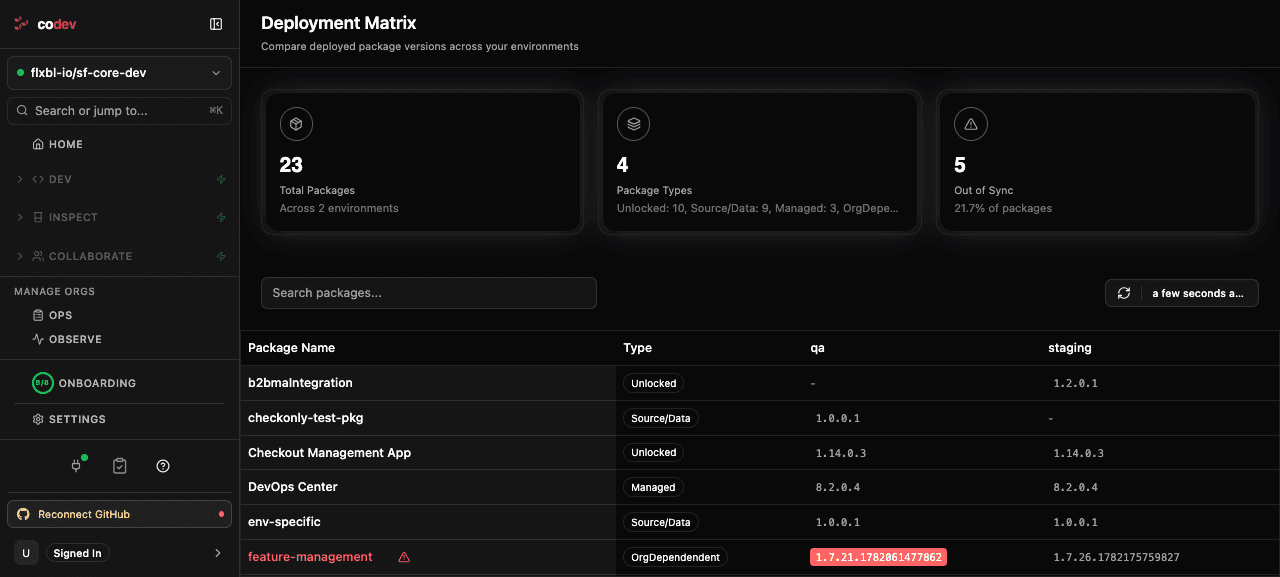
Reading the matrix
Each row is a package and each column is an environment. A cell shows the version of that package currently deployed to that environment, or a dash when it is not installed there. When the same package sits at different versions across environments, the cell is highlighted — that package is out of sync.
The summary across the top counts the total packages, the package types in play (unlocked, source/data, managed, org-dependent), and how many packages are out of sync.
Using it
Use the matrix to answer questions like "is staging behind production?", "did this package make it to UAT?", or "which environments still need this release?". Search by package name to focus on one, and click a version to see more about that deployment.