Environment Drift
Environment Drift is in Beta.
An environment should match what codev says is deployed to it. Over time orgs drift — someone edits metadata directly in the org, a component lingers after a package is dropped from a release, a hotfix never makes it back to source. Environment Drift compares the source codev expects to be on an environment against what is actually in the org, and flags the differences.
What it compares
codev takes the source it believes is deployed to the environment — the packages at their released versions — and compares it, component by component, against what the org actually contains. It looks at both presence (a component in source but missing from the org, or present in the org but gone from source) and content (the same component differing between the two), canonicalising XML so formatting noise is ignored. Data packages are compared by their records.
Mechanical findings, then an AI pass
Drift detection runs in two phases. First, a mechanical comparison produces the raw findings. Then an AI agent reviews each finding with the source and org evidence in front of it and decides whether it is real drift, benign, or it cannot tell. It assigns a verdict, a severity, and a confidence, and writes up its reasoning.
This second pass is what makes the results trustworthy: the agent only reclassifies when the evidence supports it, so a formatting-only difference is filtered out as cosmetic while a genuinely missing component is raised as actionable — and where it cannot be sure (an aliasified package it could not resolve, an incomplete retrieve), it says so rather than guessing.
How findings are grouped
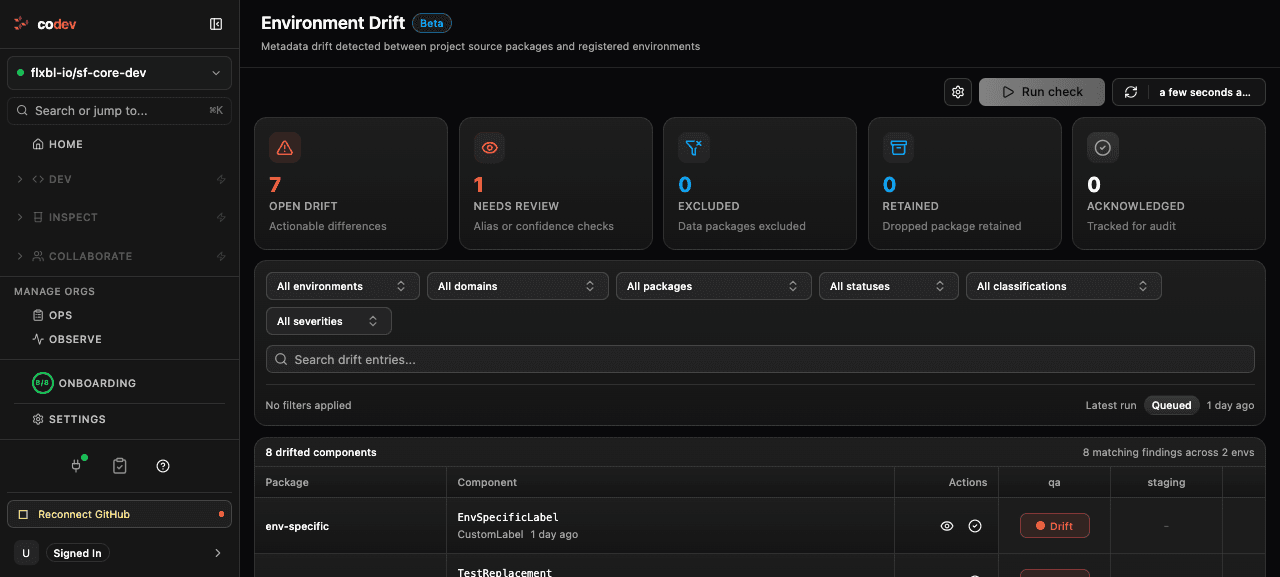
The summary across the top splits findings into five buckets:
- Open drift — actionable differences you should resolve.
- Needs review — the AI could not be confident, so a person should look (an aliasified package it could not resolve, or an incomplete org retrieve).
- Excluded — data packages that were not assessed.
- Retained — components from a package that was dropped from the release but still exist in the org.
- Acknowledged — drift you have reviewed and accepted, kept for the audit trail.
The table lists each drifting component once, with a column per environment, so you can see at a glance which environments a component has drifted on. Filter by environment, package, status, classification, or severity.
Running a check
A drift check runs on a schedule (daily by default) and can also be started by hand with Run check. While a check runs it takes an exclusive lock on the environment, so a deployment and a drift scan never run against the same org at once; the lock is released when the scan finishes. The run appears as an "Org drift check" on the Flows page.
Acknowledging drift
Some drift is expected — an environment-specific label, a configuration that only ever lives in production. Acknowledge a finding to take it off the open-drift count while keeping it on record: codev stores who acknowledged it, when, and an optional reason, and you can reopen it later. The component stays in the history for audit.
Related
- Environments
- Access and locks
- Flows: runs and approvals
- Changesets — capture an org-side change and raise it as a pull request, so it stops appearing as drift