Determining whether an artifact need to be built
sfp's build commands process the packages in the order as mentioned in your sfdx-project.json. The commands also read your dependencies property, and then when triggered, will wait till all its dependencies are resolved, before triggering the equivalent package creation command depending on the type of the package and generating an artifact in the due process
sfp's build command is equipped with a diffcheck functionality, which is enabled when one utilizes diffcheck flag, A comparison (using git diff) is made between the latest source code and the previous version of the package published by the 'publish' command. If any difference is detected in the package directory, package version or scratch org definition file (applies to unlocked packages only), then the package will be created - otherwise, it is skipped.
For eg: provided the followings packages in sfdx-project.json along with its dependencies
Scenario 1 : Build All
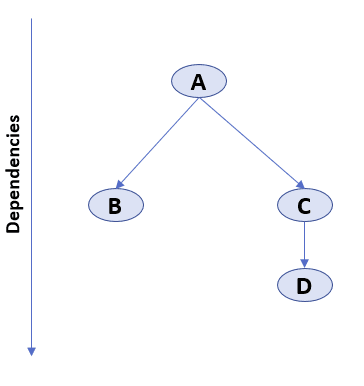
- Trigger creation of artifact for package A
- Once A is completed, trigger creation of artifacts for packages B & C **,**using the version of A, created in step 1
- Once C is completed, trigger creation of package D
Scenario 2 : Build with diffCheck enabled on a package with no dependencies
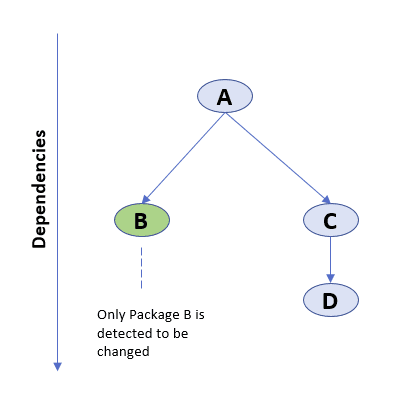
In this scenario, where only a single package has changed and diffCheck is enabled, the build command will only trigger the creation of Package B
Scenario 3 : Build with diffCheck enabled on changes in multiple packages
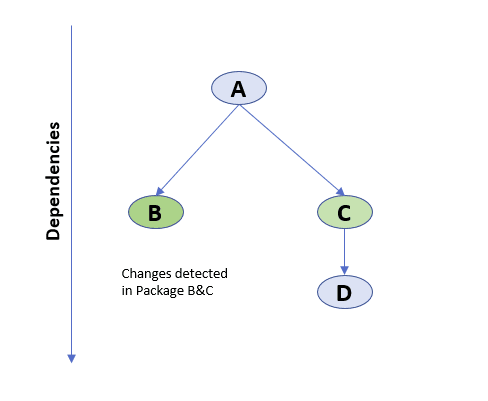
In this scenario, where there are changes in multiple packages, say B & C, the build command will trigger the creation of artifacts for these packages in parallel, as their dependent package A has not changed (hence fulfilled). Please note even though there is a change in C, package D will not be triggered, unless there is an explicit version change of version number (major.minor.patch) of package D
Packages superseded by a newer published commit
When sfp is connected to an sfp server, every publish records the commit that produced each package version on its branch. Before assigning version numbers, sfp build and sfp quickbuild compare the build commit with that recorded commit. If the build commit is an ancestor of it, the build is running at an older point of the branch than the latest published version, and the package is removed from the build. No artifact is created and no version number is assigned to it.
main:  C1 ── C2
             └── sales 1.4.1 published from C2

sfp build --branch main at C1  →  sales skipped as superseded
The build log names the commits and the published version:
sales: skipped as superseded. 1a2b3c4d is behind 5e6f7a8b, which already published 1.4.1 on main. To produce a new version, rebuild at the branch tip.The end-of-build summary lists these packages under Packages skipped as superseded, and buildResult.json records each one with status: skipped and skipReason: superseded. The other packages in the build continue, and a package that depends on a skipped package does not wait for it.
The check runs only for sfp build and sfp quickbuild with --branch and --repository set, and not with --dry-run. Validation and other commands that build packages do not run it. A package is built as before when:
- It has no publish record on the branch
- The build commit is the recorded commit, a later commit, or on a diverged line of history
- The recorded commit is not present in the local clone. The build logs a warning for the package
- The server request fails. The build logs a warning and skips the check
To produce a new version of a superseded package, build at the tip of the branch.