From Azure DevOps
Mapping a self-run Azure Pipelines setup — container-based build, deploy, and publish stages — onto codev, one pipeline at a time.
An Azure Pipelines setup that builds Salesforce with sfp follows the same shape as any self-run CI: a branch trigger starts a pipeline, the job runs in the sfp container, authenticates a Dev Hub, and calls sfp build, sfp install, sfp publish, or sfp release. This is a Build Your Own (BYO) workflow, so it runs sfp-pro. This page maps that shape onto codev: what the server takes over, and what Azure DevOps-specific pieces — Service Principal, webhook subscriptions, pull-request threads, Boards work items — replace the ones you operate today.
Read Migrating to codev first for the overall approach — connect the repository, then hand over one capability at a time. This page is the Azure DevOps-specific detail.
What your pipeline looks like today
A typical build-and-publish pipeline triggers on branch pushes, runs in a container pinned to the sfp image, authenticates on every stage, and calls sfp directly:
# azure-pipelines.yml (self-run)
trigger:
  branches:
    include: [main]

pool:
  vmImage: ubuntu-latest

container:
  image: source.flxbl.io/flxbl/sfp-pro:51.x   # you pin and upgrade this
  endpoint: flxbl-registry                     # a service connection you maintain

steps:
  - checkout: self
    fetchDepth: 0
  - script: sf org login sfdx-url -f $(DEVHUB_AUTH_FILE) -a devhub -d
    displayName: Authenticate Dev Hub
  - script: sfp build -v devhub --diffcheck --buildnumber $(Build.BuildId) --branch $(Build.SourceBranchName)
    displayName: Create packages
  - script: sfp publish -d artifacts --npm --scope my-org --gittag --pushgittag
    displayName: Publish artifacts
Alongside it, teams usually have per-environment release pipelines (or stages) each running sfp release -o <env>, a pull-request pipeline that leases a review org and runs sfp validate, and scheduled pipelines running pool preparation. Everything in this model is yours to operate: the image tag, the registry service connection, the Dev Hub auth on every run, and the PR validation plumbing.
What codev runs instead
Connecting the repository to sfp server (see Step 1) is what retires the branch triggers. On Azure DevOps, codev authenticates as a Service Principal you register once, and onboarding subscribes to your repository's push and pull-request events — so a merge notifies the server directly, with no pipeline trigger. Setting up the Service Principal and its permissions is covered end to end in Azure DevOps; note that registering the webhook subscriptions requires the Service Principal to have Project Administrator access on the project.
| Your pipeline today | On codev |
|---|---|
trigger: + container: image: …/sfp-pro:… and its registry service connection | Webhook subscriptions from onboarding; the server runs on its own image — no tag or service connection to maintain |
sf org login on every run | The server holds the org connections; no per-run auth |
sfp build --diffcheck | Build on merge — the server detects impacted domains and builds only those |
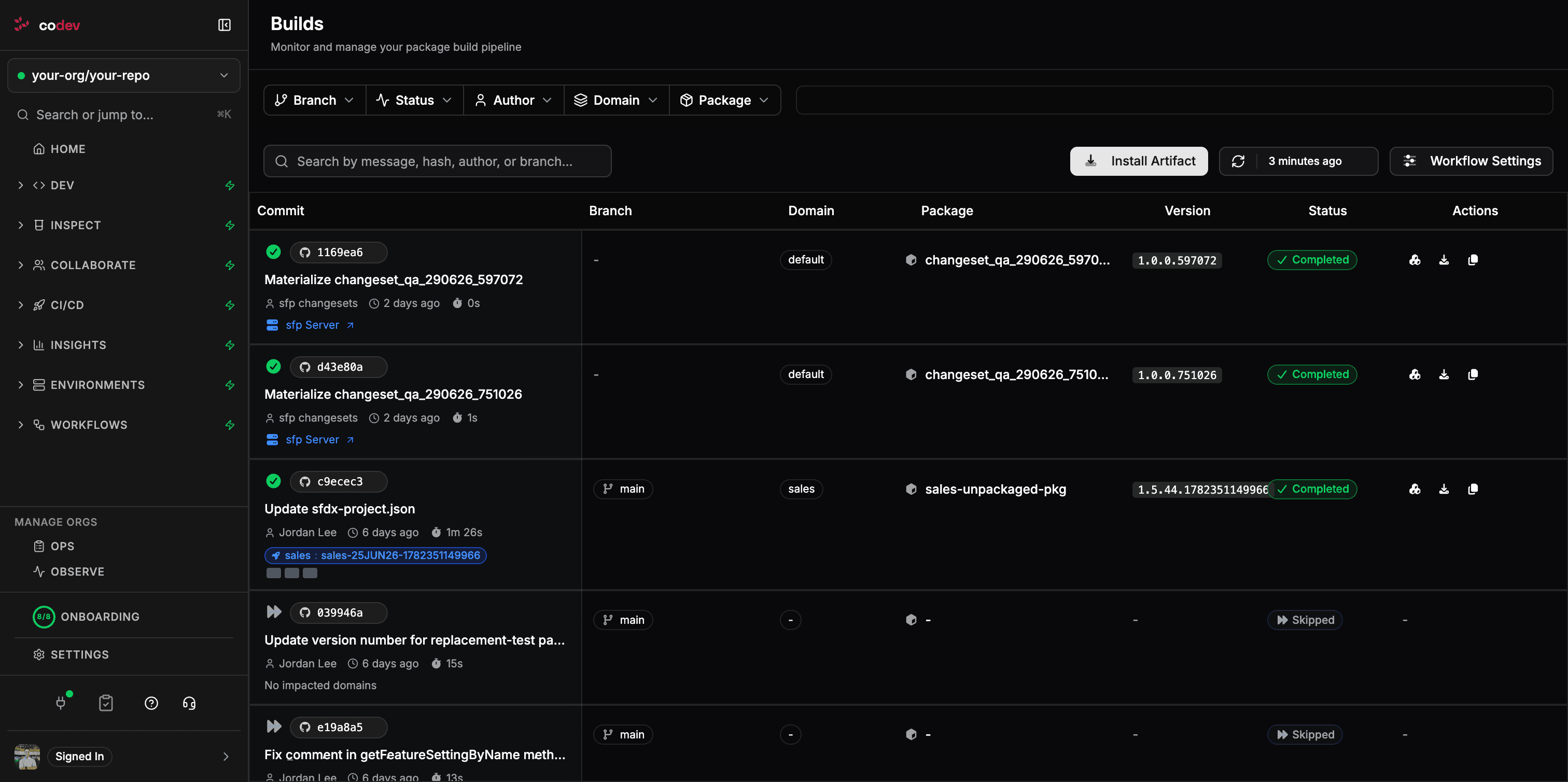
sfp publish | The server publishes package metadata; builds appear on the Builds page |
sfp release -o <env> per-environment pipelines | Release candidates and releases — target environments chosen at release time |
PR pipeline leasing a review org + sfp validate | The server validates pull requests and posts the results back to the PR |
| Scheduled pool-preparation pipelines | Server-managed pools |
Validation results land on the pull request
On Azure DevOps, codev posts validation and analysis results as commit statuses and pull-request comment threads — the reviewer sees pass/fail state and the detailed result without leaving the PR:
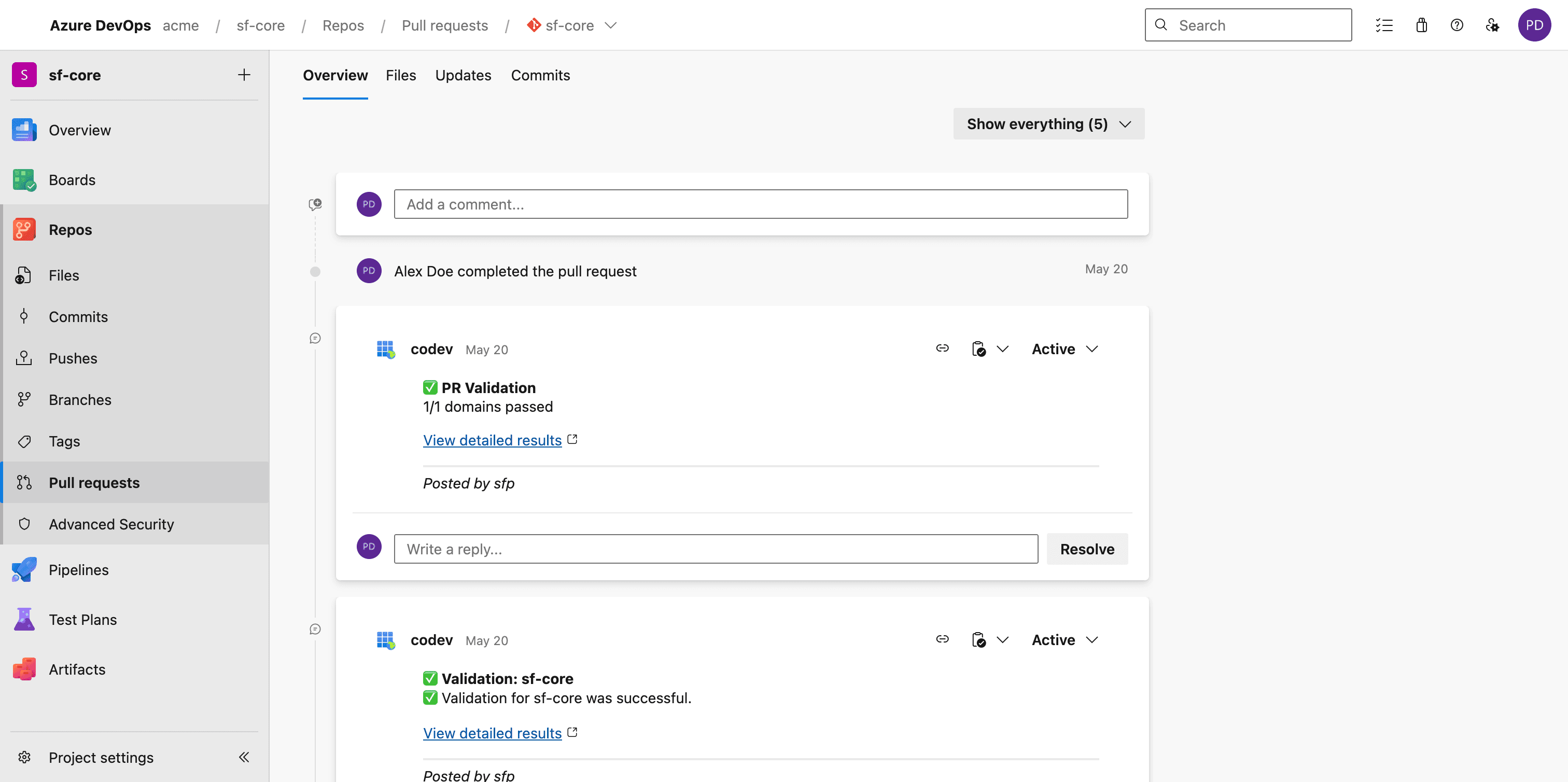
Commands (for example requesting a review environment) are issued as PR comments, and codev replies in the same thread. Work item keys referenced in commit messages are detected and surfaced on builds, release candidates, and releases, and codev's release flow can create and update Azure Boards work items — so a release request raises a work item your approvers action in Boards. The Azure DevOps integration page lists the full capability matrix.
The work your build stage did per merge shows up on the Builds page, grouped by domain, with no agent or image in your pipeline:
Move one pipeline at a time
A safe order for a live repository:
- Register the Service Principal and connect the repository — Azure DevOps walks the Entra registration, the integration form, and onboarding. Nothing changes yet: the webhook subscriptions are registered but server builds are off.
- Enable server builds for one domain using Domain build scope (Step 2). Your
azure-pipelines.ymlstill runs for everything else. - Compare. The server's build for that domain appears on the Builds page beside your pipeline's. When you trust it, remove that domain from your pipeline — or, once every domain is on the server, retire the build stages.
- Hand over releases. Replace the per-environment release pipelines with release candidates; release requests flow through Azure Boards work items for approval.
- Hand over pools and validation. Move pool-preparation pipelines to server-managed pools and the PR validation pipeline to server-run validation with review environments — results post back to the PR as statuses and threads.
At each step the pipelines you have not moved keep running exactly as before, and their builds still show on the Builds page — provided the sfp-pro CLI in those pipelines is on the same release as the server (see While you still run some builds yourself). If your pipeline pins an old sfp image, bring it current before you connect, so the builds it still produces report correctly to the server.