A card's delivery record
The delivery record Workfloor keeps for every card, measuring quality, people's interventions, delivery time and cost, and how a Salesforce team traces a regression back to the card that caused it.
Every card keeps a delivery record. It measures how the card's work was delivered: its quality, the times people stepped in, where its time went and what it cost. Workfloor builds the record from what it already keeps about the card, and updates it every few minutes. Open a card's Summary tab to read it, under Delivery.
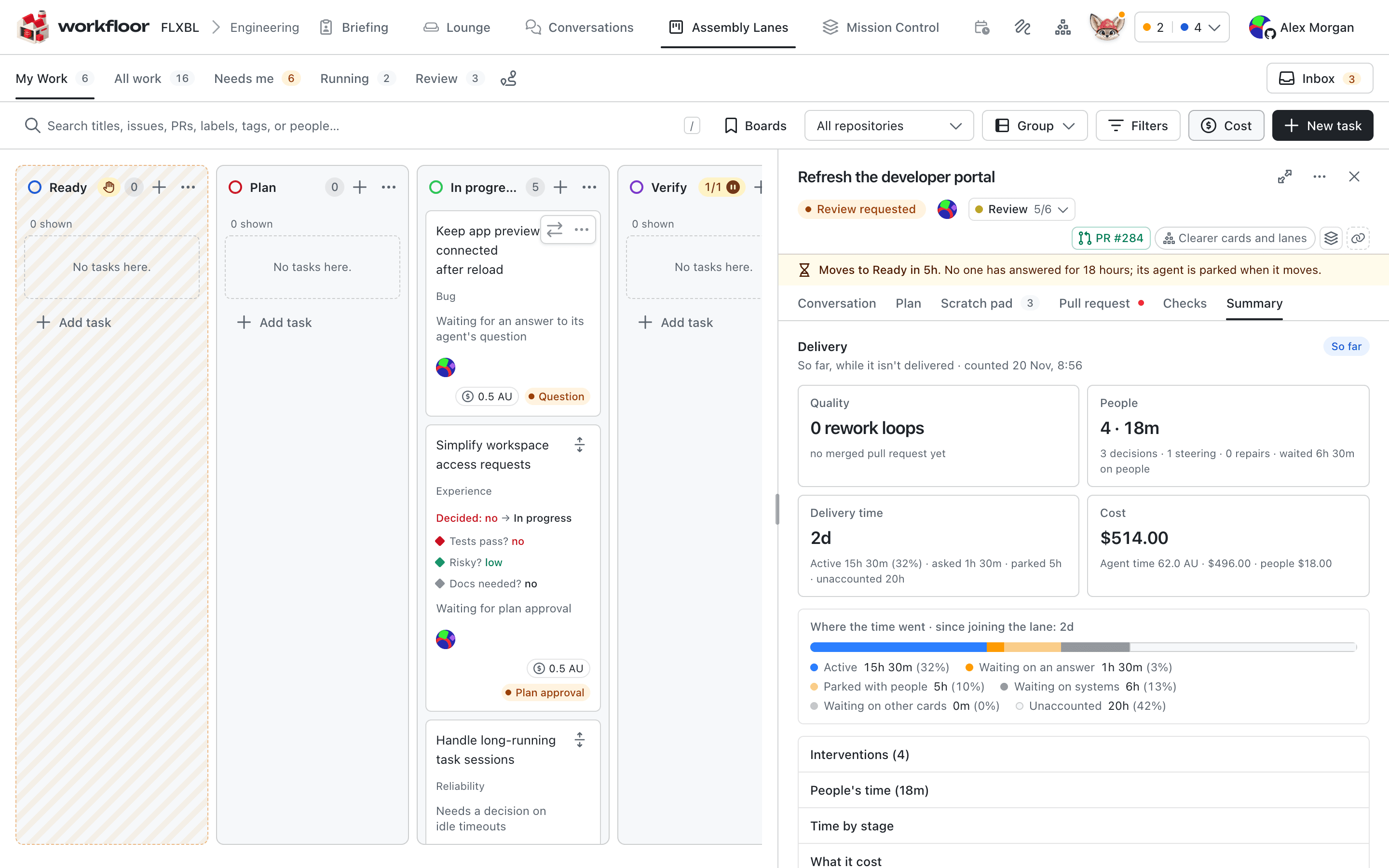
A record says how far it has got. It reads So far until the card is delivered. After that it reads No regression so far while Workfloor watches the card for regressions, then Verified. Each measure also says what it couldn't count, so a total is never mistaken for the whole.
You can also ask Flux about a card's delivery record.
Delivered, successful and abandoned
- A card is delivered when its pull requests reach production. See When work counts as delivered.
- A delivery is successful when it hasn't regressed.
- A card is abandoned when it is archived without being delivered.
Delivery time
Delivery time runs from the card joining the lane until it is delivered. Until then it runs to now. Workfloor splits the time into six parts, which add up to the whole:
| Part | What it covers |
|---|---|
| Active | An agent was working on the card |
| Waiting on an answer | Someone was asked something and hadn't answered: the agent's question or permission request, a lane's question or approval, or an open question in the plan |
| Parked with people | The agent had finished and the card waited for someone to look at it, for example for a review, or overnight |
| Waiting on systems | The agent was starting, waiting for a machine, or had failed and not yet been restarted. It also covers the wait before an automatic move, such as the merge queue's. |
| Waiting on other cards | The card was queued at a full stage's door, or waited for a card it depends on |
| Unaccounted | The rest. Workfloor shows it and never spreads it over the other parts. |
Waiting on an answer and parked with people are both shown in amber, because both wait on people. Time by stage splits the same time by the stages the card went through.
Interventions
An intervention is a time someone stepped in on the card. Workfloor records who, when and what kind. It never keeps their words. Each intervention is in one of three classes:
| Class | Examples |
|---|---|
| Decision | Answering a question or a form, an approval, a permission, sending a plan review, moving the card on along the lane |
| Steering | A message to the agent, a handoff note, a new session, notes on pictures, a Resume |
| Repair | Moving the card back, Stop run, Restart fresh, starting an agent again after a failure, Fix CI, a gate bypassed, a regression linked |
A decision also records how long the card had been waiting on people when it came.
People's time is how long each person had the card open in a visible tab while they were using the page. Time on GitHub, in Slack or anywhere else isn't counted, and the record says so.
Automatic interventions are the times something stepped in with no person behind it. They are counted apart from people's:
- a check that failed on the merge commit of one of the card's pull requests;
- a pull request bounced by the merge queue;
- a CI fix round;
- a move back by an agent, a steward or Workfloor's automation;
- an agent's run that failed.
Cost
- Agent time is what the agents' work on the card costs, counted in Agent Units (AU). It counts the time agents worked, by the second, and leaves out the time an agent waited for someone inside its turn. It is split into first pass, retries and rework. Retries are sessions that failed or were restarted fresh. Rework is work done after the card moved back, after a merge-queue bounce or in a CI fix round.
- People is people's time with the card in view, priced at the lane's person-hour rate. Without a rate, it shows as hours and the total reads "at least".
What it cost lists each part and how it was counted.
Quality
Quality counts the signals before delivery and watches for a regression after it.
- Before delivery: each stage's verdict, rework loops such as moves back, merge-queue bounces and plan reviews, and the checks on each pull request when it merged.
- First pass: the card was delivered with no move back and no bounce, and was never reopened.
- Regressed: within 6 months, someone moved the card out of its final stage, a pull request reverted its change, or a later card was linked as fixing a regression of it.
Tracing a regression
When a later card fixes something an earlier card broke, link them. Open the newer card, open More in its header and select Fixes a regression of…. Pick the earlier card from the suggestions, or search the project's cards merged or delivered in the last 6 months by title, pull request number or card ID.
The earlier card then counts as regressed. When an agent makes the fixing card itself, it can name the card that caused the problem.
Workfloor also spots a revert on its own: a merged pull request titled Revert "<title>", or one whose description says This reverts commit followed by the merge commit.
Next: DORA metrics.
Lane stats
Read a Workfloor lane's delivery stats for a Salesforce team, with tasks delivered, lead time, cost per successful delivery, where the time went, the agents' work and the lane's report settings.
DORA metrics
Read a Salesforce project's four DORA metrics in Workfloor (deployment frequency, lead time for changes, change failure rate and time to restore), worked out from its production releases, triage and Mission Control, with the way each issue took from idea to production.