How agents get read and write access
How AI agents get read and write access to a Salesforce org or other system in Workfloor, with a person's Run for every write, the access provider's own approval and a record of each command.
A card's agent can reach a system outside Workfloor, such as a production Salesforce org or a server, only through a target the project has named. This page describes what Workfloor checks, who approves what, and what is recorded, using the support ticket from Support triage: a flow fails when a user closes a Case in production.
Targets and levels
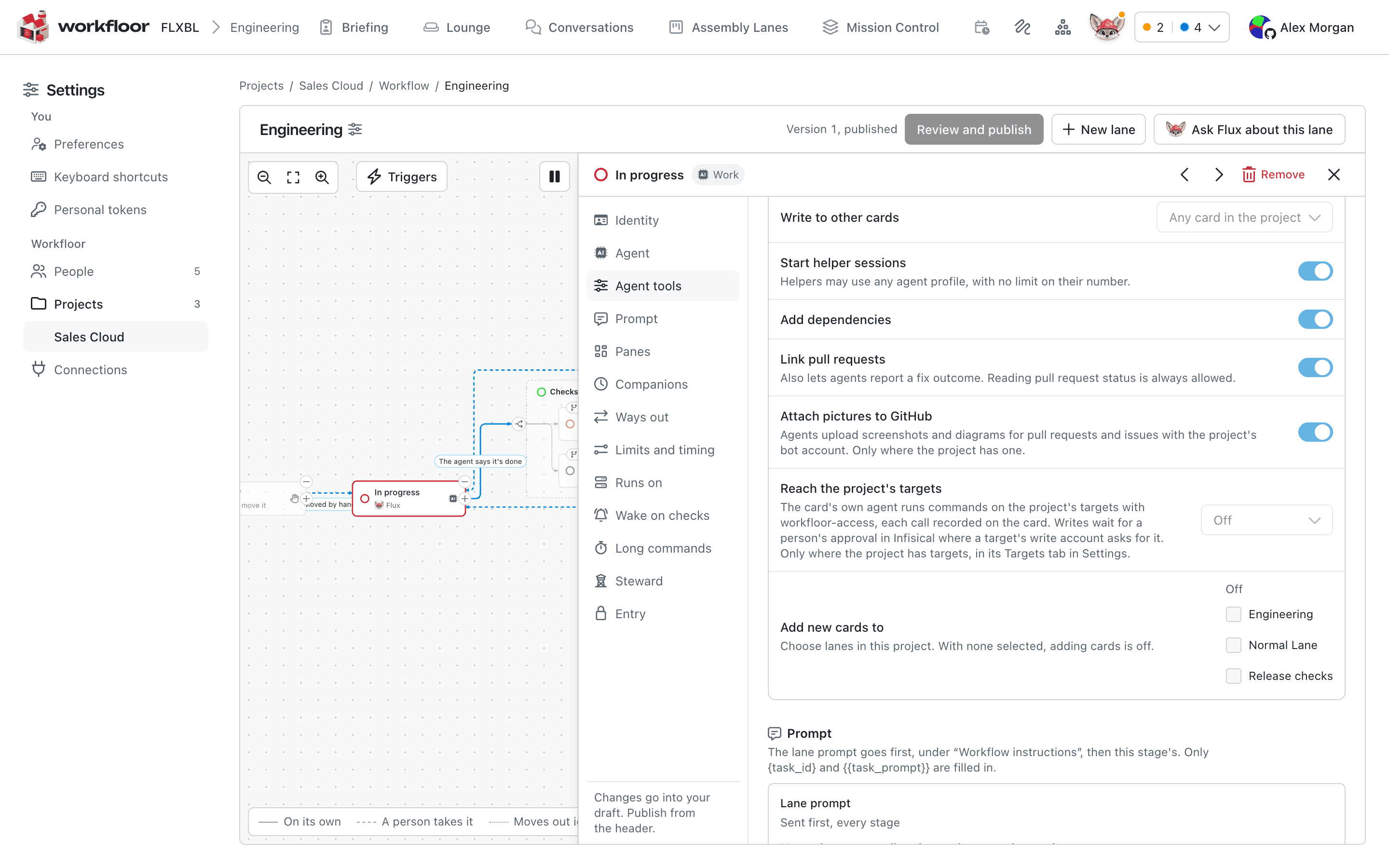
A target is an org or system a project admin has named, with a description and an environment such as prod. A target has a read level, a write level, or both. Each level has its own credential, held by an access provider such as Infisical PAM. Setting up operation targets covers the setup.
A stage of a lane gives access: Off, Read, or Read and write. A card's agent has no access to any target unless its stage gives it. Only the card's own current session can use it.
How a read happens
To find why the flow fails, Flux needs to look at the production org. It asks for one command on one target at the read level. For each command, Workfloor checks that:
- the card is in the project, on one of its lanes, and not archived;
- the session is the card's own current session;
- the card's stage gives the level asked for;
- the project has that target and level, with a credential that opens;
- the card's runner is connected, belongs to the project and carries any labels the target requires.
If a check fails, Flux is told which and nothing is recorded. If all pass, Workfloor audits the call and opens the level's credential for that command only.
The runner, not Flux, uses the credential: the program that runs the card's agents, on the card's sandbox or on a project's own runner machine. It logs in to the access provider, runs the command with a short-lived token, and revokes the token when the command ends. Flux receives the command's output. The token is a secret Workfloor removes from what the card stores. A read's session lasts 15 minutes unless the call asks for 1 to 60.
A target that accepts connections only from known addresses, or that sits inside your network, is the case a project registers its own runner for: the runner gets a label, and the target's Runs on names it. See Sandboxes and runners.
How a write happens
Every write needs a person's Run. Workfloor refuses a write that has none. Flux makes the ask on the card with the exact target, level and command, and why it is needed. The assignee answers on the card in Workfloor: Run or Stop.
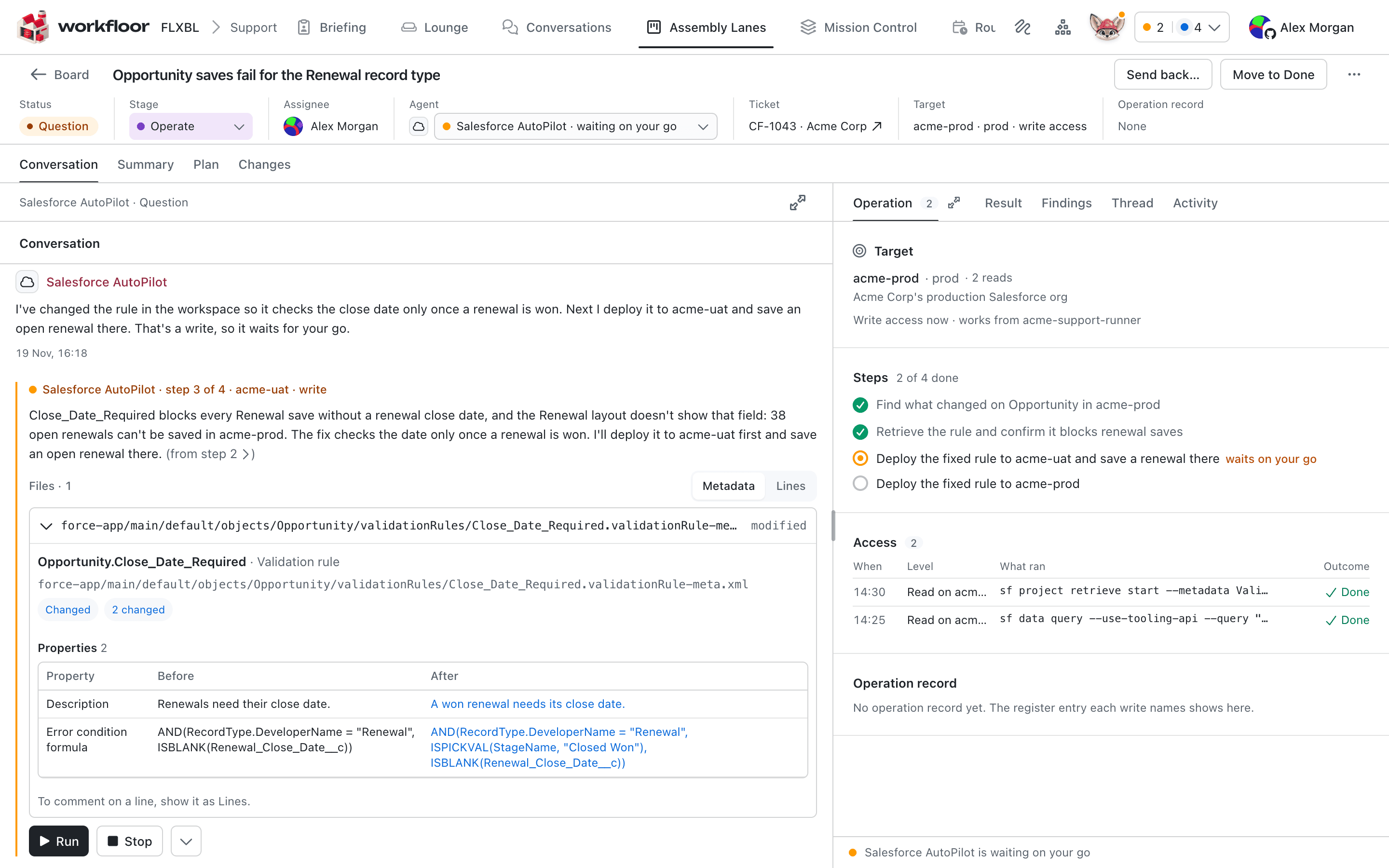
- One Run is one write. A Run applies only to the target, level and command it showed. A retry, or a different command, needs a new Run.
- A write that never ran, because it was refused or failed, gives its Run back.
- A write's session lasts 30 minutes unless the call asks for 1 to 60.
- Only the card's assignee answers, and only on the card's page in Workfloor. A script, a personal token or a message in Slack cannot give a Run.
- If a write is refused, Flux is told why, such as no Run for these exact words or a stage that gives read only.
One exception exists: a routine's approved version can declare a write by target and command. It runs without a Run while the admin who approved it still administers the project, within the version's limits per run and per day. The provider's approval and the register still apply.
The provider's own approval
Some write accounts require approval in the provider. For those, the runner files an access request with the provider for the write's window. The command's line in the conversation says it is waiting for approval in Infisical, with a link. If the project has an Approvals channel, Workfloor posts the request there once, with a link to approve it.
Workfloor never approves a request. Only the provider's approvers can, and the command runs only after the provider shows a grant. A call waits up to 9 minutes. If the wait ends, nothing has run and Flux runs the same write again with the same Run. If the request is denied, the Run is given back.
Production and the register
If the project keeps an Operation register, a GitHub issue repository, then two kinds of call must name an entry in it: a read of a production target (except a codev target), and a write whose level has not been checked as opening without approval. Flux opens the issue, passes its link with the call, and closes it with the outcome. Workfloor refuses the call without one. A target is production when its environment is prod or production.
What is recorded
The card's Operation tab lists each access: when, level, what ran and the outcome, with the target and the runner. Each register entry is listed under Operation record, as Open, Awaiting approval, Closed or Not found, with a link to approve while it waits. Workfloor's audit log records each authorised call with its target and level.
Workfloor never puts a credential or token in a prompt, a message, Flux's environment, a record or a log.
Salesforce orgs through codev
A Salesforce project's targets can come from its codev source. Each codev environment in the categories the project admin chooses becomes a target with a read and a write level; an environment in codev's release category is production. The only agent that can use a codev target is Salesforce AutoPilot, and the only command it runs is AutoPilot's org grant. Workfloor refuses any other agent or command before anything is recorded.
For that command, the runner asks codev for the org's access token and passes it to AutoPilot on a file descriptor, not in a file, an environment variable or an argument, and scrubs it from the output. A write still needs a person's Run, on production as on a sandbox.
These limits apply:
- A codev read can write. Salesforce has no read-only way in, so both levels reach the environment's one user. The levels still decide which stage may run a write, and each write needs a Run.
- The codev token is not revoked when the command ends. It lasts for the org's session timeout, so the window limits the grant, not the token.
- The runner uses one operating-system user for the agent's processes and for the step that opens access. During a command, a process the agent started could reach the token and so reach the target outside Workfloor's per-command checks. This applies to targets from any provider, not only codev; with codev the token also outlives the command.
Next
Setting up operation targets covers adding targets, checking levels and giving a stage access.
Support triage
How Workfloor turns support messages in a Slack channel into triage cards, where Flux investigates a Salesforce issue and answers in the thread, and how a person opens the drafted GitHub issue.
Setting up operation targets
How a Workfloor project admin adds operation targets, sets their read and write levels with Infisical PAM or a codev source, checks them, and gives a lane's stage access.