ServiceNow change requests
Connect ServiceNow, configure what the change request contains, and verify it is created for your releases.
codev can open a ServiceNow change request for a release and write the changed packages into it — each package, its previous and new version, and the linked work items — so the change request records exactly what is being deployed. This is the foundation for release gating, but you can also use it on its own, purely to record releases in ServiceNow.
Setting it up has three steps: connect ServiceNow, configure what the change request contains, then confirm it actually creates one.
Connect ServiceNow
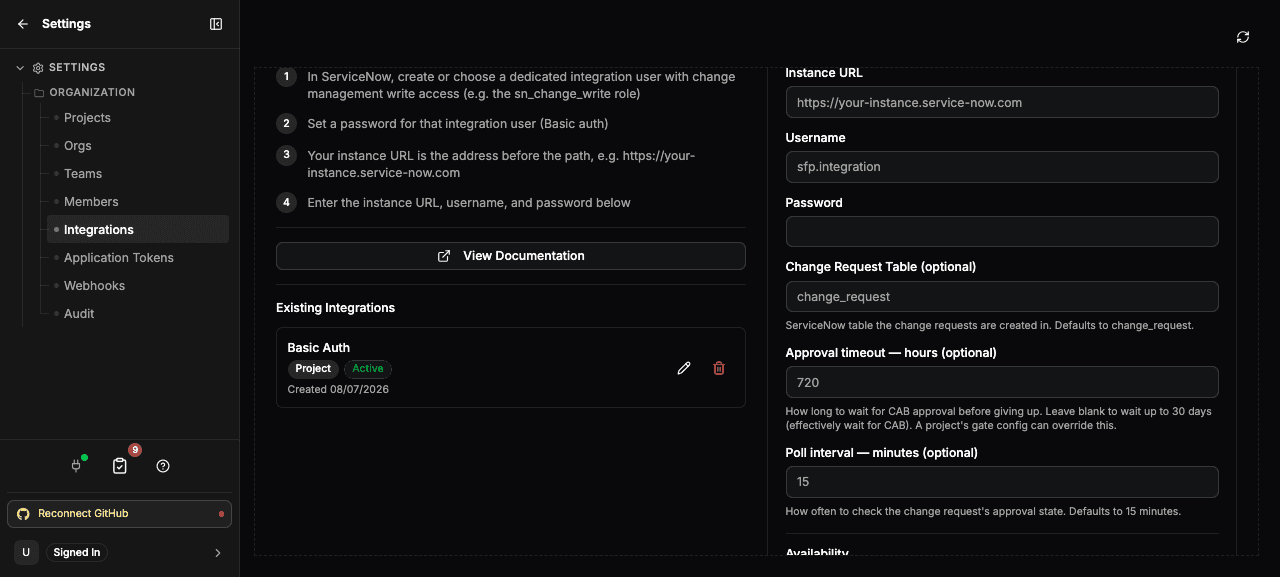
Go to Settings > Organization > Integrations and add the ServiceNow provider. Only organization owners can manage integrations.
In ServiceNow, first create or choose a dedicated integration user with change-management write access (for example the sn_change_write role), and set a password for it. Then fill in the form:
| Field | What to enter |
|---|---|
| Instance URL | Your ServiceNow instance address, e.g. https://your-instance.service-now.com. |
| Username | The integration user, e.g. sfp.integration. |
| Password | The integration user's password. |
Set Availability to make the connection available to all projects or to a single project, and save. The credentials are stored encrypted; codev talks to ServiceNow on your behalf using them.
This form is only the connection. What the change request contains, and how long codev waits for it, is set separately — see below.
Configure change requests
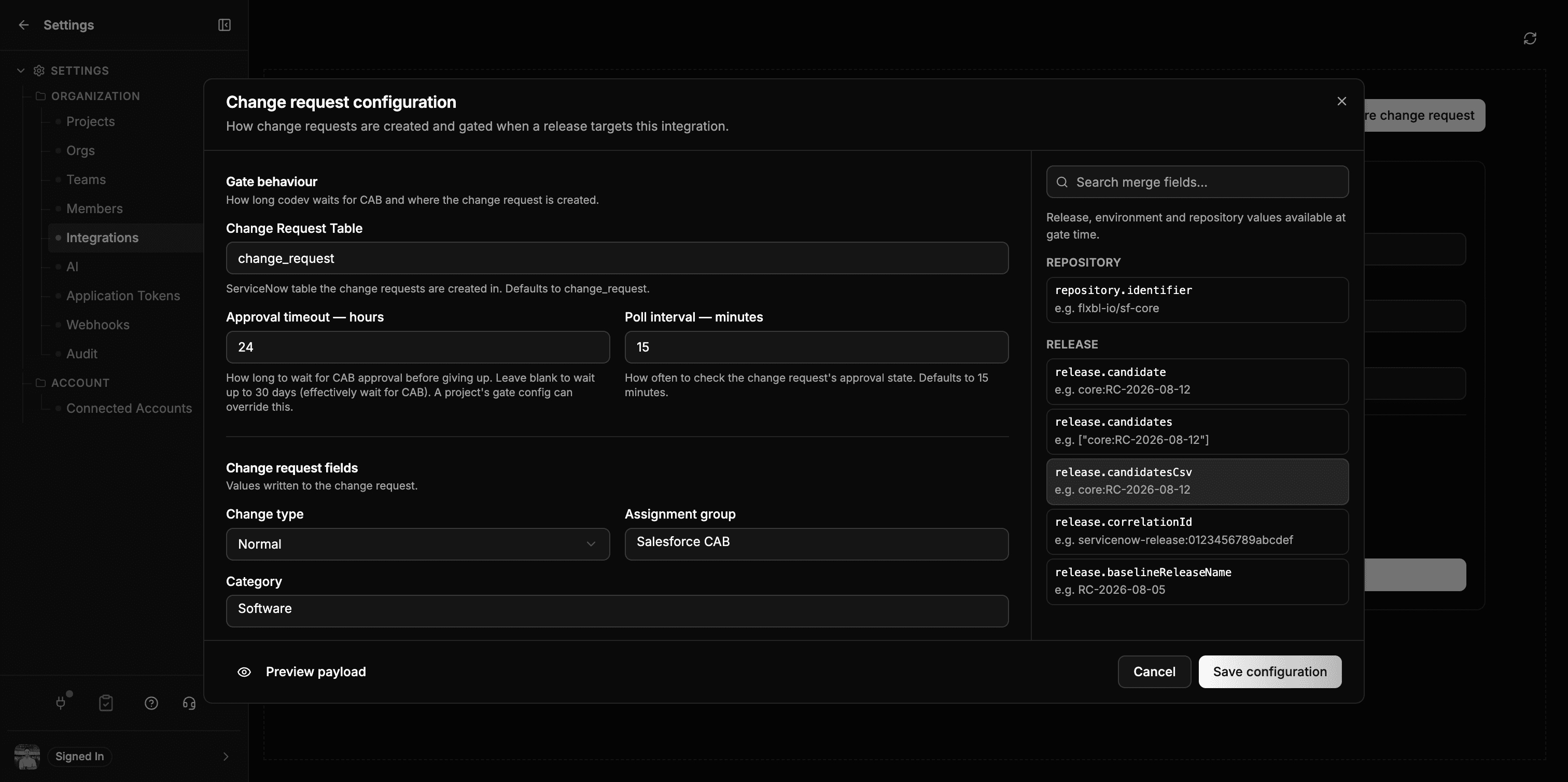
Once ServiceNow is connected, select Configure change request on the integration page. The dialog holds everything about the change request itself, so you do not have to hand-write project configuration to get started.
Gate behaviour
The top section controls where the change request is created and how long codev waits for CAB.
| Field | Effect |
|---|---|
| Change Request Table | The ServiceNow table change requests are created in. Defaults to change_request. |
| Approval timeout — hours | How long codev waits for CAB approval before giving up. Leave blank to wait up to 30 days — effectively, wait for CAB. A project's gate config can override this. |
| Poll interval — minutes | How often codev re-checks the change request's approval state. Defaults to 15 minutes. |
Change request fields
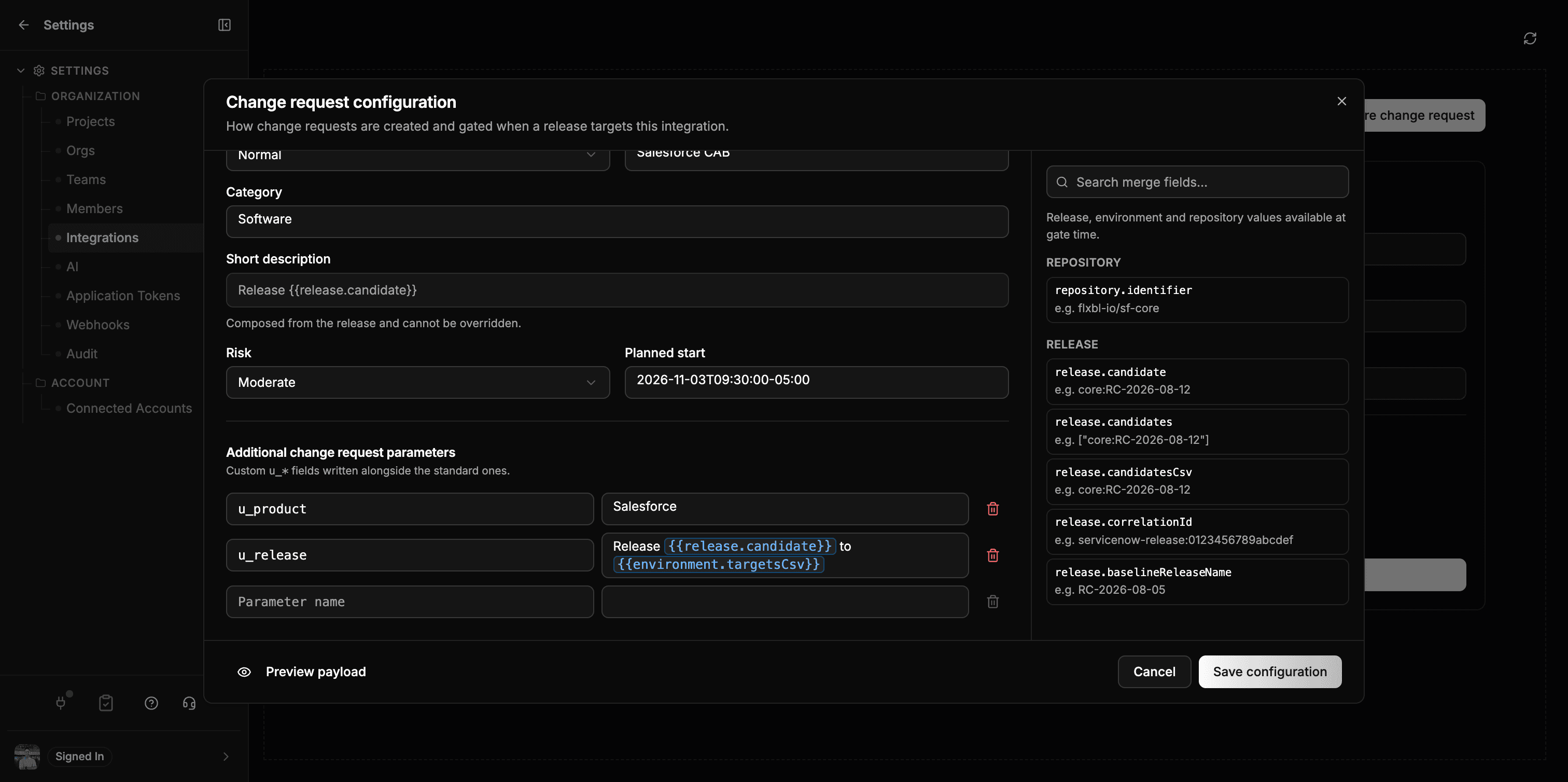
u_* parameters underneath.These are the values written to the change request:
| Field | Effect |
|---|---|
| Change type | normal, standard or emergency — used for CAB routing. |
| Assignment group | The group (name or sys_id) the change request is routed to. |
| Category | The change request category. |
| Short description | Composed by codev as Release <candidate>, and shown read-only — ServiceNow reserves this field. |
| Risk | The change request risk — see below. |
| Planned start | The planned start, written to start_date in ServiceNow's date format. Takes a merge field; {{now.dateTime}} sets it to the time the change request is opened. |
Any field can take a merge field — a release, environment, repository or current-time value resolved at gate time. Pick one from the list on the right to insert it, or type {{ to search.
Merge fields work inside surrounding text, so Release {{release.candidate}} to {{environment.targetsCsv}} reaches ServiceNow as Release core:RC-2026-08-12 to uat, prod. Use Preview payload to see every field resolved against a sample release before you save.
Use Additional change request parameters for your instance's own u_* columns. They are written alongside the standard fields, and take merge fields the same way.
A merge field that does not resolve stops the change request. If a path is misspelled — {{release.candidat}} — the request fails with a message naming the field, and no change request is created. Use Preview payload to check every field against a sample release before you save.
Preview the payload and send a test
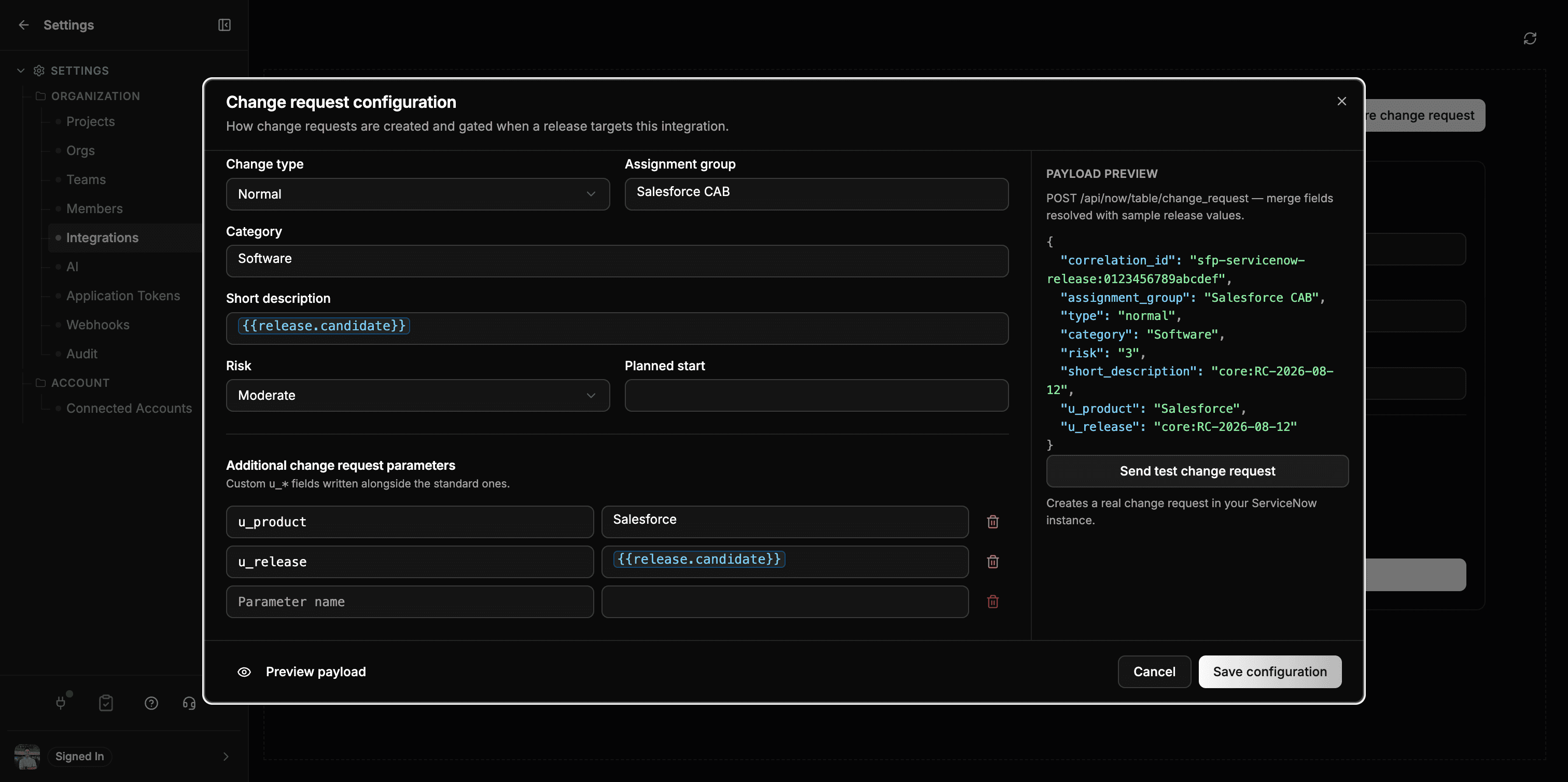
Select Preview payload to replace the merge field list with the request codev will send — the merge fields resolved against a sample release, so you can confirm the shape before saving. Note that the risk shows as its stored value ("3" for Moderate).
Send test change request creates one real change request in ServiceNow from that payload, without touching any release, and returns its number and a link.
The test creates a real change request in your ServiceNow instance. After confirming it, cancel or close that test change request in ServiceNow so it doesn't sit in your CAB queue.
Test from the API
The same test is available as an endpoint, for scripting a setup check. Send a POST to integrations/servicenow/change-requests/test on your codev server. It requires the owner role; authenticate with an application token (create one under Settings > Organization > Application Tokens).
curl -X POST \
  "https://<your-codev-server>/sfp/api/integrations/servicenow/change-requests/test" \
  -H "Authorization: Bearer <application-token>" \
  -H "Content-Type: application/json" \
  -d '{
    "repositoryIdentifier": "your-org/your-repo",
    "releaseCandidate": "core:SNOW-INTEGRATION-TEST",
    "environments": ["uat"],
    "fields": { "category": "software", "risk": "3" }
  }'
Only repositoryIdentifier is required — it selects which project's ServiceNow connection to use. The rest are optional: releaseCandidate and environments populate the mock payload, shortDescription / description override the text, fields adds any extra ServiceNow change_request fields, and correlationId reuses an existing test change request instead of creating a new one.
A successful call returns the created change request — its number, state, approval, and a url you can open in ServiceNow — along with the correlationId and the table it was created in. Stored credentials are never returned.
| Response | Meaning |
|---|---|
| 201 | The change request was created — open the returned url to confirm it in ServiceNow. |
| 400 | The ServiceNow credentials are missing for that project, or the payload is invalid. |
| 403 | You are not an owner. |
| 502 | ServiceNow rejected or failed the request — check the instance URL, the integration user's permissions, and the change request table. |
How change requests are created
Everything in the dialog is stored as serviceNowChangeRequest in your project configuration, so you can also set it there directly, review it in a pull request, or override the integration's defaults per project:
{
  "serviceNowChangeRequest": {
    "enabled": true,
    "timeoutHours": 24,
    "pollIntervalMinutes": 5,
    "changeType": "normal",
    "category": "Software",
    "risk": "3",
    "assignmentGroup": "Salesforce CAB"
  }
}| Setting | Effect |
|---|---|
enabled | Open a change request for every release, even for environments that are not gated on ServiceNow — the change request becomes a record of the release. A ServiceNow gate opens a change request regardless of this flag. |
timeoutHours | How long codev waits for the change request to be approved when it is used as a gate. Overrides the integration's timeout for this project. |
pollIntervalMinutes | How often codev re-checks the change request's state. Overrides the integration's poll interval for this project. |
changeType | normal, standard, or emergency — for CAB routing. |
category | The change request category. |
risk | The change request risk — High/Moderate/Low or 2/3/4. |
assignmentGroup | The assignment group (name or sys_id) the change request is routed to. |
If you omit timeoutHours or pollIntervalMinutes here, codev uses the values from the integration (up to 30 days, checked every 15 minutes, by default).
Writing risk by hand is the one value worth checking. The dialog offers a fixed list, but this file does not: risk is a ServiceNow choice column, so codev accepts only High, Moderate, Low or their stored values 2, 3, 4, and rejects anything else. That guard matters because ServiceNow's Table API accepts an unrecognised choice, returns success, and creates the change request with an empty risk — a typo here would otherwise produce a risk-less change request and nothing would surface it.
Field templates
The merge fields you insert in the dialog are stored under fieldTemplate, which also accepts them written by hand. A value is either a plain string, or a directive:
| Directive | Meaning |
|---|---|
{ "$path": "release.candidate" } | Substitute a value from the release. |
{ "$format": "Release {{release.candidate}}" } | Substitute every {{path}} token into the surrounding text. This is what the dialog stores when you mix wording with a merge field. |
{ "$literal": "..." } | Use a fixed value without interpreting it — the escape hatch for text that must keep its braces. |
{ "$date": ... } | Render the inner value as a ServiceNow date (YYYY-MM-DD). |
{ "$datetime": ... } | Render the inner value as a ServiceNow datetime (YYYY-MM-DD HH:MM:SS). |
{
  "serviceNowChangeRequest": {
    "fieldTemplate": {
      "u_release": { "$path": "release.candidate" },
      "u_product": { "$format": "Salesforce {{release.candidate}} to {{environment.targetsCsv}}" },
      "start_date": { "$datetime": { "$path": "now.dateTime" } }
    }
  }
}
Merge-field catalogue
The rail in the dialog lists these, and owners can retrieve the authoritative catalogue from GET /integrations/servicenow/field-catalog. Each entry carries the path, type, description and an example.
| Context | Paths |
|---|---|
| Repository | repository.identifier |
| Release | release.candidate, release.candidates, release.candidatesCsv, release.correlationId, release.baselineReleaseName, release.artifacts |
| Environments | environment.targets, environment.targetsCsv, environment.serviceNowGated, environment.serviceNowGatedCsv, environment.gateSummaries, environment.gateSummariesCsv |
| Package changes | packageChanges.items, packageChanges.count |
| Changelog | changelog.totalCommits, changelog.totalWorkItems |
| Work items | workItems.ids, workItems.csv, workItems.url |
| Gate timing | gate.timeoutHours, gate.pollIntervalMinutes |
| Current time | now.date, now.dateTime |
ServiceNow fields are flat, so use the scalar forms — release.candidatesCsv, environment.targetsCsv, environment.gateSummariesCsv, workItems.csv, packageChanges.count — where the underlying value is an array.
Glide date and time
$datetime accepts an ISO-8601 timestamp with Z or a numeric offset. codev converts the instant to UTC and emits yyyy-MM-dd HH:mm:ss, so 2026-10-08T14:20:00-04:00 is written as 2026-10-08 18:20:00. Naive or invalid timestamps are rejected.
$date emits yyyy-MM-dd. It accepts a date-only value or an offset-aware ISO timestamp, from which codev derives the UTC calendar date.
Without one of the two, a raw ISO timestamp is rejected or silently dropped.
Current time
now.dateTime and now.date resolve to the time the change request is created.
| Path | Emits | Example |
|---|---|---|
now.dateTime | The current UTC timestamp | 2026-08-22T14:20:00Z |
now.date | The current UTC date | 2026-08-22 |
To start the change window when the change request is opened, set Planned start to {{now.dateTime}}. This is stored as:
"start_date": { "$datetime": { "$path": "now.dateTime" } }To start it today at a fixed time — say 09:00 UTC — write the time around {{now.date}}:
"start_date": { "$datetime": { "$format": "{{now.date}}T09:00:00Z" } }{{now.date}} alone in Planned start fails when the release runs — it carries no time, and $datetime rejects date-only values. Preview payload does not catch this; it fills in the token without applying the date format. Use {{now.dateTime}}, or write a time around {{now.date}} as above.
now.* is resolved once per change request. Re-requesting a release while its change request is still waiting for a decision keeps the original start_date; after a rejection or timeout, the next request moves it to the current time.
Only columns that exist are written. ServiceNow accepts a create call containing a column it does not recognise, returns 201, and stores nothing for it — no error. Before templating a custom field, confirm the column exists on your change_request table; short_description, correlation_id and the other fields codev composes are reserved and are rejected if you template them.
Creating a change request is separate from making a release wait for its approval — see Release gating for how the two relate.
Related
- Release gating — make a release wait for its change request to be approved
- Integrations — how integrations are scoped and resolved
- Audit trail — the record of every change-request decision