Release candidates and releases
What a release candidate is, how it becomes a release, and why deploying a candidate brings everything accumulated since the last release.
The two are easy to conflate, and the distinction runs through every codev screen that mentions them:
- A release candidate is what is ready to deploy. codev creates them at the end of a build, whether that build came from a merge or from Run build.
- A release is what has been deployed. You create one by releasing a candidate, through an approval gate.
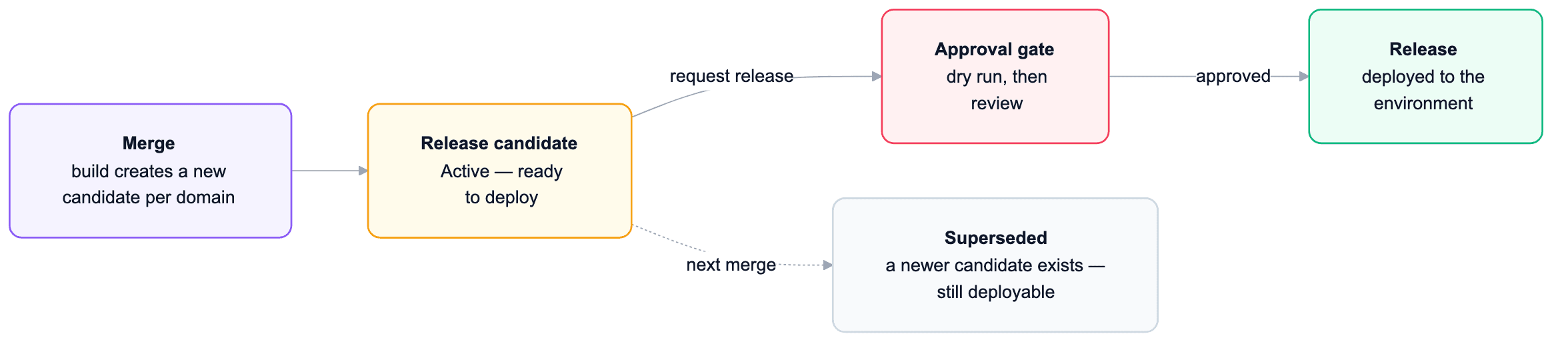
Where candidates come from
Every merge that changes a domain's packages produces a new release candidate for that domain — automatically, as the tail end of the build. A build started with Run build on the Builds page produces one the same way, for the commit and packages you chose; see Running a build manually. A candidate records the exact package versions built, the work items that are new in it, and the cumulative work items accumulated since the last release. Domains that the merge did not touch get no new candidate.
Because a candidate arrives per merge, they stack up: the newest candidate for a domain is Active, and earlier ones become Superseded. Superseded is informational — an older candidate can still be deployed if you need exactly that state.
| Status | Meaning |
|---|---|
| Active | The newest candidate for the domain — ready to release or test. |
| Released | Deployed to at least one environment. It stays on the Release Candidates page, with a Deployed to indicator. |
| Superseded | A newer candidate exists for the domain. Still deployable. |
A candidate deploys the accumulated state, not one merge
This is the point that trips people most. A candidate's package versions are the latest built versions of the domain's packages — so releasing it installs everything that has changed since the last release, not just the changes from the merge that created it.
The work items display exists for exactly this reason: each candidate shows the items new in this candidate alongside the cumulative set since the last release. When you request a release, the cumulative list is the honest scope of what you are about to ship — review that one, not just the newest items.
From candidate to release
A candidate becomes a release through the Release action:
- A dry run confirms which packages would install into the target environment.
- The request waits at an approval gate — designated approvers review and approve or reject.
- If the environment gates on manual deployment steps, the release waits after approval until those steps are completed in that environment.
- codev then locks the environment, installs the artifacts, and unlocks it.
- The result is recorded on the Releases page.
Each target environment gets its own approval and deploys independently — releasing the same candidate to staging and production are two gated releases, not one.
Deploying a candidate to a sandbox for testing does not go through this: Get on Sandbox installs the candidate without an approval gate and without creating a release. A release is only ever created by the Release action.
Releases are the record
The Releases page is the deployment history: which versions went to which environment, when, carrying which work items. From a release you can create a patch branch to hotfix exactly what is in production, or roll back an environment to an earlier release.
The actions in detail: Managing Release Candidates · Releases · Rolling back a release · Work items.
Destructive changes
How metadata is deleted from orgs — destructive changes per package type, how they move through validation and releases, and how left-behind components are tracked.
Development
The Dev section of the codev desktop app — your orgs, your workspace, and the pages you use for day-to-day Salesforce development.