Deployment Steps (Beta)
Track the manual actions a release needs before or after it deploys — declared on the pull request, completed per environment, and able to hold a release until they are done.
Deployment steps are in beta. The flow described here works end to end, but the feature is still evolving and some behaviour and wording may change.
Some changes need a person to do something in the org that the deployment itself cannot do: turn on a feature setting, run a one-off data load, schedule a batch job, rotate a credential. A deployment step records that action in codev, attached to the pull request that made it necessary, and tracks whether it has been done in each environment.
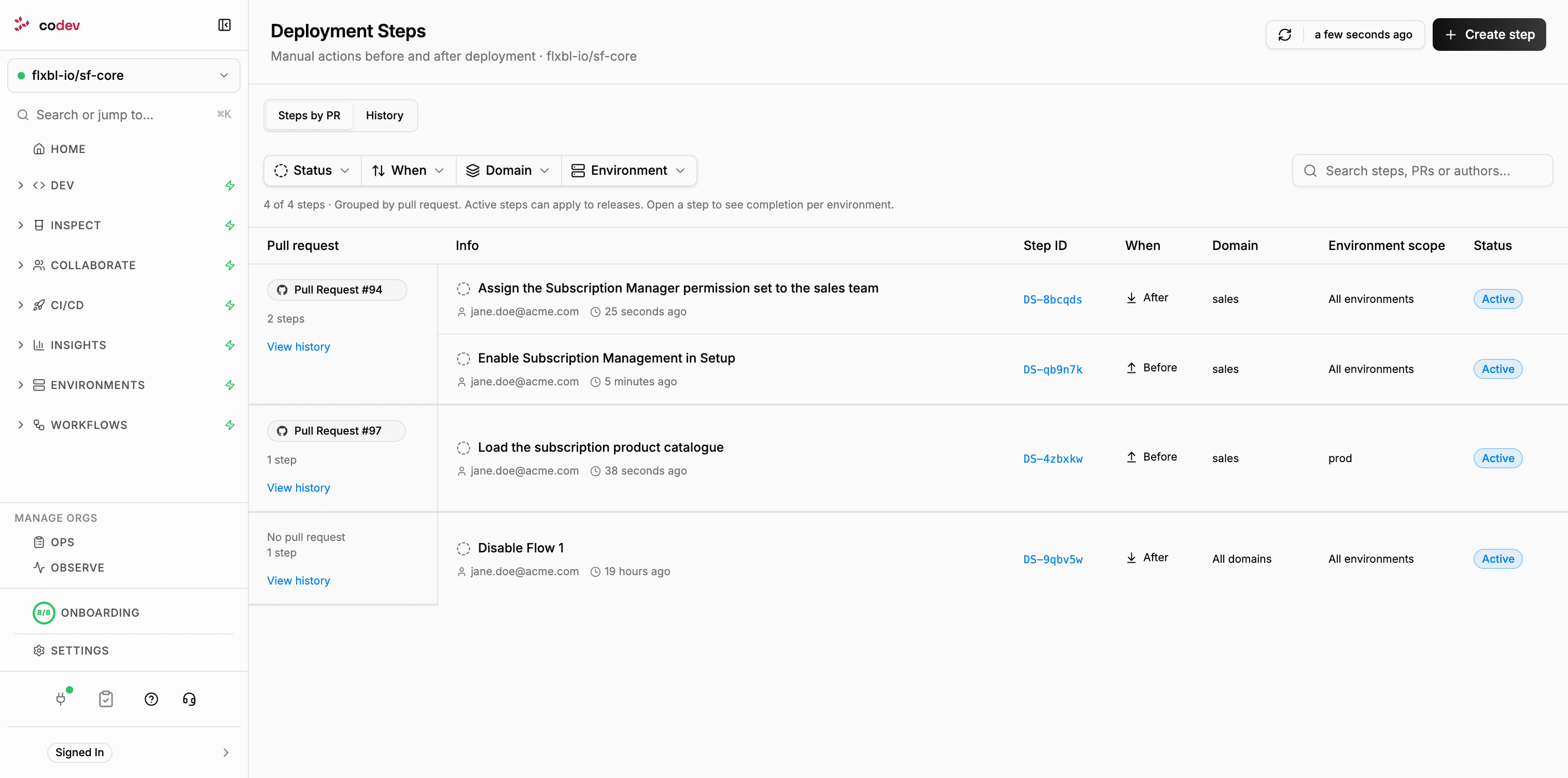
You will find deployment steps under CI/CD > Deployment Steps. The page lists every step in the project grouped by pull request, and its History tab records every completion.
Pre and post steps
A step is either done before the change deploys or after it.
| Kind | When it is done | Effect on a release |
|---|---|---|
| Pre-deployment step | Before the change is deployed to an environment. | When the environment gates on manual steps, the release waits after approval until the step is completed in that environment. |
| Post-deployment step | After the change has been deployed. | Becomes due once the deployment succeeds. It is tracked and reported, and never blocks a release. |
How a step travels
- A step is declared. A developer adds it to the pull request with a
/codev step addcomment, or a release manager creates it on the Deployment Steps page and attaches it to a pull request or a release candidate. See Declaring a step. - It follows the merged change. When the pull request merges, the step is tied to that merge. From then on it applies to every release candidate that contains the change, in every domain the change is built into.
- Environments show what is outstanding. An environment lists a pre-deployment step as pending while the change is in a release candidate for that environment but not yet in the release deployed there. See Completing steps in an environment.
- Someone completes it, per environment. Completing a step in
uatrecords it foruatonly;productionstill shows it as pending until it is completed there too. Each completion records who did it, when, an optional note and an optional link to evidence. - A gated release waits for it. With the
manual-stepsgate enabled for an environment, a release to that environment waits, after approval, until every applicable pre-deployment step is completed there. See Gating releases on pre-deployment steps.
A step that was completed before a later release does not need to be completed again. Once the change is deployed to an environment, the step no longer applies to that environment's future releases.
Where steps appear
| Place | What you see |
|---|---|
| CI/CD > Deployment Steps | Every step in the project, its scope and status, and the completion history. |
| Environment detail > Pre/Post Steps | The steps pending or due for that environment, and the actions to complete or reopen them. |
| Release Candidates and Releases pages | A Pre/Post Steps count on any candidate that carries steps, opening a preview for a chosen environment. |
| Release dialog | Review Pre/Post Steps for the target environments before the request is made. |
| Workflows > Runs | A Deployment Steps button on a release run that is waiting on steps, or that recorded a check. |
| The pull request | Replies to /codev step commands, the checklist a waiting release posts, and a notice when post-deployment steps become due. |
Who can do what
| Action | Who |
|---|---|
| Declare or create a step | Any member or owner of the project. |
| Complete or reopen a step | Any member or owner of the project. |
| Include or exclude a step for a release candidate | Any member or owner of the project. |
| Withdraw a step | The step's author, or an owner. |
| Enable the gate and change its wait settings | Owners, through the project configuration or Workflow Settings. |
A /codev step comment is accepted when the commenting Git identity is linked to a member or owner account, the same requirement as /codev approve.
Deployment steps and deployment scripts
Deployment steps are for actions a person performs and confirms. They are separate from the pre- and post-deployment scripts a package can carry, which run automatically as part of every installation. See sfp: Pre/Post deployment script for the scripted variant, and Tracking manual steps for keeping environment runbooks in the repository.
Where to go next
- Declaring a step — from a pull request comment or the Deployment Steps page, and how scope works
- Completing steps in an environment — the environment checklist, completion records, previews and history
- Gating releases on pre-deployment steps — enabling the gate, what a waiting release does, timeouts and settings
- Managing steps — the step detail page, candidate associations, withdrawal, and how steps behave with unbundle, cherry-to and rollback