Completing steps in an environment
See which steps an environment is waiting on, mark them complete with a note and evidence, reopen them, and review the completion history.
A step is completed in one environment at a time. Completing it in uat says the action was performed in uat; production keeps showing the step until it is completed there as well. Every completion records who confirmed it, when, and optionally a note and a link to evidence.
The environment's Pre/Post Steps
Open an environment from Environments and choose Pre/Post Steps in its section list.
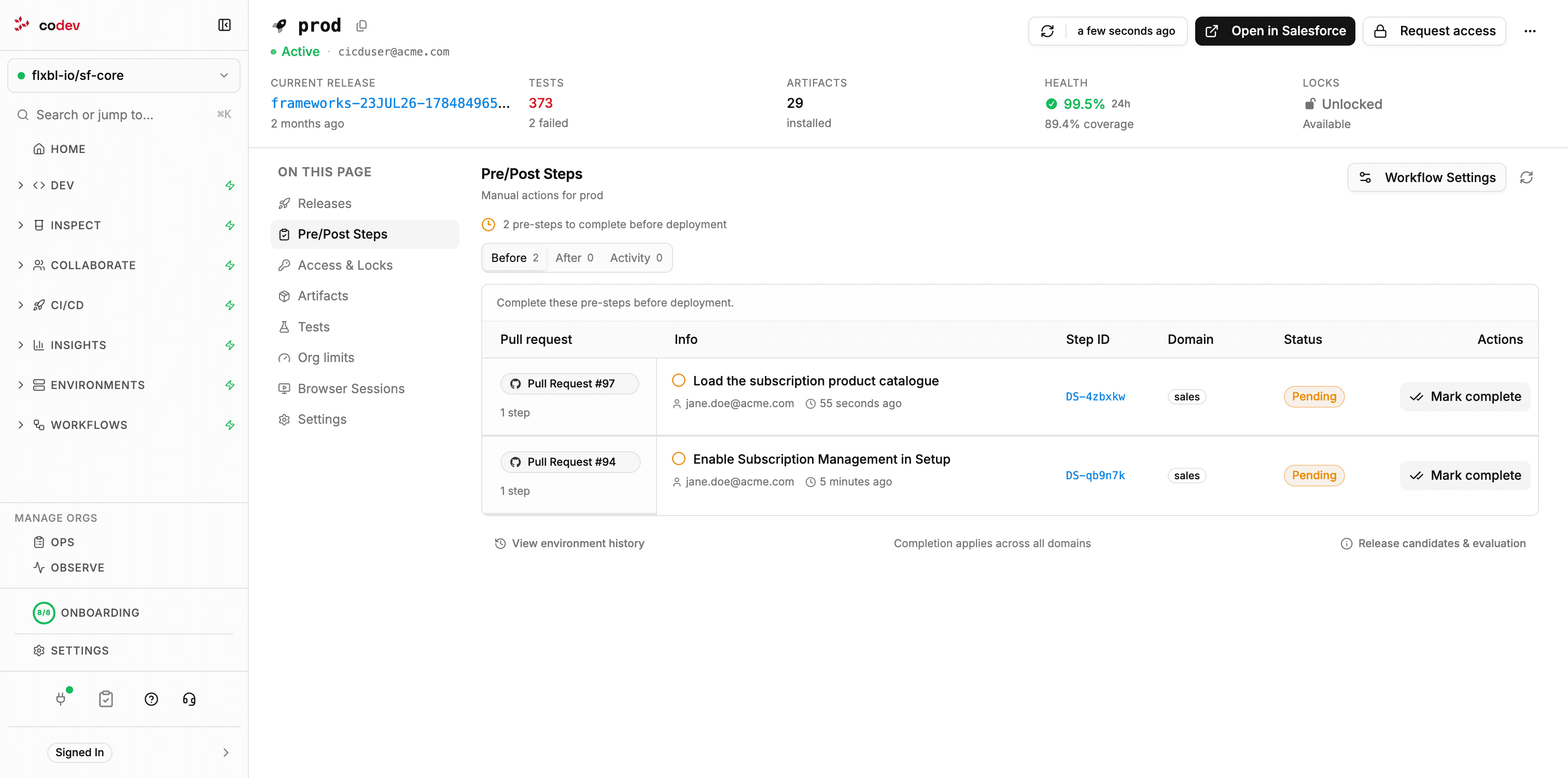
The line at the top states the environment's position: Manual gate disabled, N pre-steps to complete before deployment, or Manual pre-steps are clear. The panel has three tabs:
| Tab | Contents |
|---|---|
| Before | Pre-deployment steps that are pending for this environment. |
| After | Post-deployment steps that are due after the last successful deployment. |
| Activity | The most recent completions and reopenings recorded in this environment, up to 200. |
For each domain, the Before list is worked out by comparing the domain's newest release candidate — on the environment's branch, where the environment tracks one — with the release currently deployed to the environment. A step is pending when its change is in the candidate and not in the deployed release, and it has not been completed here. Release candidates & evaluation at the bottom of the panel opens a dialog that shows, per domain, the deployed release and the candidate that were compared.
If a domain could not be evaluated, the panel says so and names the domain. Steps from that domain may be missing from the list until the reported problem is resolved and the checklist is refreshed.
What a row shows
Each row carries the pull request that declared the step, the step's title, author and age, its id, the domain scope, and a status:
| Status | Meaning |
|---|---|
| Pending | A pre-deployment step to complete before deployment. |
| Due | A post-deployment step to complete now that the deployment has succeeded. |
| Upcoming | A post-deployment step that becomes due once the candidate is deployed. Shown in previews. |
| Completed | Recorded as done in this environment. |
| Reopened | Was completed here and has been reopened; the action is required again. |
| Review required | The step's change was rewritten by an unbundle and the step needs a decision. See Managing steps. |
| Cancelled | The step was withdrawn. Its history is kept. |
Click a row to open the step's instructions, its pull request, and the history of completions and reopenings in this environment. The step id links to the step's detail page.
Marking a step complete
Click Mark complete on the row, or in the step's details.
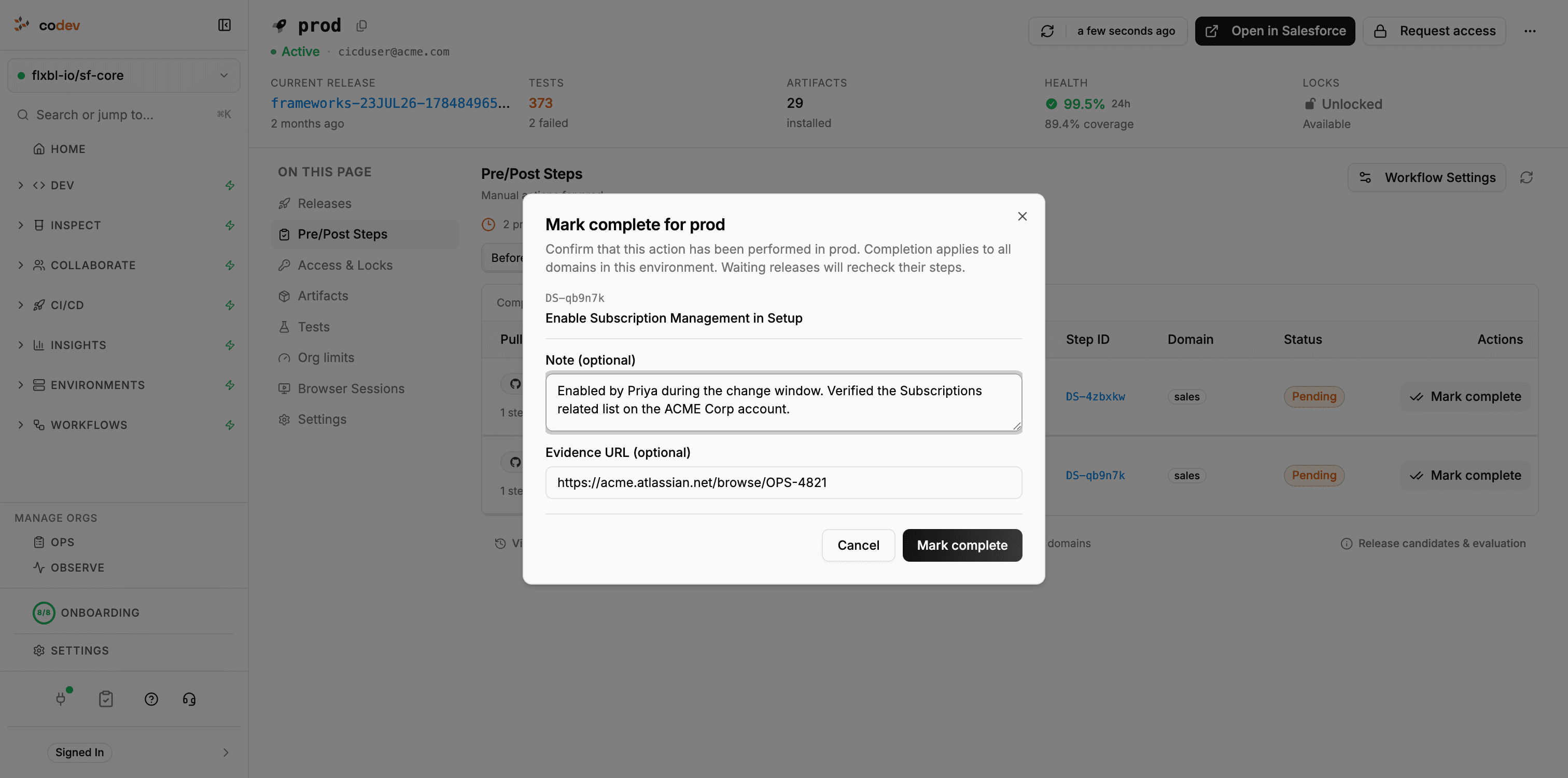
| Field | Purpose |
|---|---|
| Note | Free text, up to 2,000 characters — what was done, or anything the next environment should know. |
| Evidence URL | An https:// link to a screenshot, a ticket, a log, or another record of the action. |
The completion applies to the environment across all domains. A release that is waiting on this environment's steps rechecks them as soon as the completion is saved.
Reopening a step
Reopen marks a completed step as required again in that environment — for example after a sandbox refresh, or when a rollback undid the action. A reopened pre-deployment step is pending again, and a gated release to that environment waits on it. Reopening records who reopened the step and an optional note.
Reopening after a release has deployed does not affect that release; it only affects releases that check the environment from then on.
Completing from the pull request
The same completion can be recorded with a comment on the pull request that declared the step. The environment is always named, because the completion is per environment.
/codev step done DS-x7k2f9 --env uat --note "Enabled by Priya, verified on the Order layout" --evidence https://example.com/ticket/1234/codev step reopen DS-x7k2f9 --env uat --note "Sandbox refreshed on Friday"The reply confirms the environment and who recorded it. An environment name that is not registered in the project is rejected.
Previewing a candidate's steps
On the Release Candidates and Releases pages, a candidate that carries steps shows a Pre/Post Steps count next to its actions. Click it to open Candidate Pre/Post Steps, choose a target environment, and see what that candidate would wait on there: pending pre-deployment steps, post-deployment steps already due, and upcoming post-deployment steps. Steps can be completed from the preview.
The Release dialog carries the same preview under Review Pre/Post Steps, with a selector for each target environment, so outstanding steps are visible before the release is requested. See Managing Release Candidates.
History
CI/CD > Deployment Steps > History lists every completion and reopening recorded in the project, newest first. Filter by environment, action, the person who recorded it, a date range (UTC), or search by step, pull request or note text. Withdrawn steps remain in the history.
The same history is reachable from an environment's Pre/Post Steps panel (filtered to that environment), from a pull request group on the Deployment Steps page (filtered to that pull request), and from a step's detail page (filtered to that step).
Declaring a step
Add a pre- or post-deployment step from a pull request comment or from the Deployment Steps page, and scope it to environments and domains.
Gating releases on pre-deployment steps
Make a release to an environment wait until its pre-deployment steps are completed there — enabling the gate, what a waiting release does, and how long it waits.