Managing steps
The step detail page, including or excluding a step for a release candidate, withdrawing a step, and how steps behave with unbundle, cherry-to, rollback and reverts.
Every step has a detail page, opened by clicking it on the Deployment Steps page or by following its id from anywhere a step is shown.
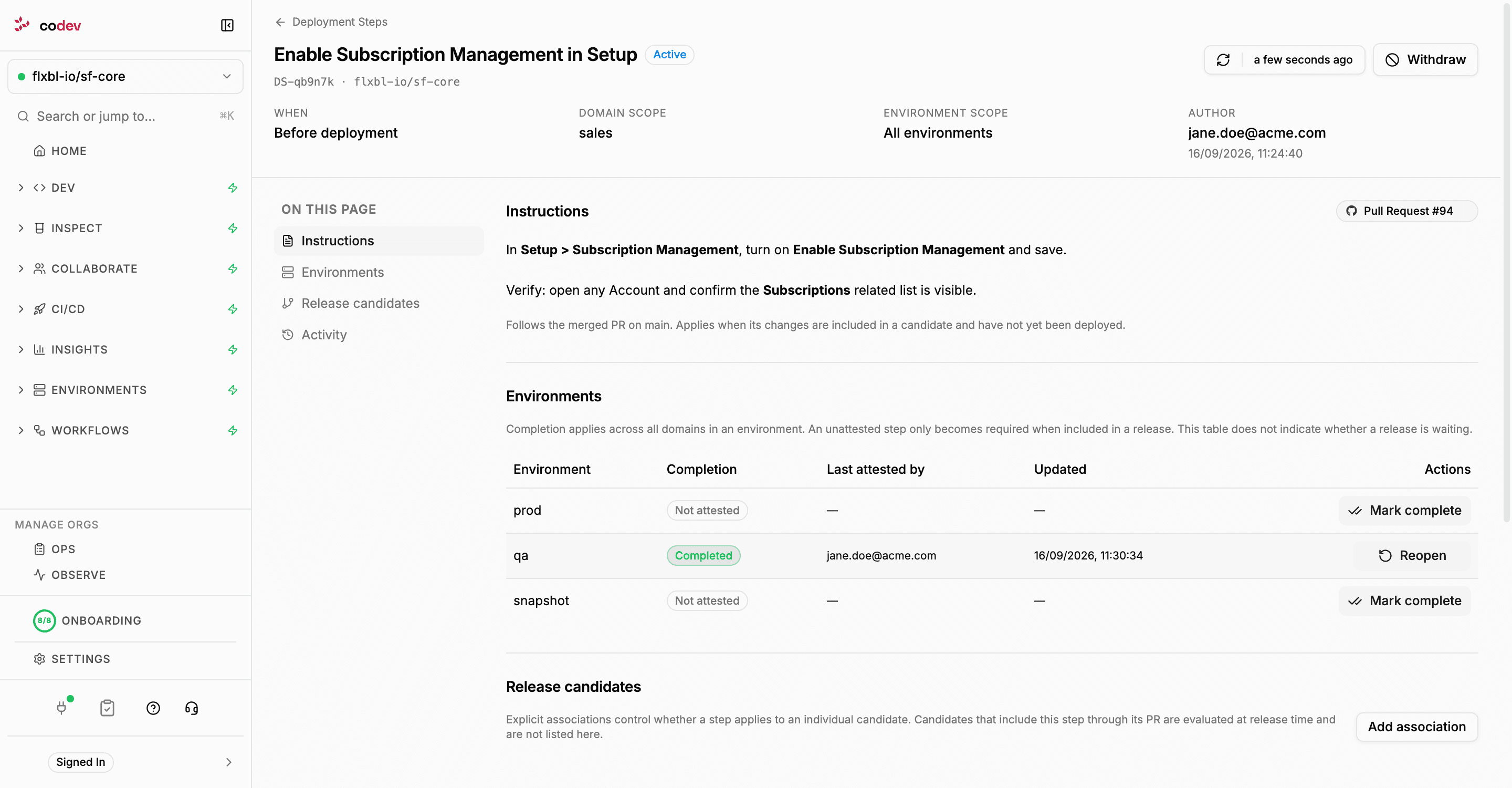
The header states whether the step is Active or Withdrawn, when it is done (before or after deployment), its domain and environment scope, and who created it. Below that:
| Section | Contents |
|---|---|
| Instructions | The step's Markdown body and the pull request it came from. A note says whether the step already follows a merged pull request or is still waiting for the pull request to merge. |
| Environments | Completion per environment in the step's scope: not attested, completed or reopened, by whom and when, with Mark complete and Reopen. Environments that recorded a completion but are no longer in scope are listed as historical. |
| Release candidates | Explicit include and exclude associations with individual candidates, and Add association. |
| Activity | Everything recorded against the step: creation, completions, reopenings, associations and withdrawal, with notes and evidence links. |
The Environments table shows completion, not whether a release is waiting. A step that is not attested in an environment only holds a release once its change is in a candidate for that environment.
Release candidate associations
A step attached to a pull request applies to candidates automatically, wherever the merged change is. An association overrides that for one candidate:
| Association | Effect |
|---|---|
| Include in this candidate | The step applies to releases of this candidate even if its change was deployed before, or if the candidate does not contain the pull request's merge at all. Environment and domain scope still apply, and existing completions still count. |
| Exclude from this candidate | The step does not apply to releases of this candidate, including through its pull request. Other candidates are unaffected. |
Click Add association, pick the candidate (from the list, or by typing domain:release-name), choose Include or Exclude, and optionally record a reason. An association can be flipped later from the same table; every change is kept in the step's activity. A step created on the Deployment Steps page and attached to a release candidate starts with an include association.
Withdrawing a step
Withdrawing a step removes it from every environment and every candidate at once. A release that is waiting on it continues once its other steps are complete. The step, its completions and its activity are kept for audit, and the step shows as Withdrawn on the Deployment Steps page. Withdrawal cannot be undone.
The step's author or an owner can withdraw it, from the detail page with Withdraw and a reason, or from the pull request:
/codev step remove DS-x7k2f9 --reason "Setting is now enabled by the package install script"Steps and branch operations
A step follows the commit that merged its pull request. Operations that move a change to a new commit, or move an environment backwards, affect what a step applies to.
| Operation | What happens to the step |
|---|---|
| Cascade | The step follows the change into the cascaded branch and applies to candidates built from it. When a cascade pull request is completed without a merge commit (squashed or rebased), codev carries the step onto the resulting commit. |
| Unbundle | Steps whose commits were kept are re-anchored to the rewritten branch automatically. A step whose change was unbundled out is flagged Review required. See below. |
| Cherry-to | The change arrives on the target branch as a new commit, so the original step does not follow it. Declare the step on the delivery pull request, or add an Include association on the target candidate. |
| Rollback | The environment's deployed release moves back, so steps for the rolled-back changes apply again to the next release there. Completions are kept, so a step already completed in that environment does not hold the release. If the rollback undid the manual action, Reopen the step. |
| Revert pull request | The original merge remains in the branch history, so the step still applies even though the change is gone. Withdraw the step. |
Review required
After an unbundle, a step whose change was removed from the rewritten branch is marked Review required, with the reason in its details, on the Deployment Steps page and in the checklist of any release that includes it. The step keeps applying wherever its original commit is still present, such as the branch it was merged to. Withdraw the step only if the change was removed everywhere; otherwise leave it in place and complete it where it is still needed.