Declaring a step
Add a pre- or post-deployment step from a pull request comment or from the Deployment Steps page, and scope it to environments and domains.
A step is declared where the change is made — on the pull request — or created afterwards on the Deployment Steps page and attached to a pull request or a release candidate. Either way the step gets an id of the form DS-x7k2f9, which is what the pull request commands and the checklist comments refer to.
From a pull request comment
Comment on the pull request with /codev step add, followed by pre or post and a title. Everything below the command line becomes the step's instructions and is rendered as Markdown wherever the step is shown.
/codev step add pre Activate the Order Capture feature toggle

In **Setup > Order Settings**, enable **Order Capture** and save.
Verify: the `Order_Capture__c` field is visible on the Order layout.
codev replies with the step id, the scope it applies to, and whether the step is already counting (the pull request has merged) or starts counting once it merges.
Tracked pre deployment step DS-x7k2f9 — Activate the Order Capture feature toggle

Scope: every gated environment, every domain. Narrow it with --envs, --category or --domains.

Releases to gated environments will wait on this step until it is attested there
(/codev step done DS-x7k2f9 --env <name>).

It is anchored to this pull request and starts counting once the pull request merges.
The commands work on GitHub and Azure DevOps pull requests, and are listed in the welcome comment codev posts on a new pull request and in /codev help.
Narrowing the scope
Without flags, a step applies to every environment and every domain. Add flags on the command line to narrow it:
| Flag | Meaning | Accepted values |
|---|---|---|
--envs uat,production | Only these environments. | Names of environments registered in the project. Matching is case-insensitive. |
--category release | Only environments in these categories. | dev, test, snapshot, release |
--domains sales,service | Only releases of these domains. | Domains that have at least one release candidate. |
/codev step add post Schedule the nightly reconciliation job --envs uat,production --domains salesAn unknown environment, category or domain is rejected, and the reply lists the known values.
A step applies to every domain's release by default, because the pull request's merge is what the step follows, not the packages it touched. If the action only matters when one domain's change lands, narrow it with --domains. Otherwise, releases of the other domains to a gated environment wait on it too.
Listing the steps on a pull request
/codev step listcodev replies with a table of the pull request's steps: id, kind, title, and whether each is awaiting merge, outstanding, done in named environments, or cancelled.
From the Deployment Steps page
Open CI/CD > Deployment Steps and click Create step.
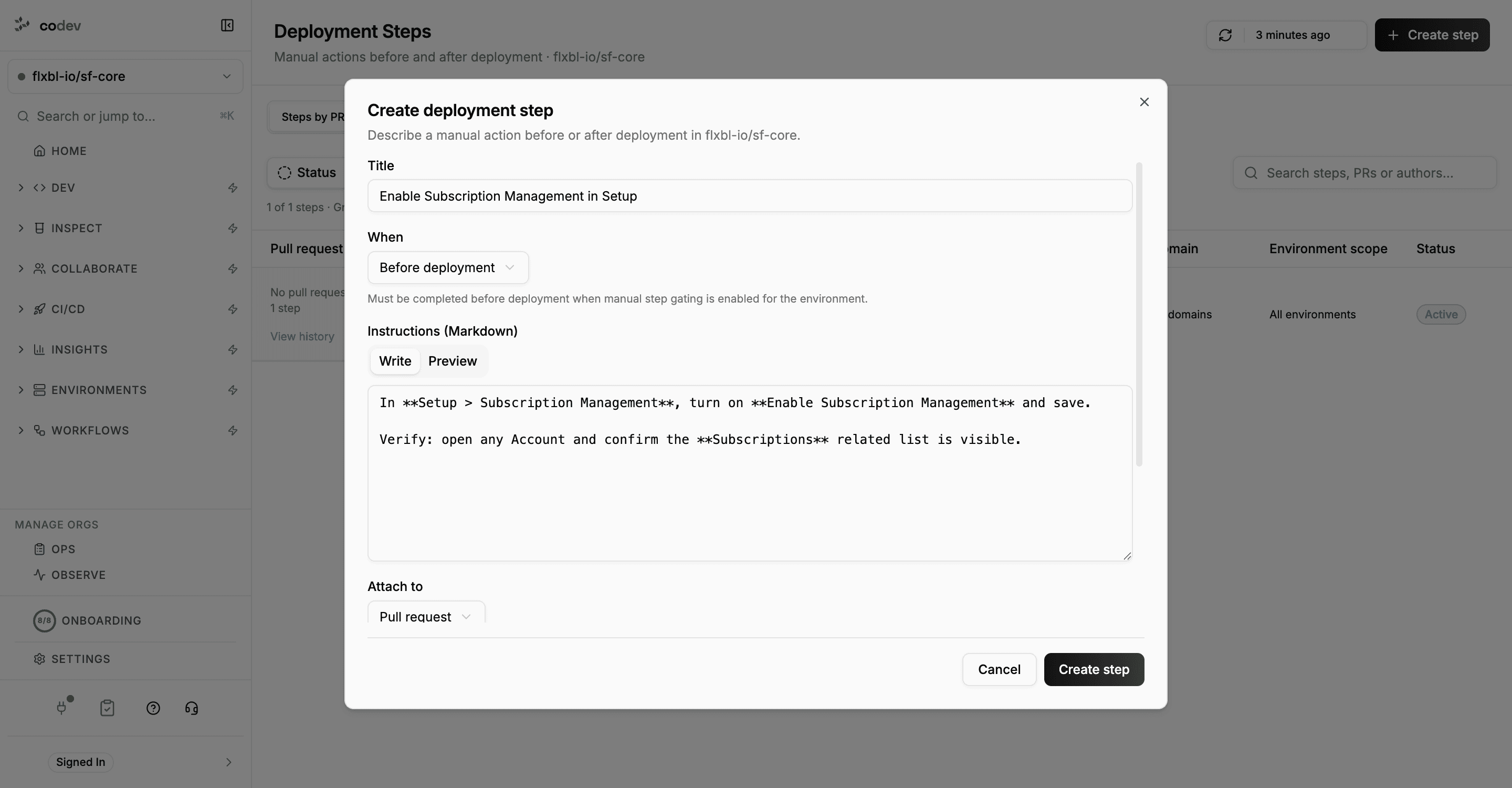
| Field | What to enter |
|---|---|
| Title | A short imperative description, up to 200 characters. |
| When | Before deployment (a pre-deployment step) or After deployment (a post-deployment step). |
| Instructions (Markdown) | The action to perform and how to verify it, up to 10,000 characters. Preview renders it. |
| Attach to | Pull request or Release candidate (see below). |
| Environments | Leave empty for all environments, or pick the ones the step applies to. |
| Domains | Leave empty for all domains, or pick the domains whose releases the step applies to. |
The step is created when you click Create step, and its detail page opens.
Attaching to a pull request
Pick a pull request from the list, or type # and the number to look up any pull request in the project. The step then behaves exactly like one declared with a comment: it follows the pull request's merged change into release candidates. A pull request that has already merged is anchored to its merge immediately.
Changes that are already deployed to an environment do not become pending again. A step attached to a pull request whose change is already in production is not shown as pending for production.
Attaching to a release candidate
Pick a release candidate from the list, or type it as domain:release-name to look up any candidate on any branch. The step is recorded as included in that candidate: it applies to that candidate's releases regardless of which pull request it came from. Use this for a step that belongs to a specific release rather than to one change, or when the change reached the candidate without its original pull request — for example through a cherry-to. See Candidate associations.
Adding a step after the pull request has merged
A step can be added to a pull request at any time, before or after it merges. A step added after the merge is anchored to the merge immediately and applies to every release candidate that already contains the change. A release that is currently waiting on manual steps for that environment picks the new step up on its next check.
What makes a good step
- One action per step. Each step is completed separately in each environment, so a step that bundles three actions is completed as one.
- Say where and how to verify. The instructions are what the person completing the step in
productionwill read weeks after the pull request was written. - Scope it. Name the environments if the action is not needed everywhere, and the domain if only one domain's release needs it.
Deployment Steps (Beta)
Track the manual actions a release needs before or after it deploys — declared on the pull request, completed per environment, and able to hold a release until they are done.
Completing steps in an environment
See which steps an environment is waiting on, mark them complete with a note and evidence, reopen them, and review the completion history.