Work items
codev reads work-item references straight from your commit messages and shows them across the delivery pipeline — on builds, on release candidates, and on releases. It recognises pull request numbers, Jira issue keys, and Azure DevOps work items with no configuration.
What codev recognises
Detection runs over each commit's subject and body. A reference is picked up when it appears in one of these forms:
| You write | Detected as |
|---|---|
#123 or (#123) | Pull request |
SALES-301 standing on its own (a space or line start before it, a space or colon after) | Issue key |
[SALES-301] | Issue key |
feat: SALES-301 …, fix(payments): SALES-301 …, feat/SALES-301 | Issue key |
AB#123 | Azure DevOps work item |
An issue key is two or more letters, a hyphen, and digits (SALES-301, DP-12). Matching is case-insensitive, and keys are shown in upper case.
When a reference is not detected
An issue key is picked up only when it stands on its own — with a space, a line start, or a colon around it — when it is in square brackets, or when it follows a conventional-commit prefix such as feat: or fix:. An issue key wrapped in round parentheses is not picked up.
For example, chore: bump to 1.4.45 (SALES-301) records no work item: the key is jammed against the (, so it is none of the recognised forms. Write it in one of these instead:
SALES-301: bump to 1.4.45chore: bump to 1.4.45 [SALES-301]feat: SALES-301 bump to 1.4.45
This round-parenthesis rule applies to issue keys only. A pull request number in parentheses — (#123), the form GitHub adds to squash-merge commits — is always detected.
Where work items appear
- On a build, the references found in that build's commits.
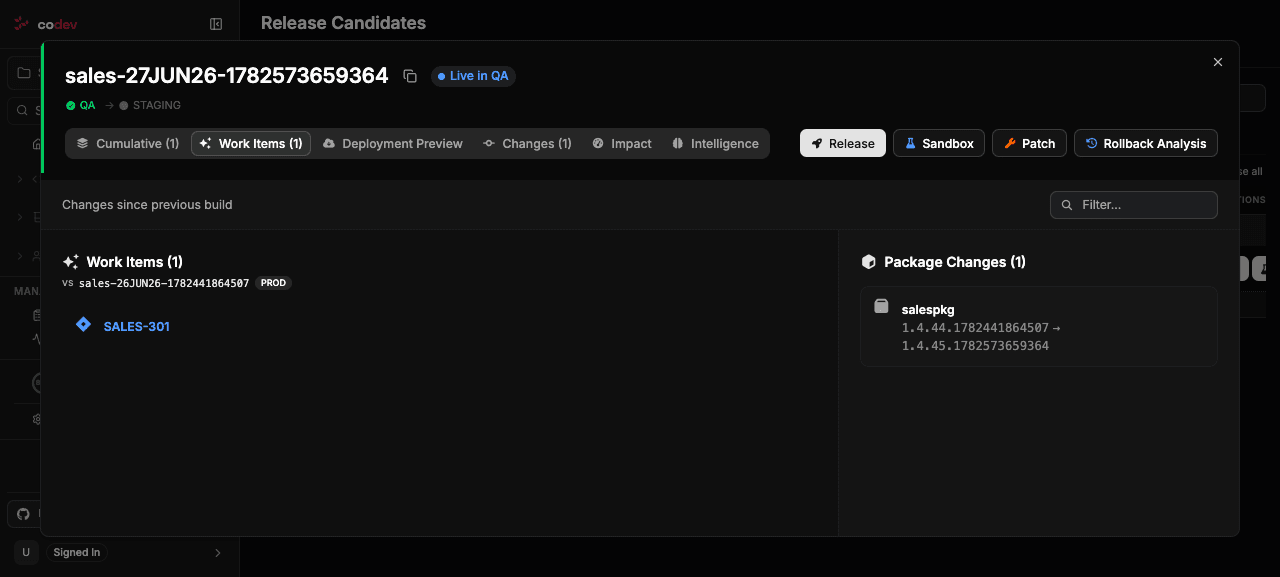
- On a release candidate, under the Work Items tab — the items new in that candidate, alongside the cumulative set since the last release.
- On a release, the items that were deployed, with cumulative totals.
When a Jira integration is connected, detected issue keys are shown with their summary, status, assignee, and a link to the issue — see Showing work items. Without one, the keys are still detected and listed; they are simply not enriched or linked.
In a project hosted on GitHub, pull request and issue numbers such as #123 are read from the project's repository and shown with their title, GitHub state, assignees, and a link to the pull request or issue. The state uses GitHub's own words:
- Open — an open issue (grey) or an open pull request, draft or ready (blue).
- Merged — a merged pull request (green).
- Closed — an issue closed as completed (green) or a pull request closed without merging (grey).
- Not planned or Duplicate — an issue closed for that reason (grey).
The first assignee is shown by their GitHub profile name, or their login when the profile has no name. More assignees add a count such as +2; an item with none reads Unassigned. If codev can't read the item, it reads Work item details unavailable with a Retry link.
Customising
Everyday detection needs no configuration — writing commit messages in a recognised form is enough. Two things can be tuned when you need them:
-
Which Jira issues are read. The Jira integration can be limited to specific project keys and uses a base URL to build issue links. See Jira.
-
Custom key patterns for the generated changelog. If your project records work items in a form the defaults do not recognise, sfp's changelog generation accepts custom
workItemFiltersregular expressions under thechangelogblock of your release configuration:releaseName: sales releasedefinitionProperties: changelog: workItemFilters: - "SALES-[0-9]{3,4}" workItemUrl: https://your-domain.atlassian.net/browse/This governs the changelog file sfp writes during a release. See sfp: Generating a changelog and the Release config reference for placement and the full set of options.
workItemFilters shapes the changelog file sfp writes during a release. The work items shown in codev — on builds, release candidates, and releases — come from the built-in detection described above and are not changed by it.