Change validation
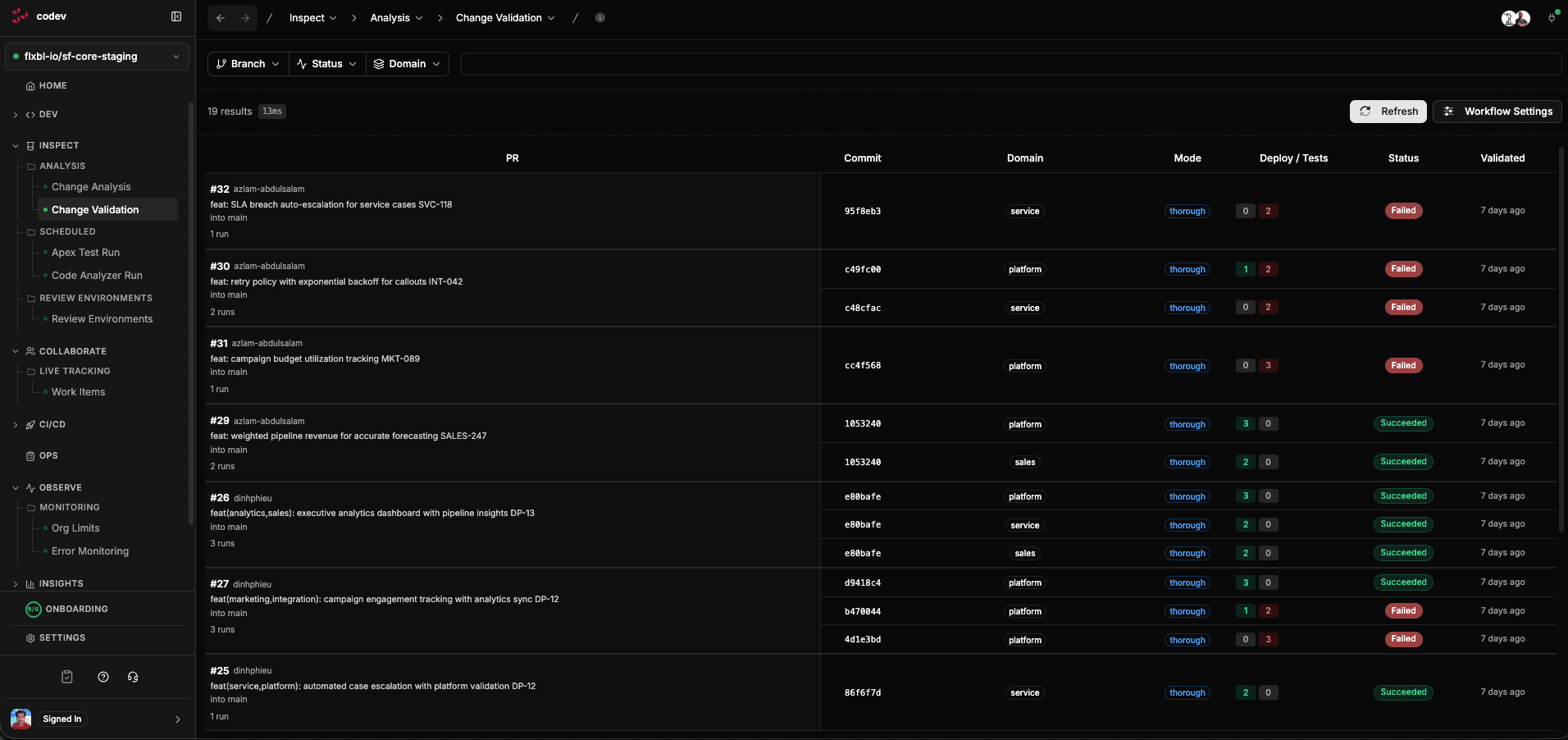
Change Validation goes beyond static analysis — it actually deploys your changed packages to a real Salesforce org and runs Apex tests against them. This tells you whether the deployment will succeed before you merge.
Unlike tools that use "check-only" deployments, codev performs a real deployment to a review environment. This catches issues that check-only deployments miss, like data-dependent failures and post-deployment script errors.
What happens when a PR is validated
When a PR is opened or updated, codev's validation workflow:
-
Detects impacted domains — analyzes the PR diff to determine which release configs (domains) have changed packages. Only affected domains are validated.
-
Allocates a review environment — for each impacted domain, codev matches the PR to a pool using review environment rules and acquires exclusive access to an org from that pool.
-
Deploys the changed packages — clones the repository at the merge ref, builds the impacted packages, and deploys them to the review org. Dependencies are installed if needed.
-
Runs Apex tests — triggers tests for the deployed packages and validates code coverage against the configured threshold (default: 75%).
-
Reports results — publishes deployment and test results to the server, updates the PR check run in GitHub, and applies labels (
validation-succeeded,validation-failed, etc.).
The review environment is released after validation completes, making it available for the next PR.
Validation modes
codev supports two validation modes, configured per branch pattern:
Thorough mode
The default for PRs targeting main. Deploys all packages in the domain (not just the changed ones) and runs comprehensive tests. This catches integration issues between packages.
Individual mode
Used for PRs targeting release branches. Validates only the changed packages individually, which is faster and appropriate when you need to verify a specific fix without rebuilding the full domain.
Viewing validation results
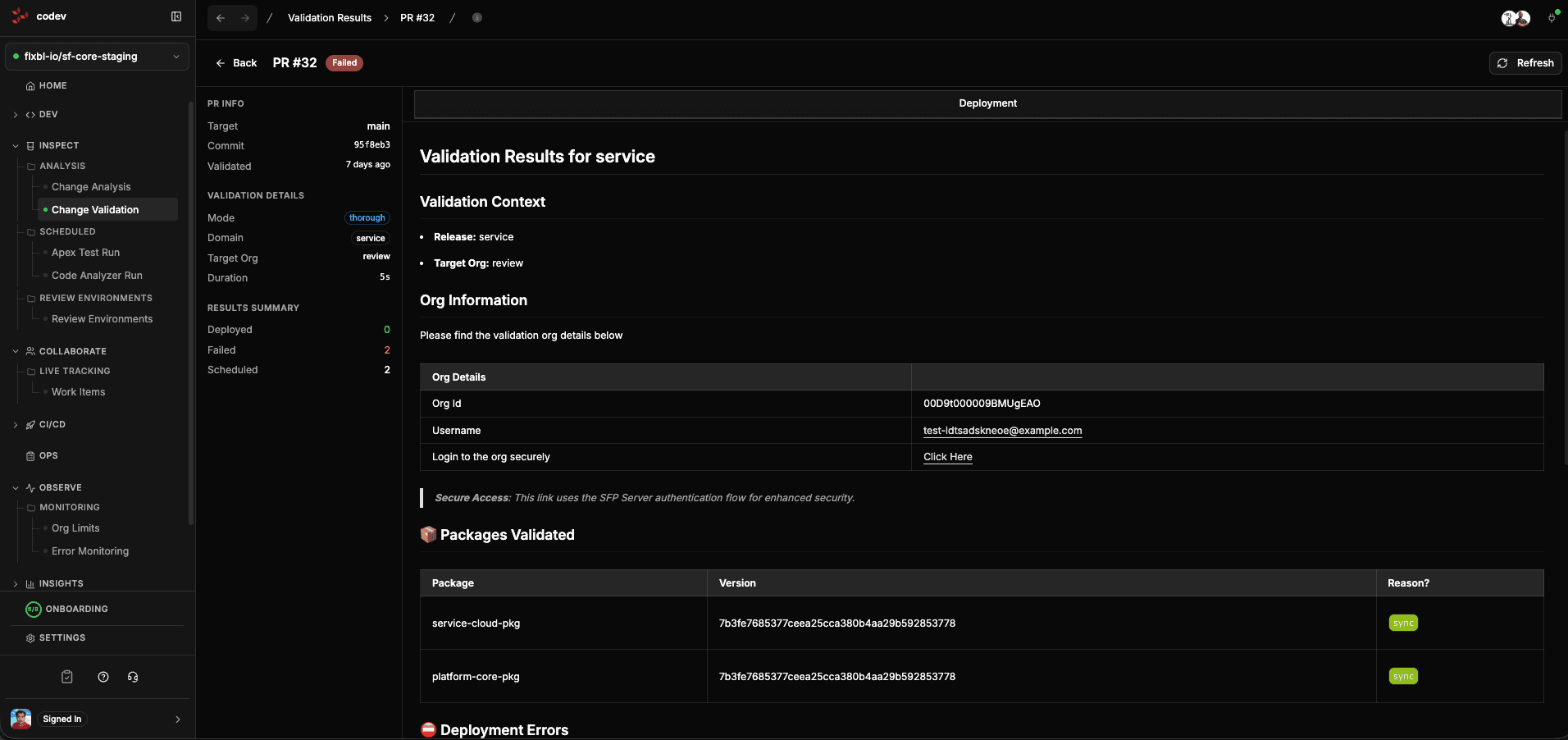
Click any PR row to see the full validation detail. The left sidebar shows:
- PR Info — branch, target, commit, when validated
- Validation Details — mode (thorough/individual), domain, target org, pool used, duration
- Results Summary — deployed/failed/scheduled counts, test pass rate
The main content area shows the validation report with:
- Validation Context — the release and target org used
- Org Information — org ID, username, and a secure login link
- Packages Validated — which packages were deployed and whether they succeeded
- Deployment Errors — if anything failed, the specific errors with component details
Tracking validation runs
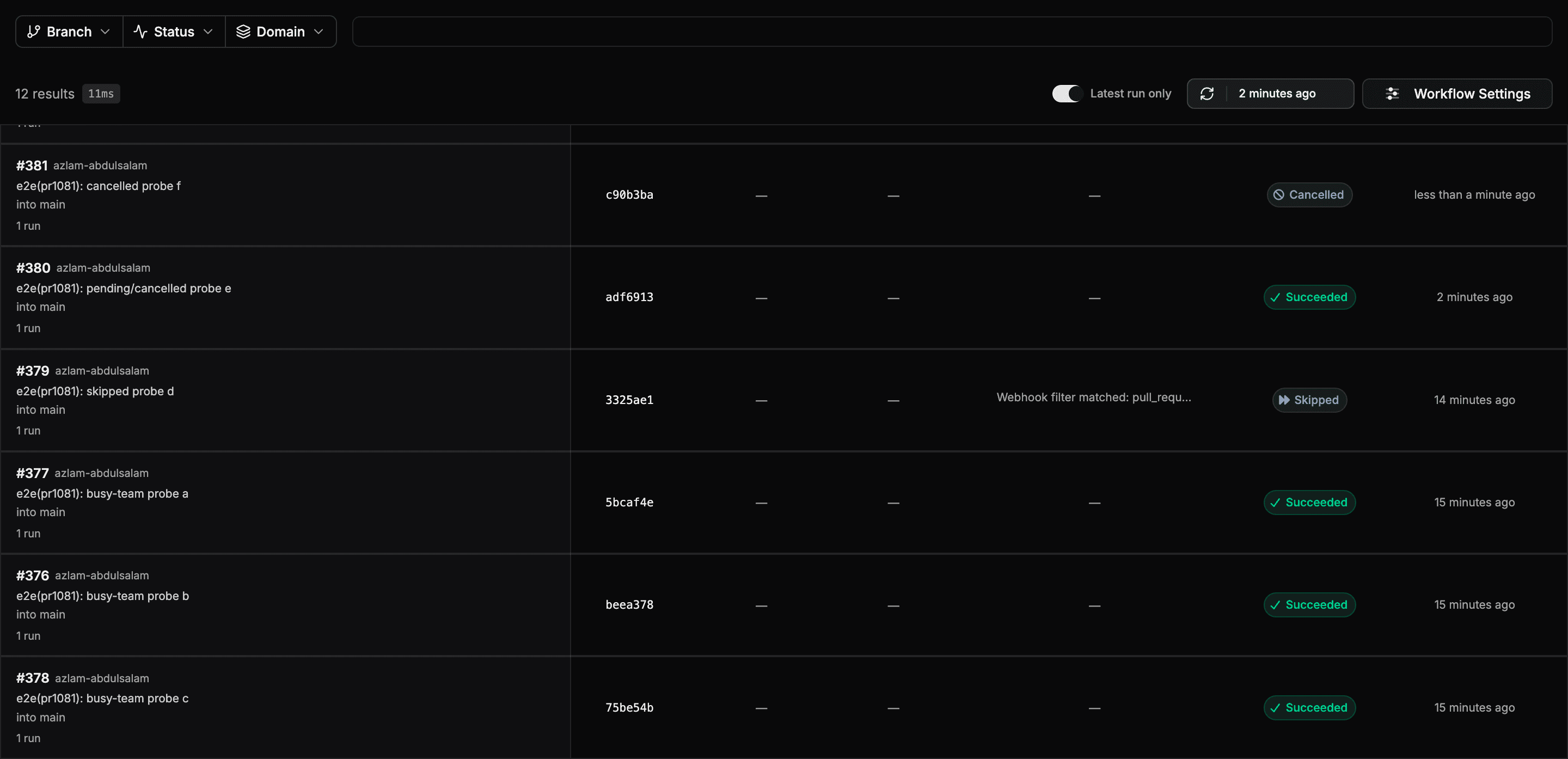
The Change Validation page tracks every PR validation from the moment it is triggered, not only runs that finished and published results. A run that is still in progress, was skipped, or failed before producing a report still appears on the page, so you can always answer "did validation run for my PR, and where is it now?"
Each run shows one of five statuses:
| Status | Meaning |
|---|---|
| Pending | Validation has been dispatched and is queued or running |
| Succeeded | The validation workflow completed |
| Failed | The validation workflow failed before publishing results |
| Cancelled | The run was cancelled — for example, the PR was closed while validation was still running |
| Skipped | A webhook filter excluded validation for this PR; the filter reason is shown on the row |
Clicking a run that has not published results yet opens the workflow run, where you can follow its logs and progress. Once results are published, the row opens the full validation detail instead.
Latest run only
By default the page shows only the most recent run for each PR. Turn off Latest run only in the action row to see the full run history, including earlier commits on the same PR.
Configuring validation
Click Workflow Settings on the Change Validation page to enable or disable the PR validation workflow.
Validation behavior can be customized per branch pattern through project settings:
- Validation mode —
thoroughorindividual - Skip testing — skip Apex test execution (use with caution)
- Coverage percent — minimum code coverage threshold (default: 75%)
- Diff check — only build and validate changed packages
- Install dependencies — install package dependencies before validation
- Component Checksum Skip — deploy only the components that changed since the previously installed artifact (on by default)
For example, you might run thorough validation with testing on PRs to main, but individual validation without testing on feature branches for faster feedback.
Component checksum skip
Validation deploys only the components whose source changed since the previously installed artifact, so the payload it validates matches what a release will deploy. It is on by default. Turn it off for a target branch with the Component Checksum Skip toggle in Workflow Settings; every validation on that branch then deploys the full component set.
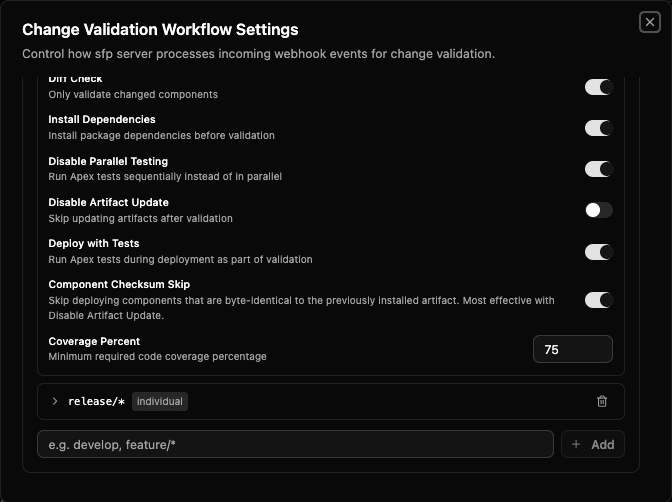
It is most effective with Disable Artifact Update. With artifact updates off, the review org's records stay pinned to the published baseline, so every pull-request iteration compares against that baseline and deploys only what changed. With artifact updates on, only the first iteration on a reused org benefits.
For what the optimisation skips, the component types it always deploys, and how it falls back, see sfp: Component checksum skip.
Per-package controls
Individual packages can override validation behavior through sfdx-project.json attributes:
skipTesting— skip Apex tests for this packageskipCoverageValidation— skip coverage checks for this packagetestSynchronous— run tests serially instead of in parallel (useful for tests with DML conflicts)alwaysSync— always include this package when any other package in the same domain is validatedcheckOnlyAgainst— validate this package using check-only deployment against specific named orgs instead of pool environmentsdisableChecksumSkip— always deploy this package's full component set, even when only some of its components changed
For detailed reference on these attributes, see sfp: Controlling validation attributes.
Prerequisites
For change validation to work, you need:
- A review environment configured — this can be a dedicated Salesforce org (simplest to get started), a sandbox pool, or a scratch org pool. See Review Environments.
- Review environment rules mapping your branches and domains to the target — see Review Environments
- The PR validation workflow enabled — toggle in Workflow Settings
Requiring validation before merge
codev posts the validation result to the pull request as the codev: PR Validation check, but it does not block the merge on its own. To stop a pull request from merging until validation passes, make that check required in your source provider's branch protection. See Branch protection and required checks.
Further reading
- Validation — the concept: what a validation run does and why its result predicts the release
- sfp: Validation overview
- sfp: Validation modes
- sfp: Validation scripts