Release Candidates
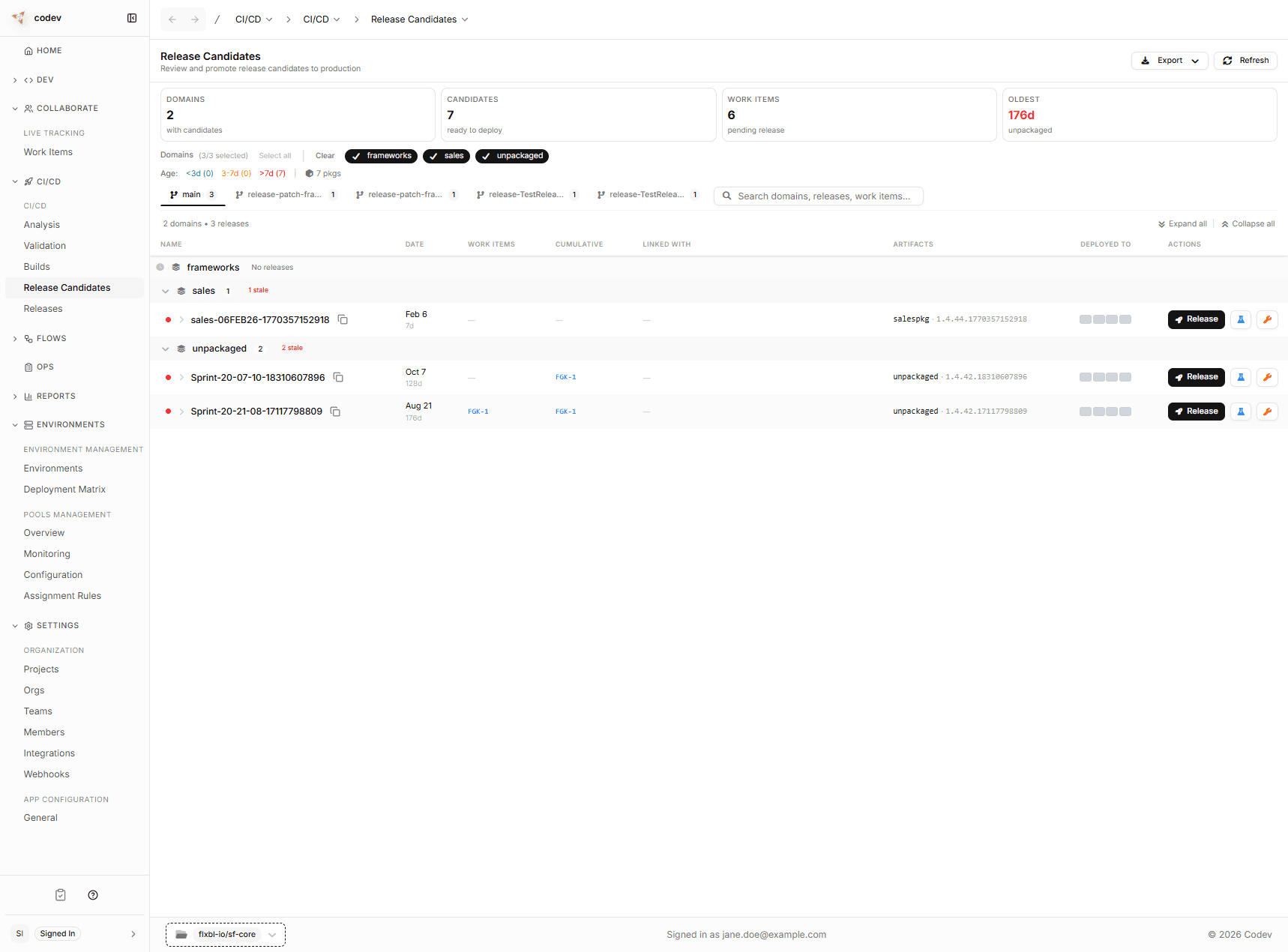
After codev builds your packages, it groups them into release candidates — bundles of changes that are ready to deploy. This page is where you decide what goes to production and what needs testing first.
A release candidate is similar to a deployment package or a release bundle. The key difference is that codev creates them automatically from every merge, tracks which work items are included, and lets you promote them through environments with approval gates.
Domains
In most Salesforce projects, not everything gets released together. You might have a set of packages for your Sales team and a different set for Service. In codev, these groupings are called domains.
Each domain is defined by a release config file in your repository that lists which packages belong together. When code is merged, codev only builds and creates release candidates for the domains that were actually affected.
On this page, release candidates are grouped by domain, so you can see at a glance what is ready to deploy for each area of your project.
Configuring domains
A release config is a YAML file that defines a domain:
releaseName: sales
pool: sales-pool
includeOnlyArtifacts:
  - sales-core
  - sales-ui
  - opportunity-management
You can control what goes into each domain:
- Include specific packages — use
includeOnlyArtifactsto list exactly which packages belong to the domain. - Exclude packages — use
excludeArtifactsto remove specific packages. - Manage dependencies — use
excludePackageDependenciesorincludeOnlyPackageDependenciesto control which managed package dependencies are included. - Configure deployment behavior — use
releasedefinitionPropertiesto set options like skipping already-installed packages or promoting unlocked packages before deployment.
A single repository can have multiple release configs, each representing a different domain. See Release config reference for all available options.
What you see for each release candidate
Every release candidate shows:
- When it was created and from which branch
- Which work items are new in this specific RC (linked to your issue tracker — Jira, Azure DevOps, etc.)
- Cumulative work items — everything that has accumulated since the last release, so you know the full scope of what you would be deploying
- Which packages and versions are included (click the artifact to inspect details). A candidate contains the packages its build produced — for a build started with Run build, that is the set of packages selected in the dialog
- Where it has already been deployed (if anywhere)
The stats bar at the top gives you a quick summary: how many domains have candidates ready, total RCs, pending work items, and the age of the oldest undeployed candidate.
What you can do
From any release candidate row, you have three actions:
- Release — promote this candidate to an environment (staging, UAT, production). This goes through an approval gate before deployment happens. See Managing release candidates.
- Get on Sandbox — deploy to a sandbox for testing, without needing approval. Useful for validating changes before requesting a formal release. See Managing release candidates.
- Patch — create a hotfix branch from this candidate. Use this when you need to fix something in production without including all the other pending changes. See Managing release candidates.
Branches and patch releases
The branch tabs at the top let you switch between release candidates from different branches. By default, you see candidates from main (your trunk branch). When someone creates a patch branch for a hotfix, that branch gets its own tab with its own release candidates.
Getting started
For release candidates to appear, you need:
- A release config in your repository defining at least one domain — this tells codev which packages to group together. See Release config.
- A project selected in codev that matches your repository (top-left project selector).
- At least one merge to a tracked branch to trigger the first build.
If the Build on Merge workflow is enabled (it is by default), that is all you need.
Troubleshooting
| Symptom | Check |
|---|---|
| Page is empty | Make sure the correct project is selected in the top-left selector. |
| RCs appear for some domains but not others | Only domains with changed packages get new RCs. Your merge may not have touched packages in the missing domain. |
| Build completed but no RC appeared | Open CI/CD > Builds and check if the build shows a release candidate name. If not, the release definition step may have failed — check the workflow logs via the sfp Server link. |
| "No environments configured" in Release dialog | Environments are not yet registered. See Environments. |