How AutoPilot plans and builds a change
How Salesforce AutoPilot in Workfloor plans a Salesforce change against a repository and an org, works on the plan with you, then builds, tests and delivers it as a pull request.
Salesforce AutoPilot plans a change in a Plan stage. You approve the plan, and AutoPilot builds it in a Build stage. The example here is a validation rule on Opportunity that requires a close reason, with an Apex test.
Plan
A stage that uses the Plan profile runs AutoPilot in its plan mode. It reads the repository and the org, and changes neither of them or the workspace.
Discovery. AutoPilot looks in the repository for the package that owns Opportunity's validation rules, for what references the fields, and for the tests. It then reads the same components in the card's sandbox org, for example whether Close_Reason_Required exists there.
Reconciliation. Where the repository and the org differ, the plan records how each affected component is reconciled. The Source of truth setting decides how. With Repository, the plan proposes bringing the org in line with the repository, then the change. With Org, it takes the org as the basis and proposes the repository update. With Both, it records an explicit decision for each component, with no default. AutoPilot never synchronizes the whole org.
The plan. AutoPilot publishes the plan to the card. It states the goal, the behavior before and after, the acceptance criteria, and each open decision as a question. For the example, it lists the rule, the field access for the permission sets that need it, and the Apex test. The plan is bound to the evidence it read, and that evidence can be published to the card as files. A plan whose scope or inputs have changed is not built as it stands.
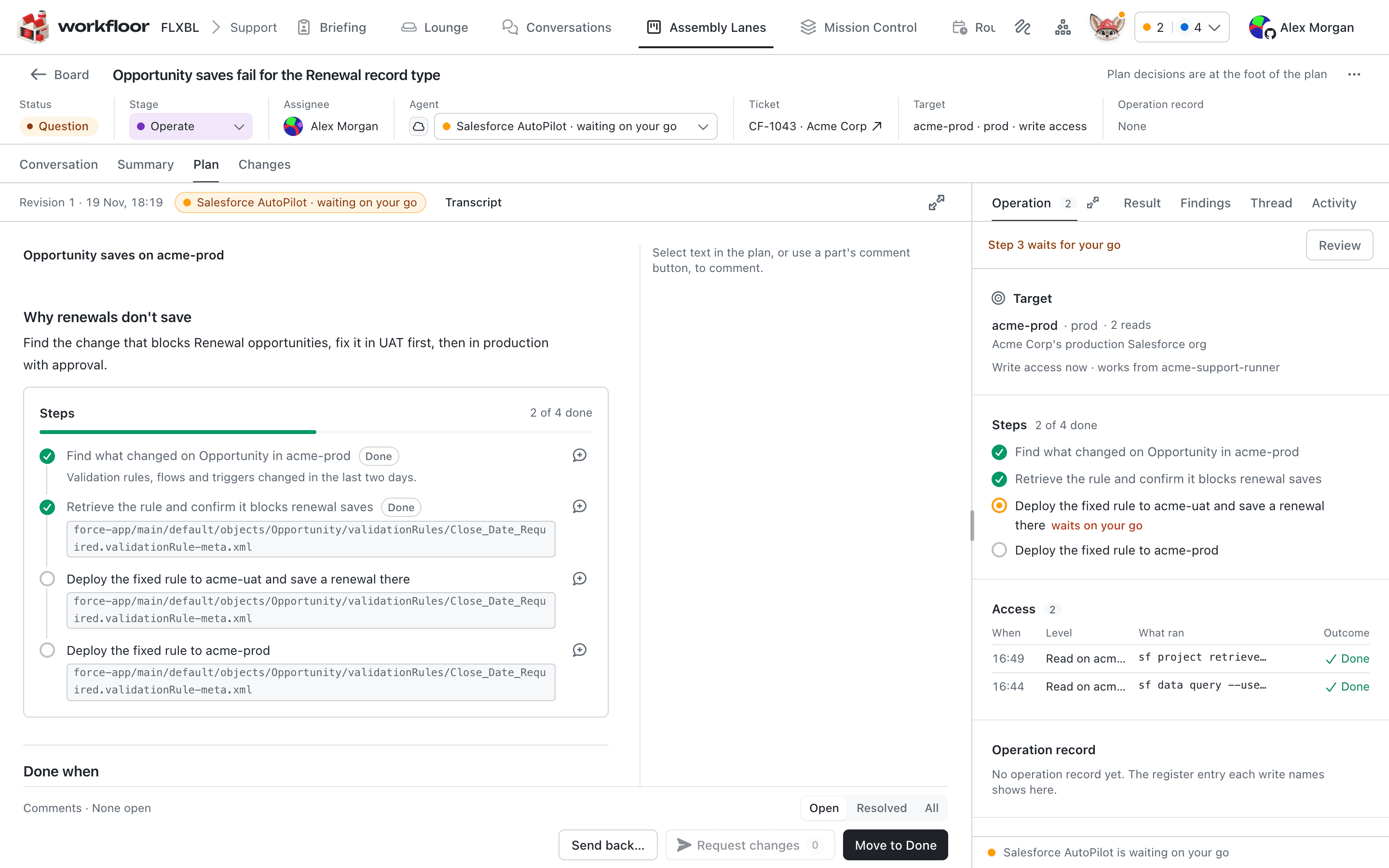
Work on the plan with it
The plan belongs to the card, and its newest revision is the current plan.
- Comment on a passage and send with Request changes. AutoPilot answers each thread, then publishes one revision that settles them.
- Edit the plan yourself. AutoPilot continues from your text. An edit that changes the scope, such as one that brings in another object, starts a new plan, so that the evidence is read again.
- AutoPilot reads the org again only when there is a reason, such as a comment that questions the org's state.
Approve plan moves the card on (see Approvals between stages and Stage workbenches).
Plan mode refuses file edits, publishing, and shell commands that change files, Git, packages or the org. It works by matching commands, so it is not a sandbox.
Build
A stage that uses the Build profile builds the plan that people approved, in the card's own sandbox org. If the approved revision changed the scope, AutoPilot plans again instead. A direct instruction to change something in the org that needs no reviewed source change is carried out as a run, without a pull request.
During a build, AutoPilot asks you only about a business ambiguity, a conflict with the plan, or a change to what it delivers. A bounded addition you send, such as "also add two assertions to the test", is carried out and listed in the pull request under Deviations from the approved plan.
Preflight. Before any deploy, AutoPilot captures the org's current state for the plan's components. If the org has changed since the plan was made, and the change is not this same plan already applied by an earlier build, the build does not overwrite it. It records the differences and plans again from the current org.
Deploy and test. It deploys to the card's sandbox org and runs development tests. A deploy can pass its tests and still roll back because of Apex coverage, which is 75% for each changed class. When that happens, AutoPilot extends the test class and deploys again.
Field access. The plan names the permission sets that get read and edit access to a new field. After deploying, AutoPilot reads the field permissions back and reports a new field that nothing can read.
Deletions. Before a deletion deploys, AutoPilot lists what still references each component, in the org and in the repository, including names inside Apex strings. A reference the plan changes is handled first. A reference that the plan does not cover becomes a question to the card's assignee, with options and a recommendation. In a source or diff package, the deleted file moves into the package's post-destructive folder, so the pull request deletes the component in every environment the package reaches. In an unlocked package the file is removed.
Saved source. When the build ends, AutoPilot reads the changed source back from the org and compares it with the snapshot taken before. That difference is the change in the pull request.
UI-only work. Browser work is not captured in metadata, so a build that did any browser work leaves a runbook. Where the project has a codev server, the runbook is posted on the pull request as a codev manual step for other environments.
Deliver
AutoPilot commits only the files the build captured, on the card's branch, without force. It opens one pull request, as the Publish setting says, and updates that same pull request on later pushes. It then waits up to 60 minutes for the pull request's checks, including codev's pull request validation and Apex test results.
- Green: it records the checks and finishes the card.
- Red: a failure within the story gets a new build of the same plan, for up to 3 rounds. A failure that predates the change is recorded as a known exception on the pull request and the card.
Browser steps, runbooks and recipes
Work with no metadata API, such as a Setup page, is done in the browser during a build or a run on the card. AutoPilot picks each action from the controls it observed on the page, and the browser carries it out. A recipe is a procedure for one Setup task, kept as data and verified in a live run. A step that matches a recipe follows it. Candidate recipes, which have not yet been run live, are not used.
After each click that changes the page, AutoPilot checks the page against the original request to decide whether the step is done. In a run, a page that warns of permanent data loss, or a destructive recipe, needs a person to confirm. In a build of a reviewed plan, AutoPilot may authorise that one action. The runbook that a build leaves is described under UI-only work, above.
Retrieving a build's source
AutoPilot can export a build's saved source into another checkout, from what the build captured, without reading the org again. Files go to the packages that own their components, and an ambiguous placement is reported, not guessed. Uncommitted and ignored files are protected, and symlinks and path traversal are refused. A receipt lists each file's outcome, conflicts included. The safe changes of an unfinished build are exported labelled as partial. So are its reviewed worktree changes, which are not verified in the org. Retrieval never commits, pushes or deploys. On a card, the pull request carries a build's source.
Repository context
AutoPilot reads package ownership from the card's checkout, without writing to it or fetching branches. Existing ownership comes first. A new component goes to the diff package or to the only metadata package. When there are several, AutoPilot never picks one by their order. It reasons about the package boundaries, or needs someone to name the target package. A plan also reads the repository's tracked branch from the project's codev server, and says why when it cannot.
Ownership and the tracked branch are on a card today. Two things are not on a card yet: metadata types read from the server's tree, and a production reference (the package installations that codev recorded in production). Those records show what was installed, not that production's metadata still matches.
Next: AutoPilot in support triage.
Salesforce AutoPilot
What Salesforce AutoPilot is in Workfloor, which projects are offered it, and how it differs from Flux in planning, building and working against a Salesforce org.
AutoPilot in support triage
How Salesforce AutoPilot in Workfloor investigates a support ticket against a Salesforce org, asks the card's assignee for a Run before each write, and reports its findings on the card.