AutoPilot in support triage
How Salesforce AutoPilot in Workfloor investigates a support ticket against a Salesforce org, asks the card's assignee for a Run before each write, and reports its findings on the card.
In a support lane whose agent is Salesforce AutoPilot, the card for a ticket is worked against the customer's org. AutoPilot reads the org to find the cause and plans the fix as steps. Each step that changes the org waits for the go of the card's assignee, who gives it with Run. The lane, the Slack channel and the card's tabs are covered in Support triage.
The example is a sample ticket: sales reps at Acme Corp cannot save Opportunities in production. For records of the Renewal record type, they get the error "Enter the renewal's close date."
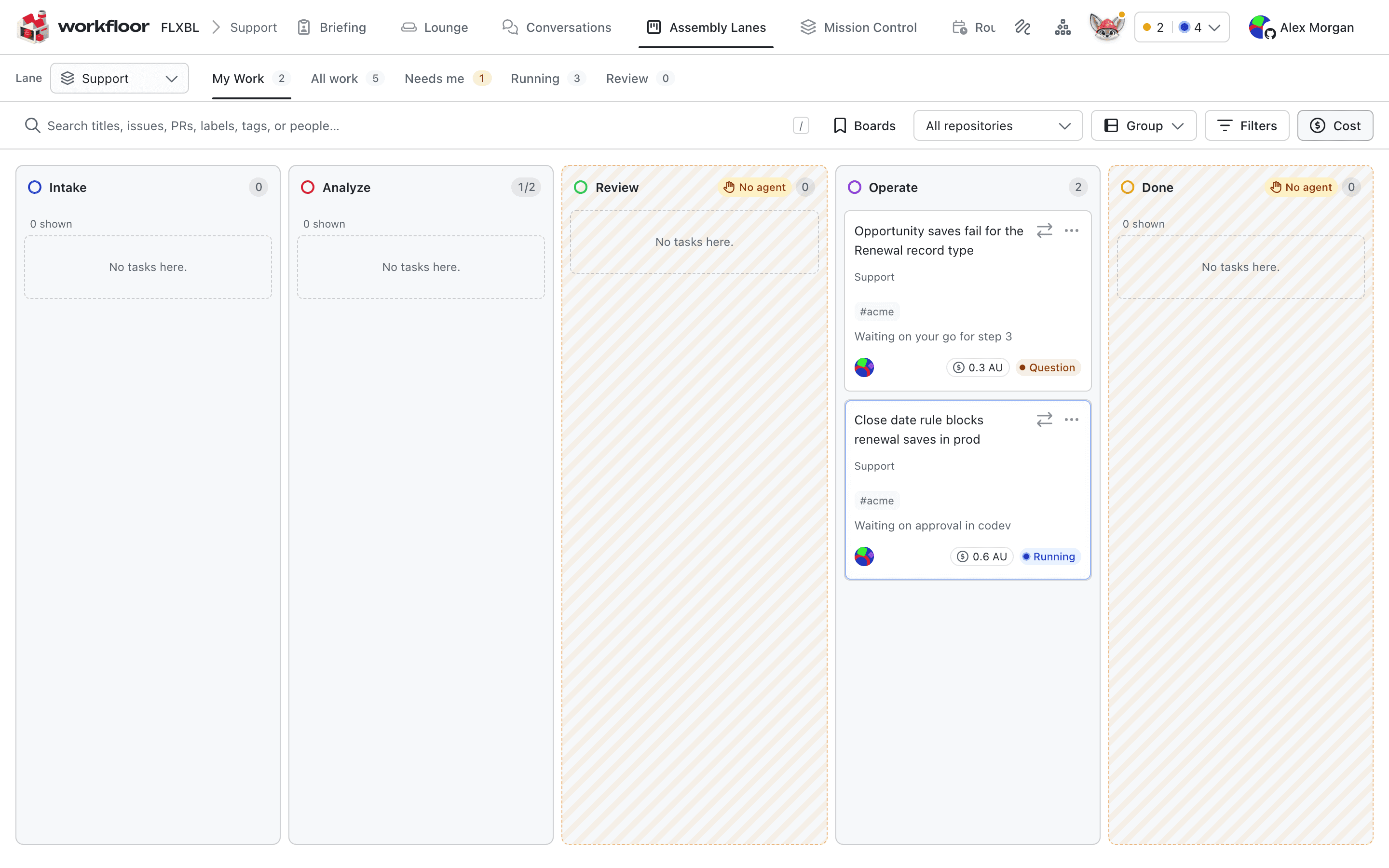
The org it works against
AutoPilot works against one org per requirement.
- A codev environment. Where a stage gives access to the project's targets and a target comes from the project's codev source, AutoPilot reaches that environment through Workfloor. Workfloor refuses any other agent or command on a codev target. See How agents get read and write access and Setting up operation targets.
- The card's own sandbox, when no environment is named. A build always uses this one.
Before it starts work, AutoPilot checks which org it has reached and whether that org is a sandbox or production. The org is pinned for the requirement and checked again before each operation. An org that is not the requirement's target is refused. Two AutoPilot runs never change the same org at once. The second run waits, for up to 30 minutes.
Investigate
A stage that gives Read access lets AutoPilot plan against the target. For the sample ticket, it asks acme-prod two questions: which validation rules, flows and triggers on Opportunity changed in the last two days, and what the rule's metadata says. Each read shows on the card's Operation tab with the target, level and outcome. A read is renewed before its window ends.
Findings
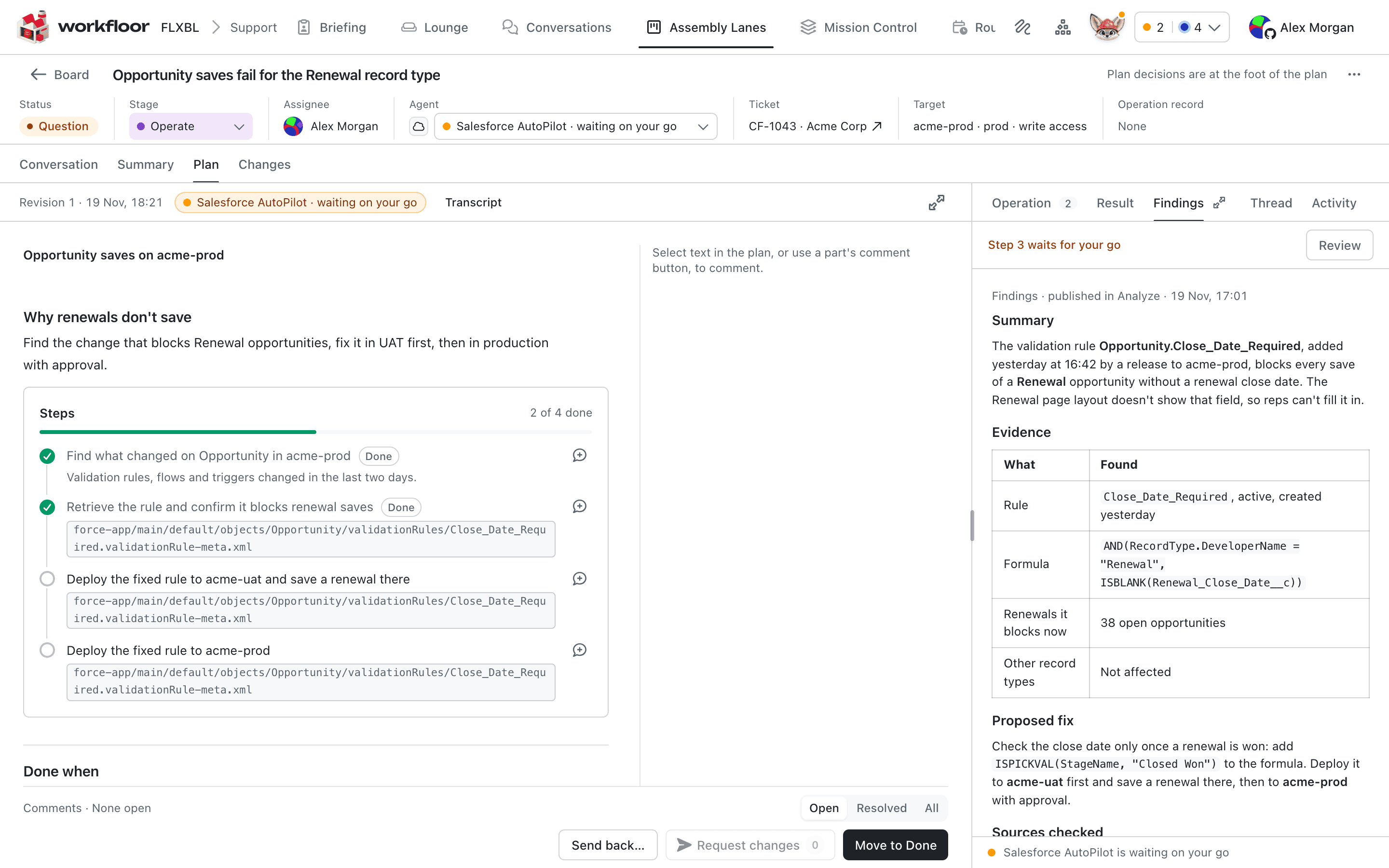
The findings for the sample ticket say that the validation rule Close_Date_Required, added the day before, blocks every save of a Renewal opportunity without a renewal close date. The Renewal page layout does not show that field. The evidence table lists the rule, its formula, the 38 open renewals it blocks, and that other record types are not affected. The proposed fix checks the date only once a renewal is won.
Steps that wait for your Run
The fix is a set of steps on the card. Reads need no Run. Deploying the changed rule to the UAT sandbox is a write, so AutoPilot starts nothing and asks the card's assignee for a go on that step. The card shows the target, the level and the change as metadata.
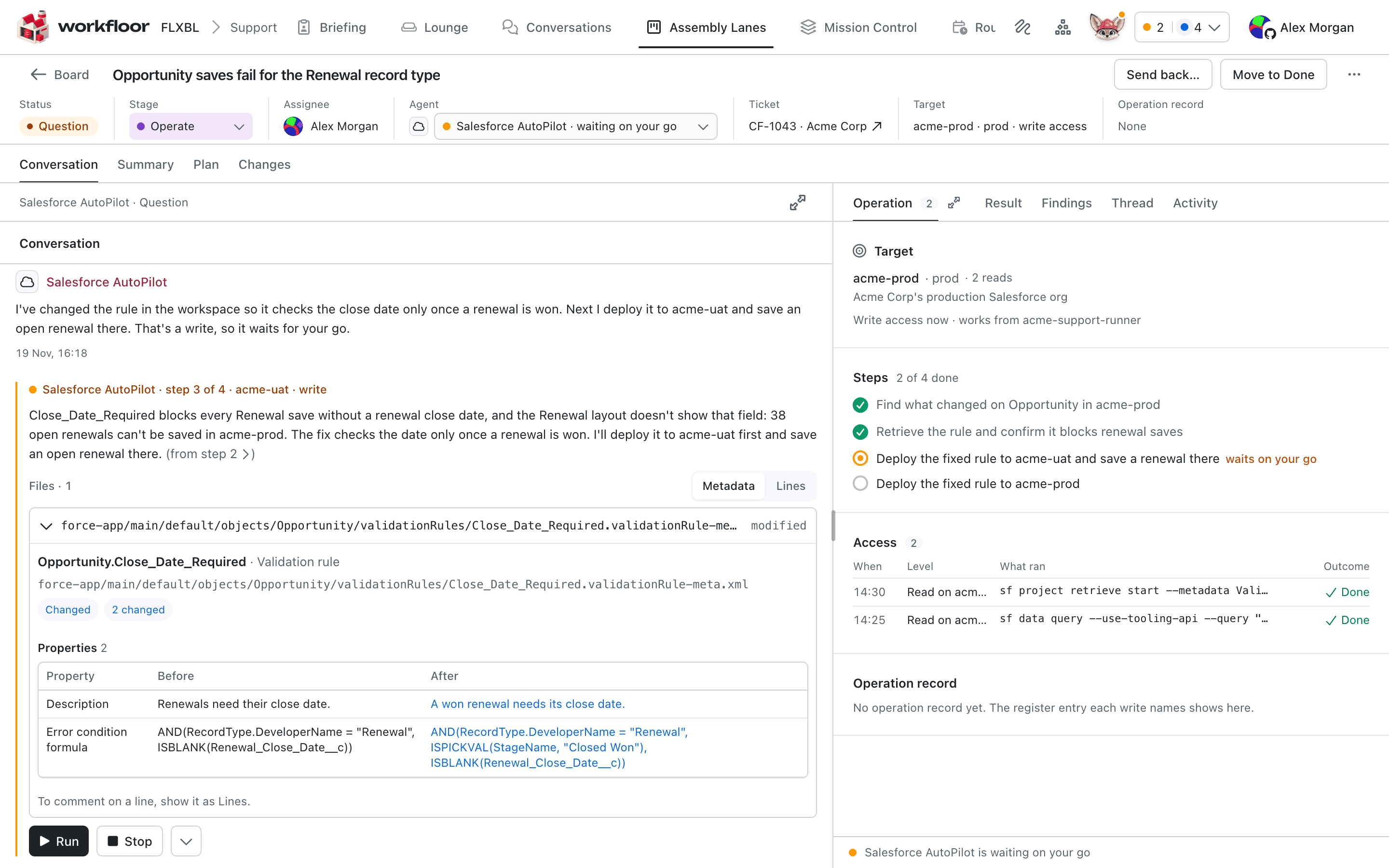
How agents get read and write access describes the model: one Run is one write, only the assignee gives it, and a write's window is not renewed. A run longer than its window asks for a new Run. After the Run, AutoPilot repeats its request and the write goes ahead. Step 4, the same change in production, needs its own Run.
Production
Production is an AutoPilot setting with two values, Refuse and Allow. Refuse is the default, and a requirement whose org is production does not start. Sandboxes and scratch orgs are always allowed. Production is marked admins only by default. Only a project admin can set it, as a default on the project's Agents tab, and neither a lane stage nor a card can change it. So neither a lane's publisher who is not an admin nor a card's assignee can switch a card to production. A person's Run is still needed for each write on production.
Production risk evaluation
Before it carries out browser steps in an org that is not a verified sandbox, AutoPilot classifies the risk of the whole request and of each step: LOW (only reads, or narrow and easily reversed), MEDIUM (reversible, but can affect live behavior or other users), HIGH (data loss, or an irreversible, security, bulk or external change) or UNKNOWN (unclear).
Unless every classification is LOW with a probability of at least 0.90, the work stops before the browser opens. AutoPilot names each flagged item and why it was flagged, and continues only when a person explicitly accepts the risk. An org whose kind cannot be verified always needs that acceptance. A failed classification stops the work, and acceptance cannot override it.
The classification is advisory and also stops some safe requests. It does not replace Production, which decides whether a requirement may start in a production org at all.
After a change
For a change made through the browser, AutoPilot looks in Salesforce's Setup Audit Trail for an entry that shows the change, starting from the time the requirement began. The trail lists only what Salesforce audits, so an empty result does not show that nothing happened. The card's Result tab shows a summary of the run, listing each step, what it expected and what it found.
Investigating with the Setup Audit Trail
On a card, the trail is used only for the check after a browser change, above. AutoPilot can also check the trail on request, for evidence that stated changes were made.
AutoPilot splits a statement into at most 8 claims. Each claim is a state that should hold, such as "the fiscal year starts in April". Each claim is judged on its own against the newest 200 entries of a window of up to 180 days, which can be narrowed to one user's changes. A claim is confirmed only when an entry shows the change to the stated value and is named as proof, and no later entry undoes it.
It cannot confirm that something did not happen. It also cannot confirm a bare audit action code, or a change that Salesforce does not audit. A window with no entries is reported, not judged.
How AutoPilot plans and builds a change
How Salesforce AutoPilot in Workfloor plans a Salesforce change against a repository and an org, works on the plan with you, then builds, tests and delivers it as a pull request.
Stage workbenches and scratch pads
How a Workfloor card's page changes with the stage it is in, what the Plan, Changes and Scratch pad views hold, and how Salesforce projects see metadata changes.