> For the complete documentation index, see [llms.txt](https://docs.flxbl.io/flxbl/llms.txt). Markdown versions of documentation pages are available by appending `.md` to page URLs; this page is available as [Markdown](https://docs.flxbl.io/flxbl/codev/inspect/getting-started.md).

# Getting Started

Inspect validates changes before they merge: code analysis on the diff, and change validation — a deployment of the changed packages to a review environment with Apex tests. This guide covers activating the feature and setting up review environments. Unfamiliar terms (GitHub App, Dev Hub, SFDX auth URL) are explained in the [CI/CD getting started guide](/flxbl/codev/ci-cd/getting-started.md#concepts).

## Step 1: Activate the feature

On the **Activate Features** page, open the **Inspect** card. Its setup wizard has two steps, both shared with other features:

* **App Integration** — connect GitHub, as in [Step 3 of the CI/CD guide](/flxbl/codev/ci-cd/getting-started.md#step-3-connect-github-app-integration).
* **Configure Webhooks** — subscribe codev to the repository's pull request events, as in [Step 5 of the CI/CD guide](/flxbl/codev/ci-cd/getting-started.md#step-5-readiness-check-and-webhooks). Without this, codev does not hear about new pull requests.
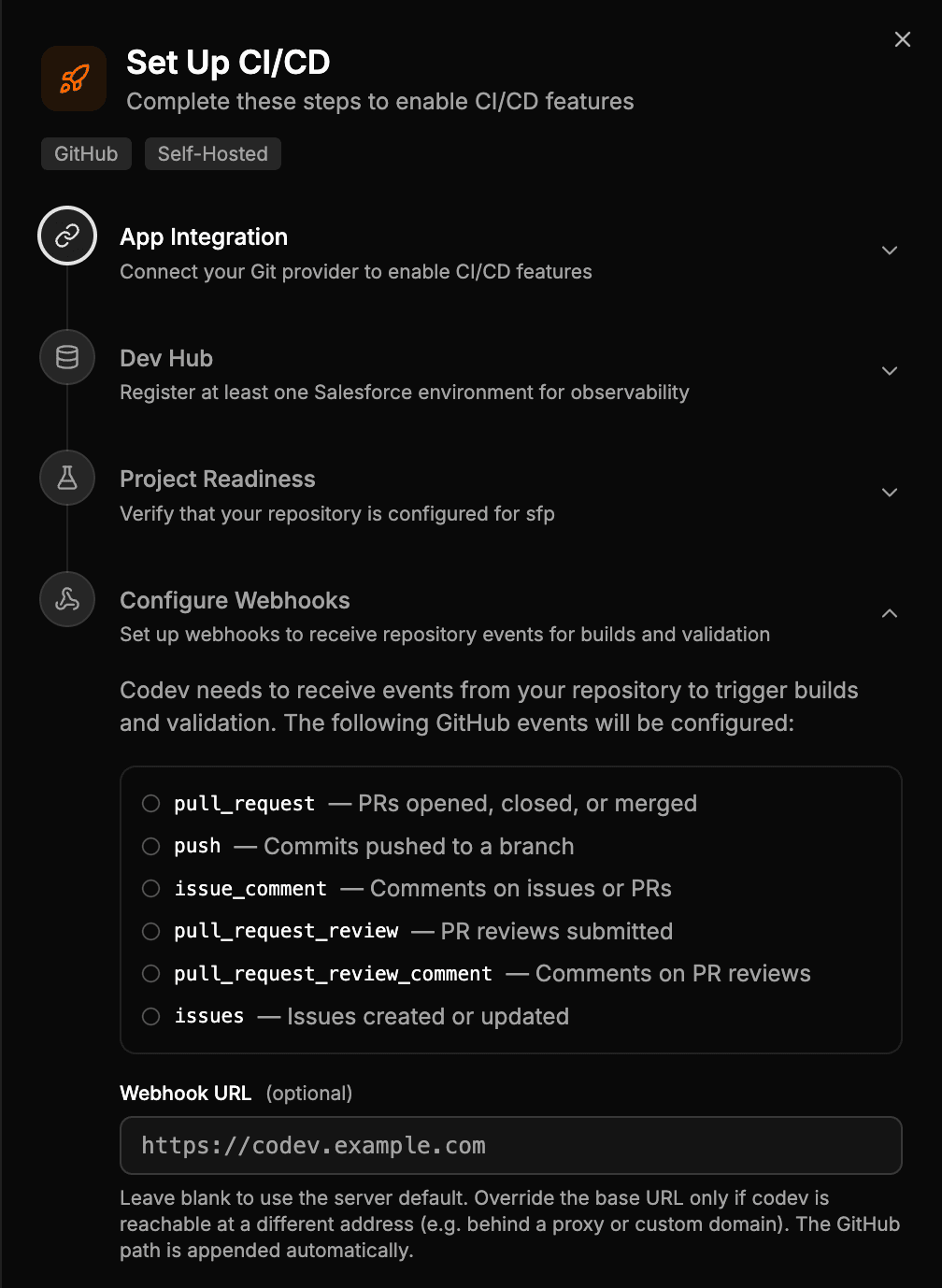
<figure><img src="/files/SnRoy3tDJxNHOrt83w0Q" alt="Configure Webhooks step listing the repository events codev subscribes to"><figcaption><p>Webhooks are what start analysis and validation when a pull request opens.</p></figcaption></figure>

## Step 2: Set up review environments

Change validation deploys to a **review environment** — an org assigned to the pull request for its lifetime. Assignment rules decide where those come from: under **Inspect > Review Environments**, create a rule mapping a branch pattern (and optionally domain patterns) to a target. The simplest target is a **dedicated environment** — a sandbox you register once, shared by the pull requests that match the rule. A [pool](/flxbl/codev/pools/getting-started.md) gives each pull request its own environment, once you need that.
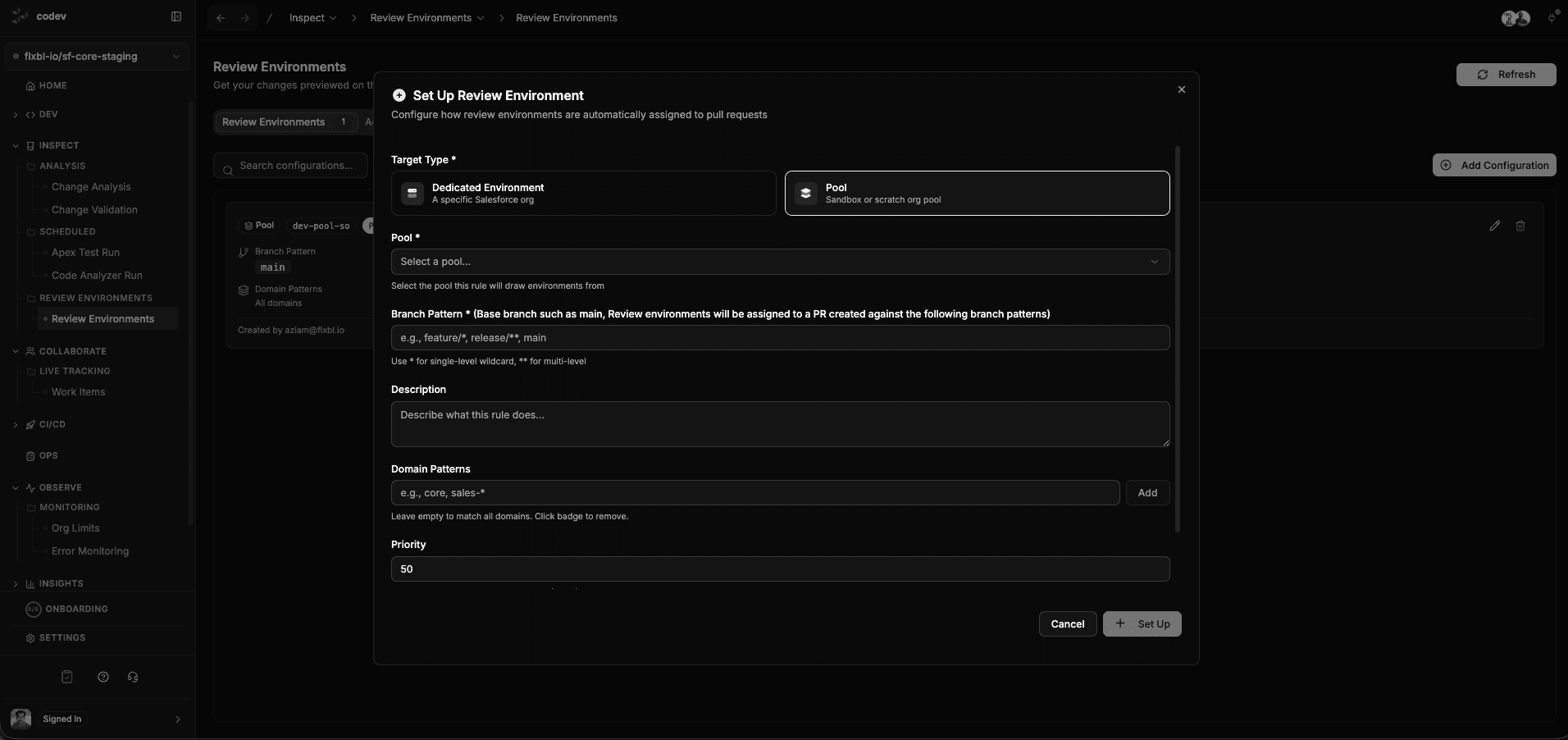
<figure><img src="/files/41n4DyFVuzxSfVfKCVb3" alt="Set Up Review Environment dialog with target type, pool, branch pattern, and priority"><figcaption><p>An assignment rule: pull requests matching the branch pattern get an environment from the selected pool.</p></figcaption></figure>

## Step 3: Open a pull request

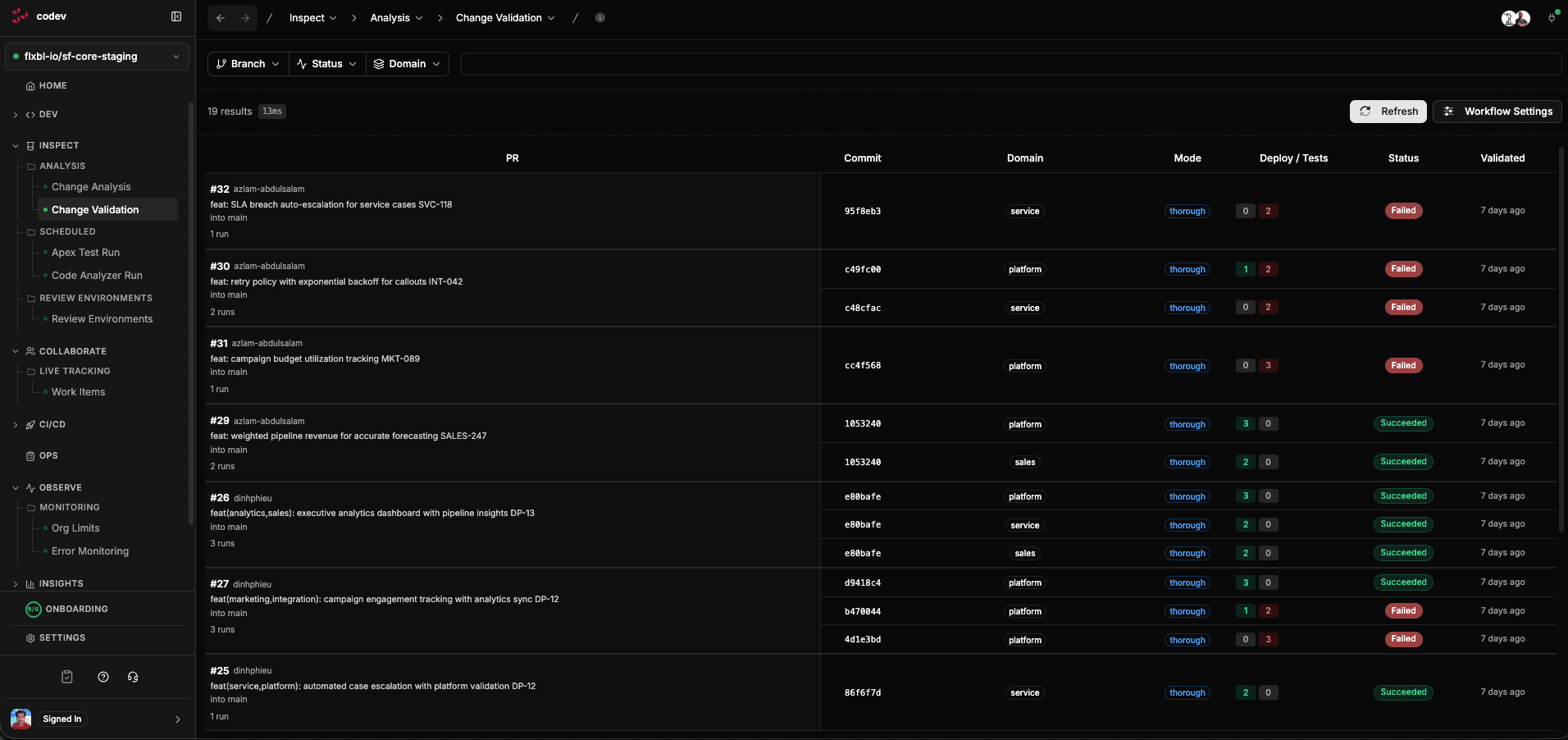
With webhooks and an assignment rule in place, every pull request is handled without anyone triggering it: codev detects the impacted domains, assigns a review environment, deploys the changed packages, runs the Apex tests, and posts the result back on the pull request as a check with pass/fail and coverage. The runs and their detail live under **Inspect > Change Validation**.

<figure><img src="/files/iho9KqMOJe2g7nJ8tUIF" alt="Change Validation runs list with status per pull request"><figcaption><p>Every pull request's validation runs, with the same result the PR check links to.</p></figcaption></figure>

## Where to go next

{% content-ref url="/pages/Hvy9VU2TQa0cOQnKS5Cq" %}
[Change Validation](/flxbl/codev/inspect/change-validation.md)
{% endcontent-ref %}

{% content-ref url="/pages/zMJJ7PxztdNA62o1HSWI" %}
[Change Analysis](/flxbl/codev/inspect/change-analysis.md)
{% endcontent-ref %}

{% content-ref url="/pages/yU7u82dhuU3VcZt9vJCB" %}
[Review Environments](/flxbl/codev/inspect/review-environments.md)
{% endcontent-ref %}


---

# Agent Instructions
This documentation is published with GitBook. GitBook is the documentation platform designed so that both humans and AI agents can read, navigate, and reason over technical content effectively. Learn more at gitbook.com.

## Querying This Documentation
If you need additional information that is not directly available in this page, you can query the documentation dynamically by asking a question.

Perform an HTTP GET request on the current page URL with the `ask` query parameter, and the optional `goal` query parameter:

```
GET https://docs.flxbl.io/flxbl/codev/inspect/getting-started.md?ask=<question>&goal=<endgoal>
```

`ask` is the immediate question: it should be specific, self-contained, and written in natural language.
`goal` is optional and describes the broader end goal you are ultimately trying to accomplish on behalf of the user. GitBook uses it to tailor the answer towards what is most useful for that goal.

The response will contain a direct answer to the question and relevant excerpts and sources from the documentation.

Use this mechanism when the answer is not explicitly present in the current page, you need clarification or additional context, or you want to retrieve related documentation sections.