Knowing what needs you
How Workfloor tells each person on a team what waits on them, through the Needs me view, the Briefing, Slack messages and the board's Inbox, and how a private conversation with Flux becomes team work.
With several people and agents on one project, each person needs to know what waits on them, and nothing else. Workfloor works this out from each card's assignee and the lane's approvals, and shows it in a few places.
Needs me
Needs me is a view of the lane board. Open Assembly Lanes and select it next to My Work and All work.
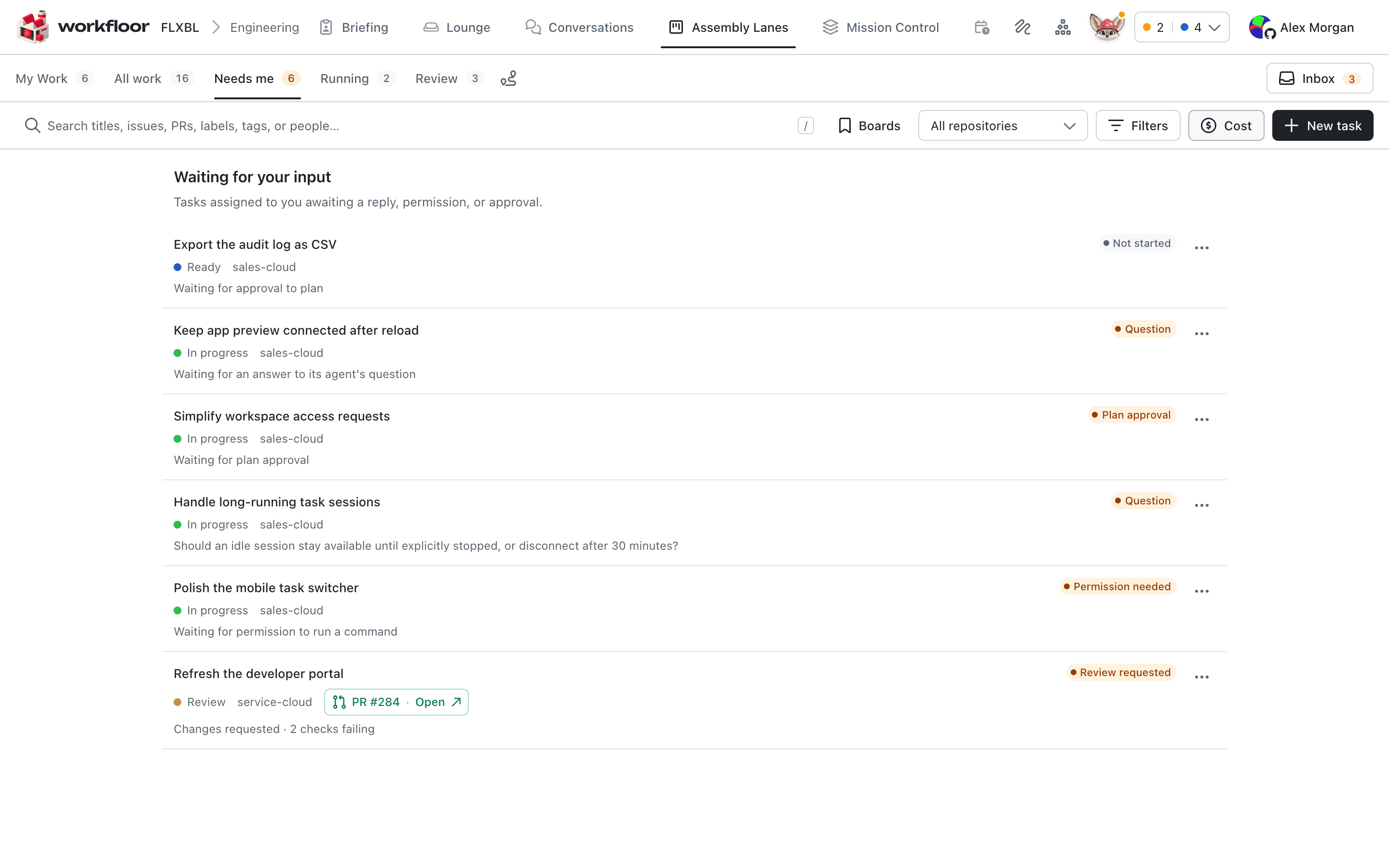
It lists:
- the cards assigned to you that wait for a reply, a permission or an approval;
- the cards where you are one of the people who must approve a move, whoever their assignee is.
Each card says what it waits for, such as Question, Plan approval, Permission needed or Review requested. A card leaves the list as soon as it no longer waits on you, for example when someone else answers Flux's question.
The agents menu in the top bar gives the same picture for agents. It counts the agents waiting on you and the ones working, and its Mine tab narrows the list to your cards.
The Briefing
The Briefing has two tabs. Your shift is Flux's summary of your own work, in the order to take it. The second tab, Across followed by the project's name, is one summary for the whole team. It groups cards under headings such as Waiting on people, so anyone can see where the team is held up.
In Slack
Once you connect your Slack account, Flux tells you in a direct message when a card assigned to you needs you: it asks something, wants a permission, is ready for review, or has failed. You get one message each time a card starts needing you.
A card can also have a Slack thread. Flux posts the card's updates there, and asks the lane's questions and approvals with buttons. A click answers on behalf of whoever clicked. See Flux in Slack.
The Inbox
Sometimes Workfloor gives up on a card's agent, for example after it fails several times in a row. Workfloor then tells:
- the person who last started the agent in that stage;
- the card's assignee.
If neither is still in the project, Workfloor tells the project's admins instead, so a stopped card never goes unseen.
You see it in the Inbox at the top right of the lane board, with Try again where Workfloor can start the agent again. You are also told in Slack, if you have connected it, and in your Flux chat. A resolved entry stays in the Inbox for a day.
Hand off a conversation
A conversation with Flux, under Conversations, is private. Only you can open it. Use one to think a change through before anyone else sees it.
When it is ready for the team, Hand off to the team turns it into team work. You choose what to make:
- Open an issue and make a card
- Card only
- Issue only
- New mission
- Add to a mission
- Existing work — a comment on an open issue, or a message to a card's agent.
Flux can propose the handoff for you, and you decide what goes in it. The new work is made in your name, from the brief and the files you pick. Your teammates see that work, not the conversation, and the work carries no link back to it.
Next: Salesforce AutoPilot.
The Foreman's Lounge
Use the Workfloor Lounge, a notice board for the whole project, to pin a note about a card, a pull request or a passage of a plan, and open a Slack channel where Flux keeps a summary of the discussion.
Salesforce AutoPilot
What Salesforce AutoPilot is in Workfloor, which projects are offered it, and how it differs from Flux in planning, building and working against a Salesforce org.