Component Cleanup
Component Cleanup is in Beta.
When you remove a component from a package — delete an Apex class, drop a field — it disappears from your source, but it does not automatically disappear from the orgs it was already deployed to. Salesforce only removes metadata when you ship a destructive change. Component Cleanup keeps track of these left-behind components so they do not quietly accumulate in your orgs.
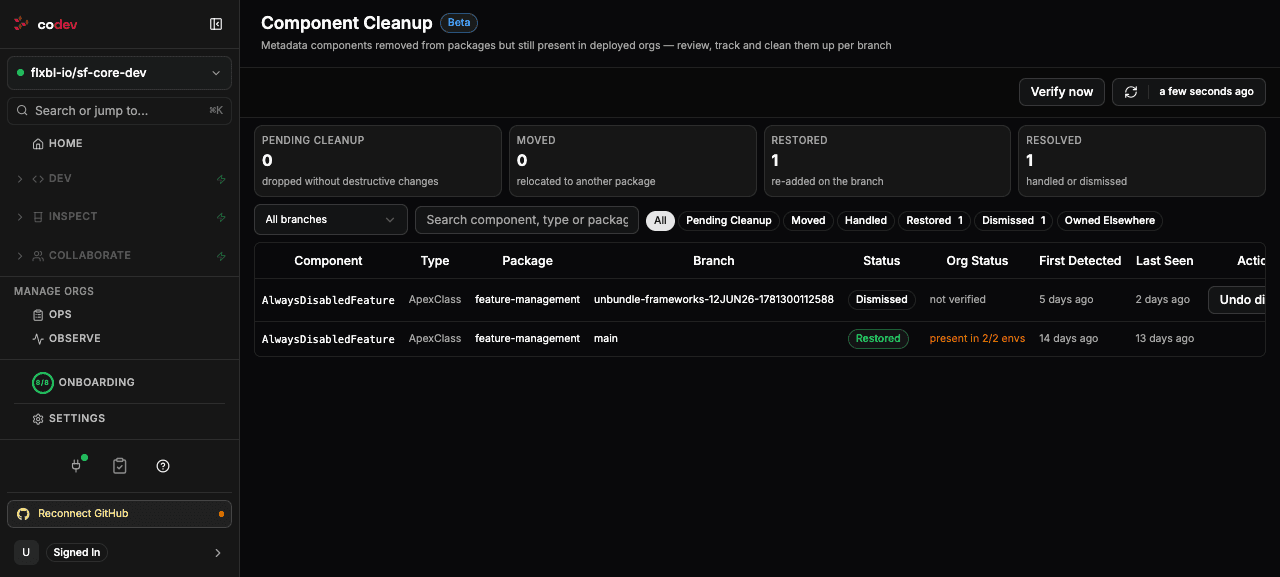
How components are tracked
Every build compares a package's current source against the last version codev published on that branch. Anything that was in the previous version but is gone now is a dropped component, and codev records it in a per-branch ledger with the package it came from, its type and name, and when it was first seen.
Because the ledger is per branch, a component dropped on main is tracked separately from the same component on a release branch — each branch reflects its own state.
Statuses
Each entry has a status that reflects what happened to the dropped component:
- Pending cleanup — removed from the package with no destructive change issued, so it may still be sitting in your orgs. These are the ones to act on.
- Moved — the component now lives in a different package in the same repository. Nothing to clean up; it just moved.
- Handled — a destructive change now covers it, so it will be removed from orgs on the next deployment.
- Restored — the component was added back to its package on the branch; the drop was undone.
- Dismissed — you reviewed it and chose to leave it. It stays on record, and you can undo a dismissal later, but it is off the pending count.
- Owned elsewhere — another repository that deploys into the same org now ships this component, so it is not yours to clean up. codev re-checks this and reopens the entry if that repository stops shipping it.
Verifying against orgs
A status tells you what your source says; Org Status tells you what is actually in your orgs. Press Verify now (it also runs on a schedule) and codev checks each registered environment on the branch for the component, briefly locking each environment while it looks. The result shows as present in N/M environments, absent, or not verified. When a component is confirmed absent from every registered environment, codev drops the entry — there is nothing left to clean up.
Cleaning up
Component Cleanup tracks and verifies; it does not delete metadata for you. To actually remove a pending component from your orgs, issue a destructive change for it in the package — codev then marks the entry Handled. If a left-behind component is harmless and you would rather leave it, Dismiss the entry.
Component Cleanup and Environment Drift
Both surface "things in the org that are not in source," but they answer different questions. Component Cleanup is narrow and intentional: it tracks components you removed from a package, per branch, from the moment they are dropped. Environment Drift is broad: it compares an environment's whole state against source and flags any difference — manual edits, missing components, configuration drift — per environment. Use Component Cleanup to manage deliberate removals; use Environment Drift to catch unexpected divergence.