Rolling back a release
Beta. Rollback is a new capability and still evolving. Review the limitations before relying on it for a production environment, and prefer a forward patch when in doubt.
Sometimes a release causes a problem and you need to get an environment back to a known-good state quickly. Rollback returns a single environment to an earlier release that was previously deployed to it.
A rollback is not a magic undo — it re-deploys the earlier release on top of the current one. codev first checks whether that can be done cleanly, and steers you to a forward patch when it can't.
Requesting a rollback
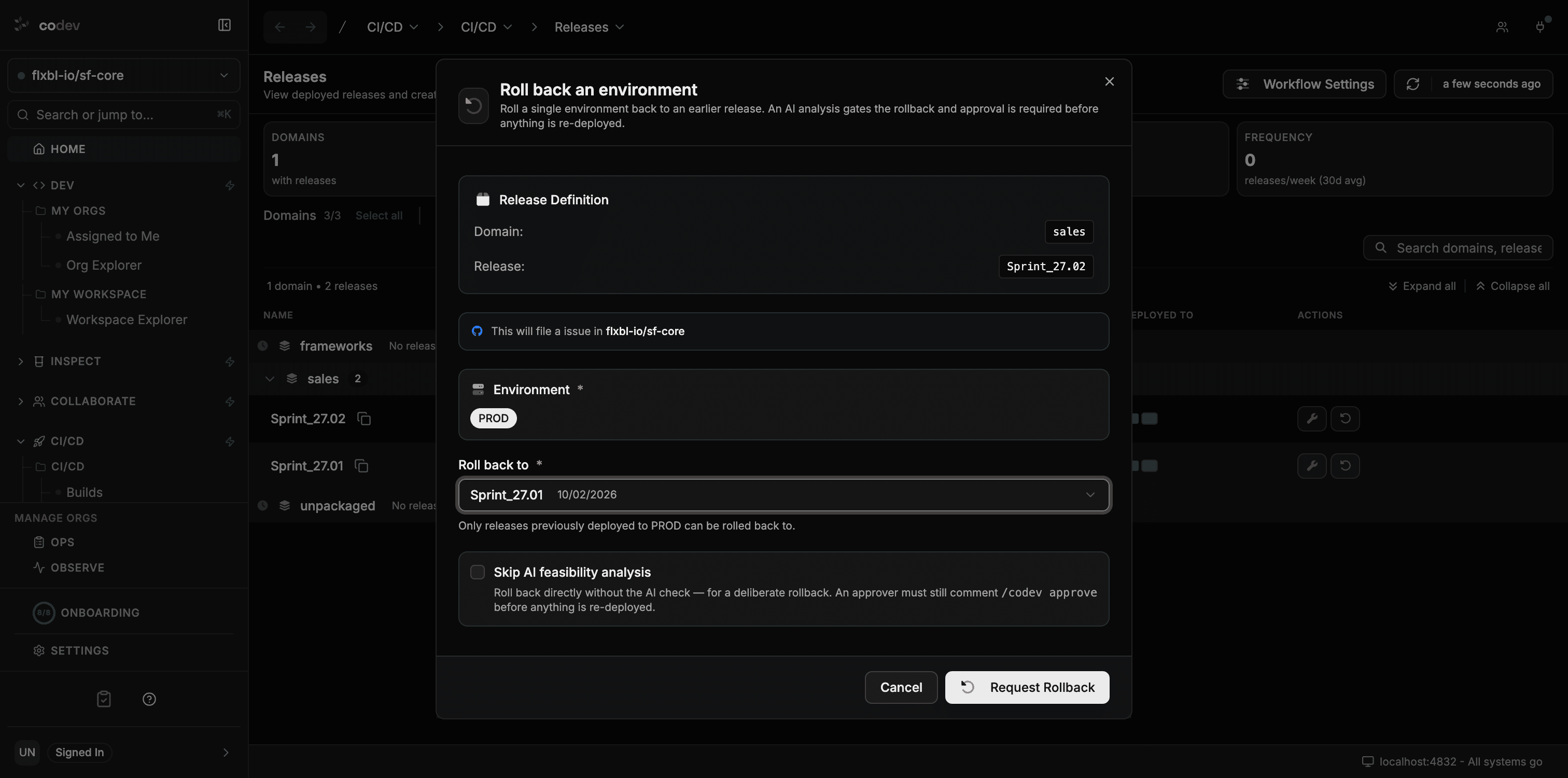
- On the Releases page, click the rollback action on the release that is currently live in the environment you want to roll back.
- Choose the environment to roll back.
- Pick the release to roll back to. Only releases that were previously deployed to that environment — and are older than the current one — are offered.
- Click Request Rollback. This files an issue in your project repository and starts the rollback workflow.
What happens after you request it
- A feasibility check runs first. codev compares the current release with the target and assesses whether rolling back is cleanly reversible — and what it would undo.
- If the rollback is clean, the request enters an approval gate. A designated approver reviews the feasibility report and approves (or rejects) it. Nothing is re-deployed until someone approves.
- On approval, codev re-deploys the earlier release to the environment.
- If the rollback is complex or risky, codev recommends a forward patch instead and does not roll back automatically. The feasibility report explains why.
You can follow the whole process from the issue codev created, and in Workflows > Runs and Workflows > Pending Approvals.
The feasibility check is advisory. For anything beyond a clean, fully-reversible change, a forward patch is the safer path — it moves forward to a fix rather than re-applying an older state.
How codev judges a rollback
The feasibility check is what makes a rollback safer than a blind re-deploy. codev reconstructs both releases and works out the exact difference between them — every package version change, and every metadata component that was added, removed, or modified — then has an AI model reason about whether the earlier state can be cleanly re-applied.
It weighs things like:
- What the rollback would undo — the commits and work items that landed between the two releases, so you can see exactly what you'd be giving up.
- Whether the changes are reversible — additive changes (new components, new fields) are usually safe to roll back. Destructive changes (a removed field or object, a replaced component) are where a rollback gets risky, because re-applying the older state can leave orphaned or conflicting metadata behind.
- The kinds of packages involved — some package types can't serve as a clean rollback target (see the limitations).
The result is a written report — posted to the issue — that explains what the rollback does, the risk in each area, and a clear recommendation:
- Cleanly reversible → the rollback proceeds to the approval gate.
- Complex or risky → codev recommends a forward patch instead, and does not roll back.
Because this is an AI judgement on real metadata differences, treat it as expert guidance, not a guarantee — the approval gate is where a person makes the final call.
The analysis uses the AI provider configured for your project. If your team hasn't connected one yet, see AI providers. You can also skip the analysis for a deliberate rollback.
Deliberate rollback (skip the check)
If you already know you want to roll back and don't need the feasibility check, tick Skip AI feasibility analysis in the dialog. codev rolls straight to the approval gate.
This only skips the analysis — approval is still required before anything is re-deployed.
How to tell a release was rolled back
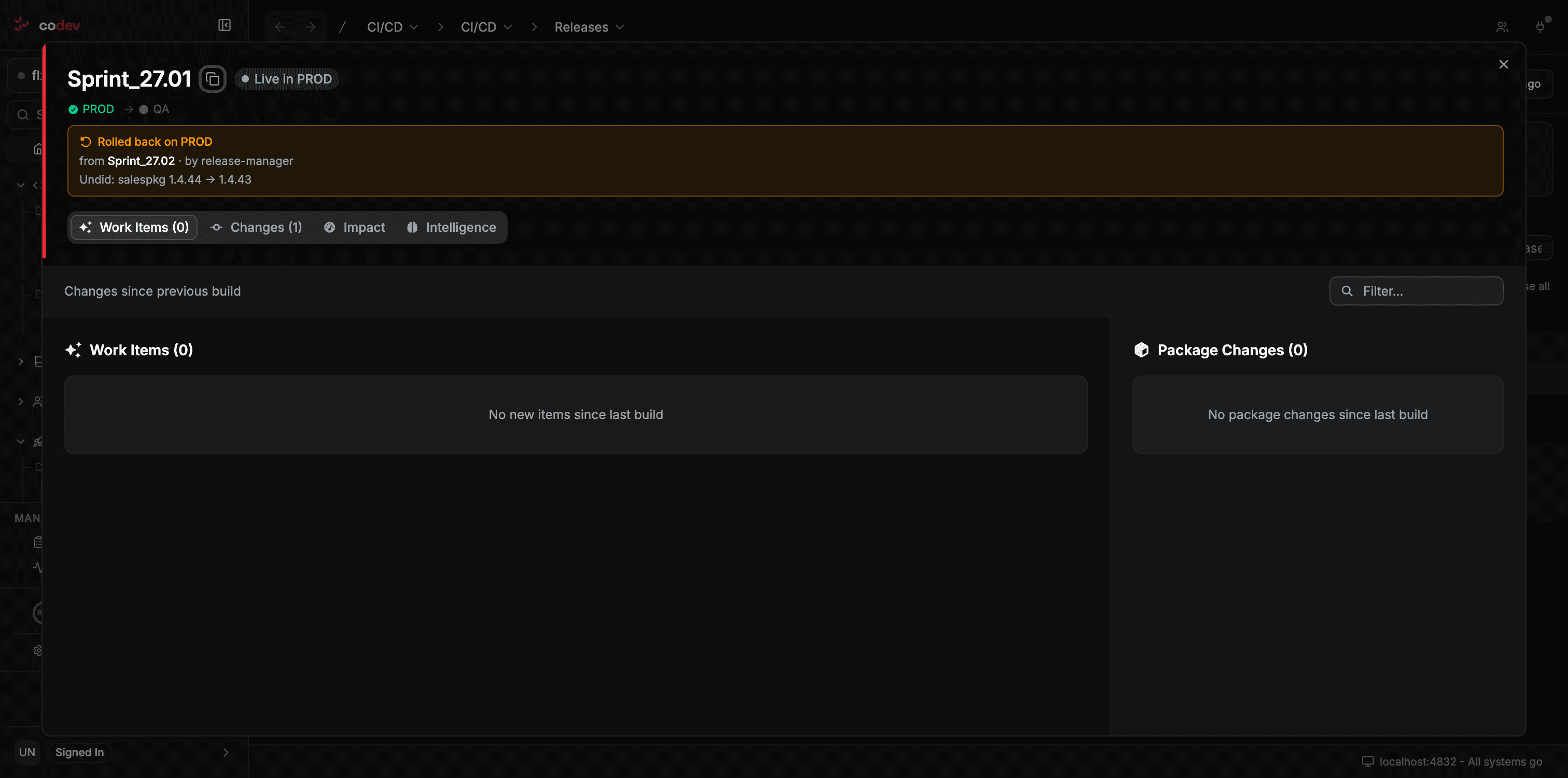
When an environment has been rolled back to a release, that release is marked as a rollback on the Releases page — showing which release it replaced, who performed it, and the package versions it undid. A release that is itself the result of a rollback does not offer the rollback or patch actions.
Limitations
- Metadata only — data is not restored. A rollback re-deploys the earlier release's metadata. Records that were created, changed, or deleted since that release are not brought back. Treat data implications separately.
- Some releases always recommend a patch. Releases that contain a diff package (a package that ships only the changes since its previous version) can't serve as a clean rollback target, so codev always recommends a forward patch for them. See Package types for what a diff package is.
- One environment at a time. A rollback targets a single environment. Roll back each environment separately if needed.
- Only previously-deployed, earlier releases. You can only roll back to a release that was already deployed to that environment and is older than what's currently live.
- Destructive changes need care. If the releases differ in ways that remove or replace metadata, review the feasibility report before approving — re-applying an older state is not always safe.